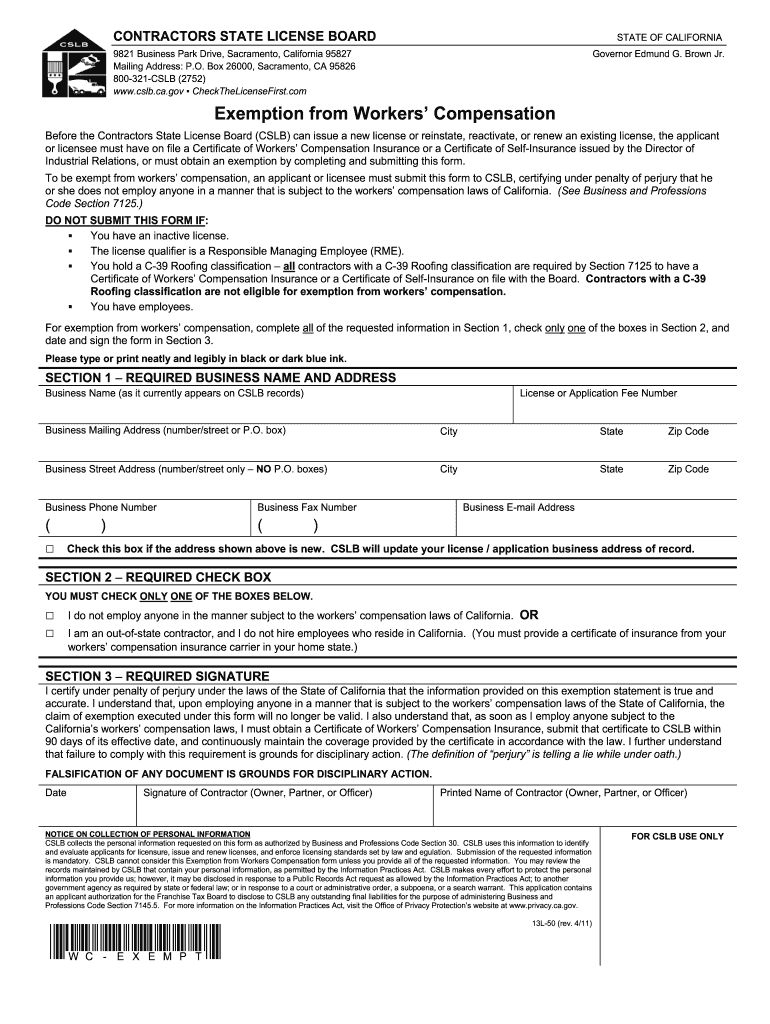
E, and continuously maintain the coverage provided by the certificate in accordance with the law. I further understand that failure to comply with this requirement is grounds for disciplinary action. (The definition of “perjury” is telling a lie while under oath.) FALSIFICATION OF ANY DOCUMENT IS GROUNDS FOR DISCIPLINARY ACTION. Date Signature of Contractor (Owner, Partner, or Officer) Printed Name of Contractor (Owner, Partner, or Officer) NOTICE ON COLLECTION OF PERSONAL INFORMATION CSL.
Loading

Open form follow the instructions

Easily sign the form with your finger

Send filled & signed form or save
How to fill out the CA 13L-50 online
The CA 13L-50 form is a crucial document for individuals seeking an exemption from workers’ compensation in California. This comprehensive guide provides step-by-step instructions to help you complete the form accurately and efficiently online.
Follow the steps to successfully complete the CA 13L-50 form online.
- Press the ‘Get Form’ button to access the CA 13L-50 form and open it in your preferred online editor.
- Fill out Section 1 with your required business name and address. Ensure that the business name matches what is currently on file with the Contractors State License Board. Include the license or application fee number, mailing address, street address, phone number, fax number, and email address. Check the box if the address is new.
- In Section 2, check only one box. Indicate if you do not employ anyone in a manner subject to California's workers’ compensation laws, or if you are an out-of-state contractor who does not hire employees residing in California.
- Proceed to Section 3. Certify under penalty of perjury that the information provided is accurate by signing and dating the form. Ensure the printed name matches the signature of the contractor, owner, partner, or officer.
- After completing all sections, review the form for accuracy. Once everything is correct, you can save your changes, download, print, or share the completed CA 13L-50 form as needed.
Complete your CA 13L-50 form online today to ensure compliance with California workers’ compensation requirements.
Experience a faster way to fill out and sign forms on the web. Access the most extensive library of templates available.
Related content
Before the Structural Pest Control Board (SPCB) can issue a new license, reinstate a...
by JN Wingard · 2005 · Cited by 110 — CaBP1 (calcium-binding protein 1) is a 19.4-kDa...
Requisitos de energia (adaptador CA):. Tensão de entrada: 100 - 240 V CA, 50/60 Hz, 0,4...
Get answers to your most pressing questions about US Legal Forms API.
Is workers' comp mandatory in California?
Yes, workers' compensation is mandatory for most employers in California. This regulation covers employees who suffer workplace injuries or illnesses, ensuring they receive medical care and compensation. By adhering to the guidelines outlined in CA 13L-50, you can guarantee compliance and uphold your responsibilities as an employer.
Do I need workers' comp insurance if I have 1099 employees?
Employers who hire 1099 workers may not be required to carry workers' compensation insurance, unless they direct the work or provide equipment and supplies. However, it is essential to understand the specifics of the relationship you hold with 1099 employees. For comprehensive information, refer to CA 13L-50 to evaluate your responsibilities regarding insurance coverage.
Can you waive workers' compensation rights in California?
In California, employees cannot waive their right to workers' compensation benefits. The law mandates that employees receive this protection, regardless of their agreement with their employer. Understanding your rights under CA 13L-50 ensures you remain informed about your entitlements and protections in the workplace.
How do I become exempt from workers comp in California?
To become exempt from workers' compensation in California, you typically need to qualify as an independent contractor or meet other specific criteria. You must fill out a designated exemption form and provide supporting documentation. Engaging with resources on CA 13L-50 can help clarify the requirements and simplify your exemption journey.
How do I file an exemption for workers' comp in California?
To file an exemption for workers' compensation in California, you must complete the appropriate exemption form and submit it to the California Department of Industrial Relations. This process requires you to meet specific criteria, which generally pertains to independent contractors or business owners. By understanding the details of CA 13L-50, you can effectively navigate the exemption process and protect your rights.
Can you opt out of workers' comp in California?
In California, generally, you cannot opt out of workers' compensation insurance. All employers are required to provide this coverage for their employees, ensuring they receive necessary benefits. However, certain exemptions may apply, particularly for independent contractors, which you can explore further within the context of CA 13L-50.
What are the requirements to filing a workers' compensation claim in California?
To file a workers' compensation claim in California, you must report your injury to your employer as soon as possible. You should also complete a claim form, known as DWC 1, within 30 days of your injury. Additionally, employers are required to provide you with the necessary forms and information for filing a claim, ensuring you have all the resources you need to navigate the CA 13L-50 process.
What happens after 104 weeks of workers' comp in California?
After 104 weeks of receiving temporary disability benefits, you may transition to permanent disability benefits if applicable. Your case will be evaluated to determine ongoing needs and benefits. Understanding these critical timelines and processes through CA 13L-50 can help you plan financially and navigate your claims efficiently.
What is the longest you can be on workers' comp?
In California, workers' comp benefits can last for up to 104 weeks for temporary disability. However, in cases of permanent disability, benefits can extend indefinitely. It's important to track your claims closely and consult CA 13L-50 resources to understand your rights and potential durations for receiving benefits.
What pays more, workers' comp or disability in California?
Typically, workers' compensation pays more than state disability benefits in California. Workers' comp allows you to receive wage loss benefits equal to two-thirds of your average weekly wages, up to a specific cap. This can be particularly advantageous if you're coping with a work-related injury, making the CA 13L-50 information crucial for maximizing your benefits.
Use professional pre-built templates to fill in and sign documents online faster. Get access to thousands of forms.
If you believe that this page should be taken down, please follow our DMCA take down process here.