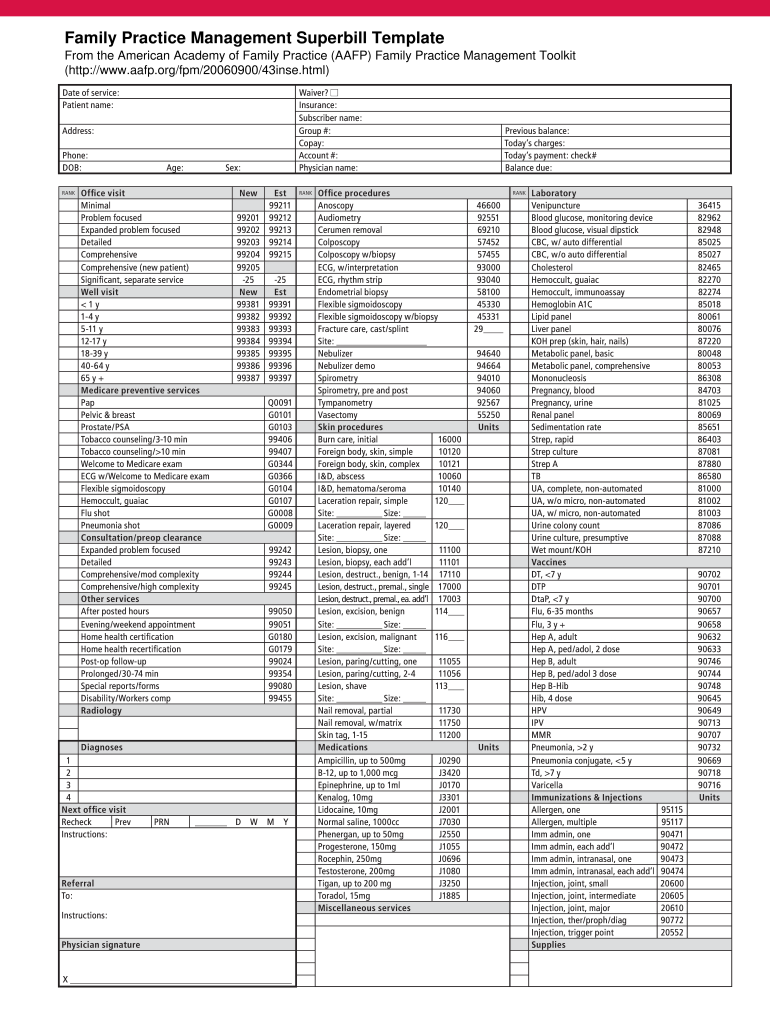
Emoglobin A1C Lipid panel Liver panel KOH prep (skin, hair, nails) Metabolic panel, basic Metabolic panel, comprehensive Mononucleosis Pregnancy, blood Pregnancy, urine Renal panel Sedimentation rate Strep, rapid Strep culture Strep A TB UA, complete, non-automated UA, w/o micro, non-automated UA, w/ micro, non-automated Urine colony count Urine culture, presumptive Wet mount/KOH Vaccines DT,.
Loading

Open form follow the instructions

Easily sign the form with your finger

Send filled & signed form or save
How to use or fill out the AAFP Family Practice Management Superbill Template online
The AAFP Family Practice Management Superbill Template is an essential tool for healthcare providers, enabling them to document patient services, diagnoses, and charges effectively. This guide provides clear, step-by-step instructions on how to fill out the template online, ensuring accuracy and compliance in your documentation.
Follow the steps to complete the superbill template online.
- Click ‘Get Form’ button to access the template and open it in the designated online editor.
- Begin filling in the patient information section with details such as the patient's name, date of birth, address, and phone number. Ensure all fields are complete for accurate record-keeping.
- In the insurance section, enter the subscriber's name, group number, copay amount, and account number. This information is critical for billing purposes.
- Record the date of service clearly and select the type of office visit from the provided options, such as 'Minimal', 'Expanded problem focused', or 'Comprehensive'. Choose the appropriate option that best describes the visit.
- Detail any relevant diagnoses by selecting from the options available in the designated section. There are spaces for up to four diagnoses; ensure they are accurate to facilitate proper billing.
- In the subsequent sections, choose the applicable procedures, office procedures, medications, and miscellaneous services that were rendered during the visit. Be thorough to ensure all services are accounted for.
- Finally, review all entered information for accuracy before saving your changes. You can then download, print, or share the completed superbill as needed.
Start filling out your superbill online today to enhance your practice's documentation and billing efficiency.
Experience a faster way to fill out and sign forms on the web. Access the most extensive library of templates available.
Related content
by E Dietrich · 2018 · Cited by 27 — Medicare defines incident-to billing as...
Scholarly Work for the Swedish Family Medicine Residency: Completed the development of a...
Get answers to your most pressing questions about US Legal Forms API.
How to generate a superbill in simple practice?
Generating a superbill in SimplePractice can be done easily within the platform. Navigate to your patient’s records, find the services rendered, and select the option to create a superbill. Utilizing the AAFP Family Practice Management Superbill Template can help ensure that all essential information is included, making the billing process smoother.
What is the difference between a claim and a superbill?
A claim is an official request for payment submitted to an insurance company, while a superbill is a document that outlines the services provided to a patient but is not submitted directly for payment. Generally, the superbill serves as a detailed record that can be used to create a claim. Using the AAFP Family Practice Management Superbill Template helps bridge this gap by providing all the necessary information to generate a claim.
How do you complete a superbill?
Completing a superbill involves filling in all necessary sections, including patient demographics, service details, and appropriate codes. The AAFP Family Practice Management Superbill Template makes this task easier by providing a structured layout. Always verify that each entry is legible and accurate to support timely reimbursement.
How to submit a superbill to insurance for therapy?
To submit a superbill to insurance for therapy, ensure that your superbill includes all required patient and service information. Use the AAFP Family Practice Management Superbill Template to make sure all relevant codes are included. Once completed, you can send the superbill to the insurance company via mail or electronic submission, according to their guidelines.
How to fill out a superbill template?
Filling out a superbill template involves noting patient information, dates of service, and CPT/ICD codes. You can ease this process by using the AAFP Family Practice Management Superbill Template, which provides clear sections for each element. Ensure that you double-check for accuracy to avoid delays in processing claims.
How to create a superbill on therapy notes?
Creating a superbill on therapy notes is straightforward. Begin by including patient and provider details, along with the services performed. Use the AAFP Family Practice Management Superbill Template to help with the correct coding and formatting. This approach ensures you capture all relevant information for efficient billing.
How to create a superbill for massage therapy?
To create a superbill for massage therapy, start by collecting the necessary patient information, including their name, insurance details, and the services provided. Next, incorporate relevant codes for services rendered, which you can find using the AAFP Family Practice Management Superbill Template. Finally, ensure that all entries are clear and accurate to facilitate claims processing.
What information is needed on a superbill?
A superbill should include critical information such as your practice name, patient details, dates of service, and the specific codes for each service rendered. You also need to record any relevant diagnosis codes. The AAFP Family Practice Management Superbill Template provides a convenient layout that ensures you capture all required information efficiently.
How do I get reimbursed with superbill?
To receive reimbursement with a superbill, you must first ensure that your superbill is properly completed and contains all necessary information. Submit the superbill to your insurance company, along with any required claim forms. Using the AAFP Family Practice Management Superbill Template can streamline the process and improve your chances of a successful reimbursement.
Who can create a superbill?
A superbill can be created by any healthcare practitioner who provides services to patients, including doctors, therapists, and other licensed providers. It's important for the creator to have a clear understanding of service codes and billing requirements. By utilizing tools like the AAFP Family Practice Management Superbill Template, healthcare providers can ensure their superbills are well-structured and ready for reimbursement.
Use professional pre-built templates to fill in and sign documents online faster. Get access to thousands of forms.
If you believe that this page should be taken down, please follow our DMCA take down process here.