Loading
Form preview
  • US Legal Forms
  • Other Templates
  • More Forms
  • More Uncategorized Forms
  • Form Ds-10 Birth Affidavit - Passport Visas Express

Get Form Ds-10 Birth Affidavit - Passport Visas Express

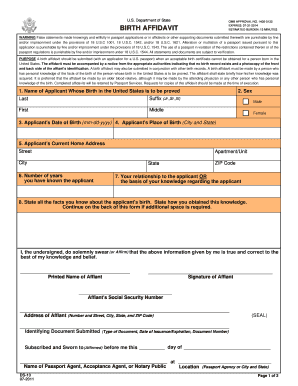
U.S. Department of State OMB APPROVAL NO. 14050132 EXPIRES: 07312014 ESTIMATED BURDEN: 15 MINUTES BIRTH AFFIDAVIT WARNING False statements made knowingly and willfully in passport applications or.

How it works

  1. Open form

    Open form follow the instructions

  2. Easily sign form

    Easily sign the form with your finger

  3. Share form

    Send filled & signed form or save

How to fill out the Form DS-10 Birth Affidavit - Passport Visas Express online

The Form DS-10 Birth Affidavit is an essential document used when a birth certificate cannot be obtained for an individual born in the United States. This guide will provide clear, step-by-step instructions on how to complete the form effectively online.

Follow the steps to fill out the Form DS-10 Birth Affidavit online.

  1. Click ‘Get Form’ button to obtain the form and open it in your chosen application.
  2. Begin by filling out the applicant's information: Enter the last name, suffix (if applicable), first name, and middle name of the applicant whose birth you are attesting to.
  3. Indicate the applicant's sex by selecting either 'Male' or 'Female'.
  4. Provide the applicant's date of birth in the format mm-dd-yyyy.
  5. Enter the applicant's place of birth, including the city and state.
  6. Fill in the applicant's current home address, including street, apartment or unit number, city, state, and ZIP code.
  7. State the number of years you have known the applicant.
  8. Describe your relationship to the applicant or explain the basis of your knowledge about the applicant's birth.
  9. Detail all facts you know about the applicant's birth, including how you acquired this knowledge. Continue on the back of the form if more space is needed.
  10. Affix your printed name, signature, and social security number in the designated areas.
  11. Complete the address section for the affiant, including the street address, city, state, and ZIP code.
  12. Identify and include the type of identifying document submitted, its date of issuance, expiration, and document number.
  13. Acknowledge the statement by signing and dating it before a passport agent, acceptance agent, or notary public at the indicated location.
  14. Once completed, review the form for accuracy and save changes. You can then download, print, or share the form, as necessary.

Complete your documents online today for a smooth passport application process.

Get form

Experience a faster way to fill out and sign forms on the web. Access the most extensive library of templates available.
Get form

Related content

Form DS-11
Each minor child applying for a U.S. passport book and/or passport card must ... front;...
Learn more
DS-11 Application for a U.S. Passport
Alteration or mutilation of a passport issued pursuant to this application is ... not...
Learn more
U.S. Government Publishing Office Style Manual...
Style Manual An official guide to the form and style of Federal Government ... Contents...
Learn more

Related links form

TEST EQUIPMENT - Pfi-germany UAB Form 1B - University Of Ghana Run By Eric Walters Pdf Rcci Membership

Questions & Answers

Get answers to your most pressing questions about US Legal Forms API.

Contact support

You may only accept an original or certified copy of a birth certificate issued by a state, county, municipal authority, or outlying possession of the United States that bears an official seal. Versions will vary by state and year of birth.

Documents typically submitted as originals with the adjustment application may include a concurrently filed petition, the medical examination report, and affidavits.

An Affidavit of Birth is a legal document that can be used to verify the facts surrounding an individual's birth, including birth date, location, and the name of each parent. If you are unable to obtain an acceptable birth certificate, you may submit an Affidavit of Birth as a substitute.

Does the affidavit need to be notarized? No. If you submit an affidavit with your DACA application, it does not have to be signed in front of a notary public.

Form DS-10 collects information relevant to establishing the identity of the affiant, and the birth circumstances of the passport applicant. We use this information to determine whether the applicant was, in fact, born in the United States despite never having been issued a U.S. birth certificate.

If a copy of birth certificate is not available to you upon exhausted efforts, USCIS allows you to submit 1) a notarized personal affidavit (written explanation) in which you fully describe the facts of your birth and the reason you're unable to get a certified copy of the document; and 2) at least one of secondary ...

Likewise, a government-issued birth certificate is an example of primary evidence of the birth of a child, whereas a baptismal certificate is an example of secondary evidence of the birth of a child.

I, [your mother's full name], being duly sworn, hereby affirm and state under oath that: I live at [your mother's complete address]. I was born in [your mother's birth city/town, state/province and country] on [your mother's birth date], and I am the mother of [your full name].

Get This Form Now!

Use professional pre-built templates to fill in and sign documents online faster. Get access to thousands of forms.
Get form
If you believe that this page should be taken down, please follow our DMCA take down processhere.
Get Form DS-10 Birth Affidavit - Passport Visas Express
Get form
  • Adoption
  • Bankruptcy
  • Contractors
  • Divorce
  • Home Sales
  • Employment
  • Identity Theft
  • Incorporation
  • Landlord Tenant
  • Living Trust
  • Name Change
  • Personal Planning
  • Small Business
  • Wills & Estates
  • Packages A-Z
  • Affidavits
  • Bankruptcy
  • Bill of Sale
  • Corporate - LLC
  • Divorce
  • Employment
  • Identity Theft
  • Internet Technology
  • Landlord Tenant
  • Living Wills
  • Name Change
  • Power of Attorney
  • Real Estate
  • Small Estates
  • Wills
  • All Forms
  • Forms A-Z
  • Other Templates
  • Legal Hub
  • About Us
  • Help Portal
  • Legal Resources
  • Blog
  • Affiliates
  • Contact Us
  • Delete My Account
  • Site Map
  • Industries
  • Forms in Spanish
  • Localized Forms
  • State-specific Forms
  • Forms Kit
  • Real Estate Handbook
  • All Guides
  • Notarize
  • Incorporation services
  • For Consumers
  • For Small Business
  • For Attorneys
  • USLegal
  • FormsPass
  • pdfFiller
  • signNow
  • altaFlow
  • DocHub
  • Instapage
Form Packages
  • Adoption
  • Bankruptcy
  • Contractors
  • Divorce
  • Home Sales
  • Employment
  • Identity Theft
  • Incorporation
  • Landlord Tenant
  • Living Trust
  • Name Change
  • Personal Planning
  • Small Business
  • Wills & Estates
  • Packages A-Z
Form Categories
  • Affidavits
  • Bankruptcy
  • Bill of Sale
  • Corporate - LLC
  • Divorce
  • Employment
  • Identity Theft
  • Internet Technology
  • Landlord Tenant
  • Living Wills
  • Name Change
  • Power of Attorney
  • Real Estate
  • Small Estates
  • Wills
  • All Forms
  • Forms A-Z
  • Other Templates
Customer Service
  • Legal Hub
  • About Us
  • Help Portal
  • Legal Resources
  • Blog
  • Affiliates
  • Contact Us
  • Delete My Account
  • Site Map
  • Industries
  • Forms in Spanish
  • Localized Forms
  • State-specific Forms
  • Forms Kit
Legal Guides
  • Real Estate Handbook
  • All Guides
Prepared for you
  • Notarize
  • Incorporation services
Our Customers
  • For Consumers
  • For Small Business
  • For Attorneys
Our Sites
  • USLegal
  • FormsPass
  • pdfFiller
  • signNow
  • altaFlow
  • DocHub
  • Instapage
Social Media
Call us now toll free:
+1 833 426 79 33
As seen in:
© Copyright 1999-2026 airSlate Legal Forms, Inc. 17 Station Street, Ste. 203, Brookline, MA 02445
  • Your Privacy Choices
  • Terms of Service
  • Privacy Notice
  • Content Takedown Policy
  • Bug Bounty Program