T as the generator as described in subdivision (b)(1)(A) of the regulation. If you qualify as a generator, you must apply with the BOE using eRegistration (eReg), available at http://www.boe.ca.gov/elecsrv/eServices.htm, 24 hours a day. If you have questions regarding registration, please contact BOE’s Taxpayer Information Section for assistance at 1-800-400-7115 toll free or (TTY: 711). Representatives are available to assist with eReg questions Monday through Friday (except State holidays) f.

Open form follow the instructions

Easily sign the form with your finger

Send filled & signed form or save
How to fill out the CA DTSC 1358 online
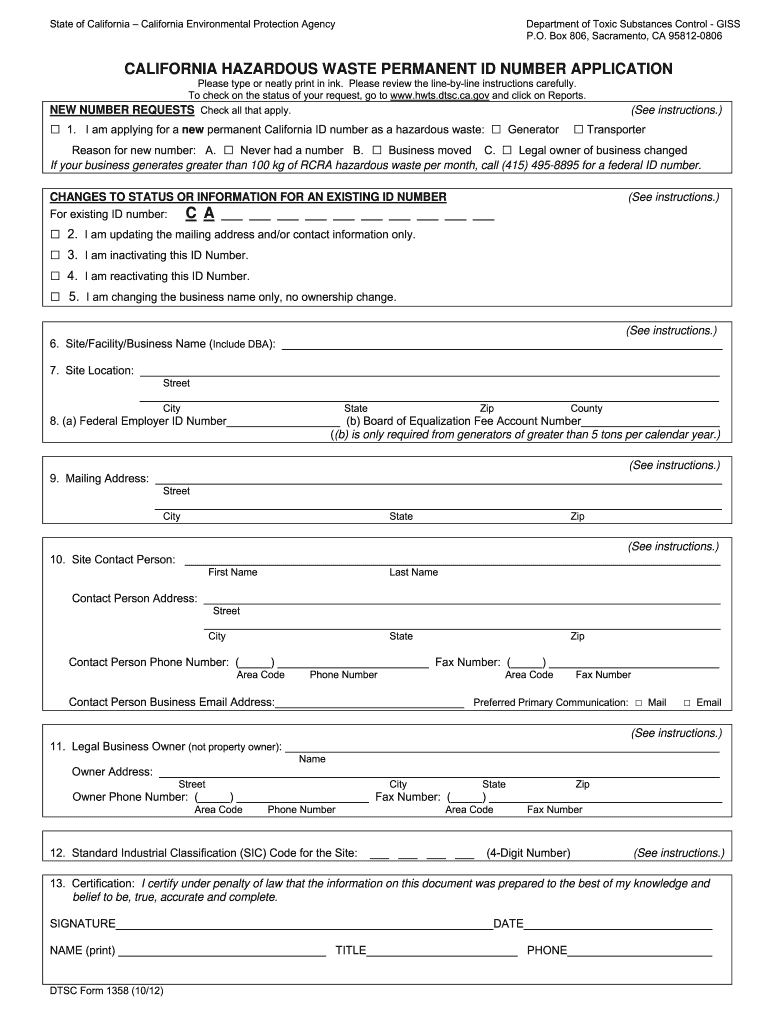
The California Department of Toxic Substances Control, also known as DTSC, utilizes Form 1358 for individuals and businesses to obtain or update a permanent California ID number. Completing this form online is essential for those dealing with hazardous waste management in California.
Follow the steps to fill out the CA DTSC 1358 online.
- Click ‘Get Form’ button to obtain the form and open it in the editor.
- Indicate if you are applying for a new permanent California ID number by checking the appropriate box. Specify if you are a hazardous waste generator, transporter, or both, and indicate the reason for your application.
- If applicable, provide your existing permanent ID number and select the action you require: update mailing address, inactivate, reactivate, or change the business name.
- Fill in the legal name of your site/facility/business along with any 'Doing Business As' (DBA) name if applicable.
- Enter the physical address of your site/business, including the county. Ensure you provide the complete address as post office boxes are not acceptable.
- Provide the business's Federal Employer Identification Number (FEIN) and Board of Equalization (BOE) fee account number if required.
- Complete the mailing address field, which may differ from your site location.
- Enter the site contact person's name and their contact information, including phone, fax, and email addresses.
- Document the legal business owner's information, ensuring to include the corporate name or the owner's name for sole proprietorships.
- Input the 4-digit Standard Industrial Classification Code (SIC) that best represents your primary business activity. Seek help online if you need assistance identifying this code.
- Ensure the form is certified with a signature from the business owner or an appropriate officer, and include the date along with their printed name, title, and contact number.
- Once all fields are filled out, review your application for completeness and accuracy to prevent delays.
- Save your changes and prepare the completed form for submission. You will have options to download, print, or share the form as needed.
Complete your documents online for efficient processing.
Experience a faster way to fill out and sign forms on the web. Access the most extensive library of templates available.
Related content
Line 1 – New Number Requests. • If you are applying for a new permanent State ID...
Sep 7, 2012 — An international group of scholars has come together to investigate the...
Some vehicle parts, such as lithium batter- ies, may contain perchlorate material. The...
Get answers to your most pressing questions about US Legal Forms API.
What is DTSC in California?
The DTSC, or Department of Toxic Substances Control, is a California agency responsible for regulating hazardous waste and protecting public health. Understanding the role of DTSC is important for compliance purposes, especially with references to CA DTSC 1358. Their guidelines help businesses manage hazardous materials safely and effectively.
How do I activate my EPA ID number?
To activate your EPA ID number, follow the instructions on the EPA's website. This typically involves confirming your business information. If you're unsure of the steps, USLegalForms offers valuable resources to assist you in activating your ID efficiently.
Do EPA ID numbers expire?
Yes, EPA ID numbers can expire if not used for a period of time or if they need to be reactivated. It's crucial to maintain communication with the EPA, especially when dealing with regulations under the CA DTSC 1358. Staying informed will help you avoid any disruptions in your operations.
How to check if an EPA number is active?
You can check if an EPA number is active by visiting the EPA’s site dedicated to this purpose. Input your EPA ID number into the provided field. This tool is particularly useful for those referring to the CA DTSC 1358 in their compliance efforts.
How do I register for an EPA number?
Registering for an EPA number involves completing an application on the EPA's official website. It's important to gather all required documents beforehand to streamline the process. If you find the registration process overwhelming, consider using USLegalForms to help you navigate the necessary steps.
How do I update my EPA ID number?
To update your EPA ID number, contact the EPA directly through their website or call their support line. You will need to provide your current ID number and the updated details. Make sure to mention the relevance of CA DTSC 1358 in your communication to facilitate the update.
How to get a temporary EPA ID number?
To obtain a temporary EPA ID number, visit the EPA's official website. You will need to fill out the necessary forms related to the CA DTSC 1358 and submit them online. Ensure that you provide accurate information to expedite the process. After submission, you should receive your temporary ID number promptly.
Which agencies oversee hazardous waste in California?
In California, several agencies oversee hazardous waste management, including the Department of Toxic Substances Control (DTSC) and the Department of Resource Recycling and Recovery (CalRecycle). These agencies work together to enforce regulations and ensure public safety. Familiarity with these agencies can help businesses stay compliant with CA DTSC 1358 standards.
What does the Toxic Substances Control Act cover?
The Toxic Substances Control Act (TSCA) regulates the introduction of new or already existing chemicals into commerce. It aims to protect human health and the environment from potential risks associated with chemical substances. By understanding TSCA, businesses can better navigate compliance issues related to CA DTSC 1358.
How do I contact the Department of Toxic Substances Control in California?
To contact the Department of Toxic Substances Control in California, visit their official website or use the contact numbers listed for inquiries. They offer support for various topics related to environmental protection and hazardous waste management. For matters concerning CA DTSC 1358, reaching out to them can provide essential information.
Use professional pre-built templates to fill in and sign documents online faster. Get access to thousands of forms.
If you believe that this page should be taken down, please follow our DMCA take down process here.