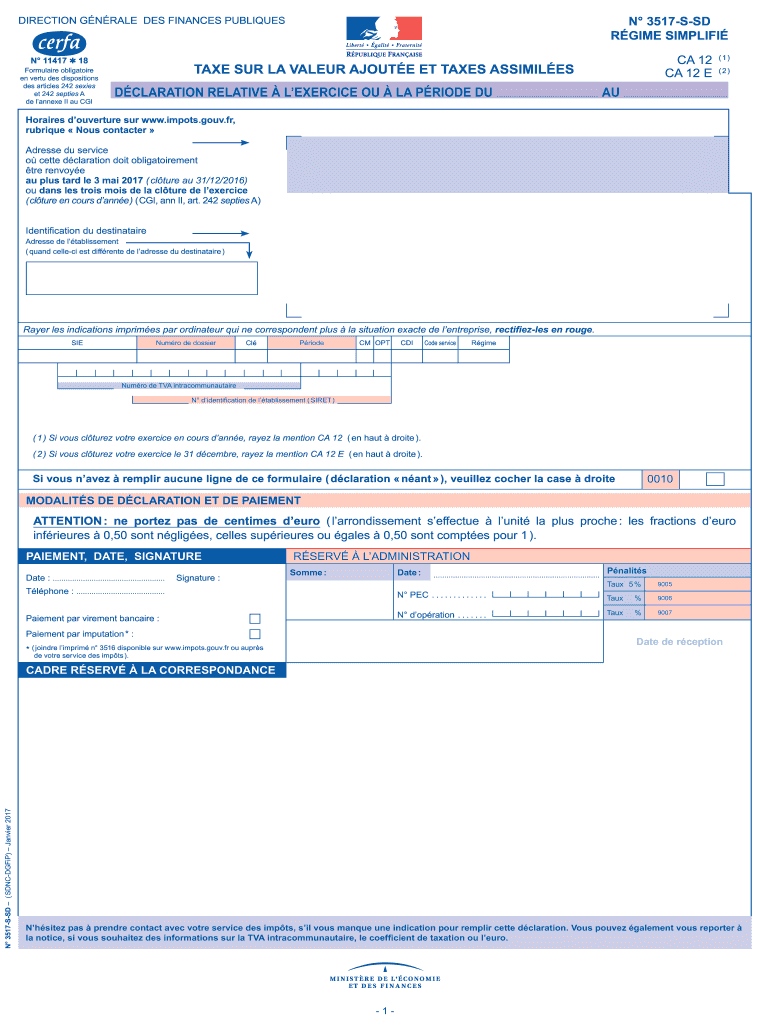
N 3517SSD RGIME SIMPLIFI DIRECTION GNRALE DES FINANCES PUBLIQUES N 11417 18 Formulaire obligatoire en vertu des dispositions des articles 242 sexies et 242 septies A de lannexe II au CGI CA 12 (1).
Loading

Open form follow the instructions

Easily sign the form with your finger

Send filled & signed form or save
How to fill out the FR 3517-S-SD online
Filling out the FR 3517-S-SD form online can seem daunting, but with clear guidance, you can navigate it effectively. This guide will walk you through each component of the form to ensure you provide accurate and complete information.
Follow the steps to successfully complete the form online.
- Click ‘Get Form’ button to obtain the FR 3517-S-SD form and open it in the designated editor.
- Begin by entering the 'Identification du destinataire' section. Fill in the address of the recipient, ensuring accuracy, especially if it differs from the establishment’s address.
- Review any pre-printed information on the form. Cross out any incorrect printed entries using red ink and enter the accurate details where necessary.
- Fill in your firm's SIRET number, number of the dossier, and other required identification numbers. Be sure to check these against your records for correctness.
- Complete the table for 'Modalités de déclaration et de paiement.' Make sure not to enter cents; round amounts to the nearest whole number as instructed.
- In the 'TVA brute' section, record all applicable operations. Carefully classify each transaction as either taxable or non-taxable and ensure to indicate the proper base amounts for taxes due.
- Proceed to the 'TVA déductible' section. Input all relevant deductions for goods and services according to your records, verifying that you have supporting invoices as needed.
- Calculate the net VAT due in the 'TVA nette' section. Subtract the total deductible VAT from the total due VAT, ensuring clarity in your calculations.
- For the refund request in section VI, complete the necessary information clearly to avoid delays. Specify the amount to be refunded, and don't forget to sign and date the form appropriately.
- Once you have filled out all sections, review the form for accuracy. Save any changes, download, print, or share the completed form as required for submission.
Complete your FR 3517-S-SD form online to ensure timely compliance with your tax obligations.
Experience a faster way to fill out and sign forms on the web. Access the most extensive library of templates available.
Related content
Sep 8, 2025 — The FAA proposes to adopt a new airworthiness directive (AD) for certain...
Changes in energy technologies and in the structure of economies have created...
NOTE: The hard drive bracket, hard drive connector cable, and screws are included in the...
Get answers to your most pressing questions about US Legal Forms API.
How do I fill out a 1040EZ tax return?
To fill out a 1040EZ tax return, first gather all necessary documents, such as W-2 forms and any other income statements. Follow the form's layout to enter your personal details, reported income, and any applicable adjustments. Be sure to refer to the FR 3517-S-SD for guidance on maximizing your deductions. For additional help, uslegalforms offers tools to ensure you complete your return accurately and efficiently.
How to fill out a w8ben form?
When completing a W-8BEN form, begin by entering your name and country of citizenship. Then, provide the required tax identification number and details about your residency. Understanding the stipulations around the FR 3517-S-SD can ease the process of filling out this form. Should you need additional resources, uslegalforms has templates available to assist in proper completion.
How to fill out EZ tax form?
To fill out the EZ tax form, start with your personal information and proceed to report your income, followed by entering your adjustments. The form is designed to guide you through each section clearly. By referencing the FR 3517-S-SD, you can ensure accuracy in your submissions. If you find yourself needing support, uslegalforms offers detailed guides to assist you.
How to fill out a withholding exemption form?
Filling out a withholding exemption form begins with entering your personal details and indicating your exemption status. You also need to understand the conditions under which you qualify for exemption. The FR 3517-S-SD provides insights to help clarify these conditions. Utilizing uslegalforms can provide helpful templates and tips for a seamless experience.
Does the IRS still use the 1040EZ form?
No, the IRS has discontinued the 1040EZ form as of the 2019 tax year. Instead, they encourage taxpayers to use the simpler 1040 form which streamlines the process. Always refer to current guidelines, like those outlined in the FR 3517-S-SD, to ensure accurate filing. Should you require assistance, uslegalforms can help navigate these changes.
Is 1040EZ the hardest tax form to complete?
While some may perceive the 1040EZ as complex, it is designed to be simple for those with straightforward tax situations. If you meet the eligibility criteria, you'll find the process manageable, especially when following guidelines like the FR 3517-S-SD. Remember, resources from uslegalforms can clarify any lingering doubts and help you feel confident in your filing.
How to fill out the Employee's Withholding Allowance Certificate?
To fill out the Employee's Withholding Allowance Certificate, also known as the W-4 form, start by entering your personal information at the top. Next, follow the instructions provided to determine the number of allowances you should claim based on your situation. Utilizing the FR 3517-S-SD can help you navigate your withholding choices effectively. If you have questions, uslegalforms provides excellent templates and advice.
How is taxable income calculated on the 1040EZ?
Taxable income on the 1040EZ is determined by taking your total income and then subtracting any adjustments and deductions you qualify for. Be sure to check for standard deductions available to you. For most filers using the FR 3517-S-SD, this process can be straightforward and ensures you maximize tax benefits. If you need assistance, uslegalforms offers resources to guide you through the details.
How long does it take to get a VAT number in France?
Acquiring a VAT number in France can take up to several weeks. Generally, the process involves submitting the appropriate documentation to the tax authorities and waiting for their review. Utilizing a well-established platform like uslegalforms can streamline this process, ensuring you complete your application correctly and submit it promptly.
How long does it take to get a VAT refund in France?
Typically, it takes between four to eight weeks to receive a VAT refund in France after submitting the FR 3517-S-SD form. The actual duration can depend on several factors, including the accuracy of your submission and the current processing times of the tax office. Regular follow-ups can help you track your claim.
Use professional pre-built templates to fill in and sign documents online faster. Get access to thousands of forms.
If you believe that this page should be taken down, please follow our DMCA take down process here.
This form is available in several versions. Select the version you need from the drop-down list below.