Loading
Get Erq 1 Form Florida Enrollment
How it works
-

Open form follow the instructions
-

Easily sign the form with your finger
-

Send filled & signed form or save
How to fill out the Erq 1 Form Florida Enrollment online
Filling out the Erq 1 Form Florida Enrollment can be a straightforward process when approached step by step. This guide is designed to support users to complete the form accurately and efficiently, ensuring all necessary information is provided.
Follow the steps to complete the form successfully.
- Click ‘Get Form’ button to obtain the form and open it in your preferred editor.
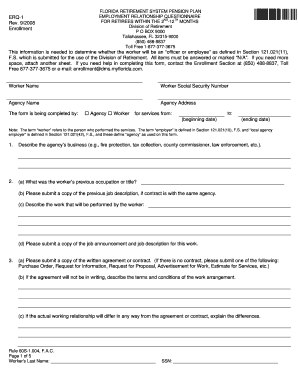
- Begin by entering the worker's name and Social Security number at the top of the form to identify the individual for whom the form is being filled out.
- Provide the agency name and address where the worker will be performing their services, ensuring accurate details for proper identification.
- Indicate who is completing the form by marking the appropriate box for 'Agency' or 'Worker'. This section clarifies the source of the information provided.
- Fill in the beginning and ending dates for the services being rendered, ensuring that the timeframe is clear.
- In section 1, describe the agency’s business nature, such as 'law enforcement' or 'fire protection', providing context for the employment.
- In section 2, answer the questions regarding the worker's previous occupation, attach necessary documents such as job descriptions or announcements.
- Section 3 requires information about written agreements. If no formal contract exists, provide alternative documentation as specified.
- Continue through sections 4 to 21, addressing each query regarding the working relationship, responsibilities, and specifics about the worker's role, using clear and concise language.
- Ensure all responses are completed or marked 'N/A' as applicable, attaching any additional sheets if necessary.
- Finalize the form by providing contact details, signature, and date at the end of the document before submission.
- After completing the form, save the changes, and then proceed to download, print, or share the form as needed.
Complete your Erq 1 Form Florida Enrollment online today!