Note that closed PO Boxes are available for new customers immediately, so late payment can lead to loss of your PO Box address. You may renew your PO Box online, at a Post Office, by mail, or at an Automated Postal Center® (APC® ). It is your responsibility to pay your renewal fee on time. Convenient payment options are: To find a PO Box in your area and get fee information, visit www.yourotheraddress.com. You may pay your initial PO Box fees online or at a Post Office. pay online: Use a val.
Loading

Open form follow the instructions

Easily sign the form with your finger

Send filled & signed form or save
How to fill out the USPS PS 1093 online
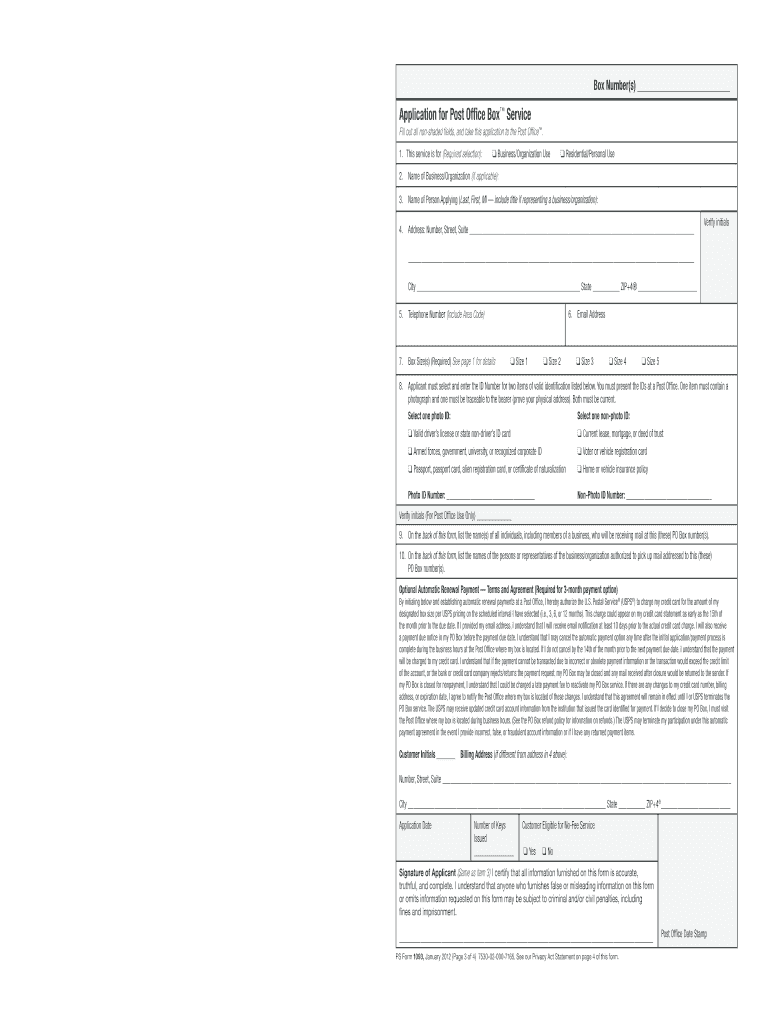
This guide provides detailed instructions on filling out the USPS PS 1093 form for Post Office Box™ service online. Whether for personal or business use, following these steps will help ensure a smooth application process.
Follow the steps to successfully complete your USPS PS 1093 application online.
- Click ‘Get Form’ button to access the USPS PS 1093 online application and open it in your editor.
- Select the purpose of the service by choosing either 'Business/Organization Use' or 'Residential/Personal Use'. Be sure to check the appropriate box.
- Enter your contact information, including your name, address (number, street, city, state, ZIP+4), telephone number, and email address.
- Choose the size of your PO Box; options include Size 1, Size 2, Size 3, Size 4, and Size 5. Consider your expected mail volume to select the most appropriate size.
- Provide the identification information. Select one valid photo ID and one non-photo ID from the provided lists, and fill in the respective ID numbers ensuring both forms are current.
- On the back of the form, list all individuals authorized to receive mail at your PO Box, including members of a business if applicable.
- Also on the back, document the names of individuals who will be authorized to pick up mail from your PO Box.
- Review all entered information for accuracy. Once confirmed, save your changes, then proceed to download, print, or share the completed form as needed.
Complete your USPS PS 1093 application online today and enjoy the convenience of Post Office Box service.
Experience a faster way to fill out and sign forms on the web. Access the most extensive library of templates available.
Related content
Once you've reserved your box, completed the PO Box application (PS Form 1093), paid the...
Applicant must select and enter the ID Number for two separate forms of valid...
The software is provided strictly on an “as is” basis. All software, including...
Get answers to your most pressing questions about US Legal Forms API.
How do I get my PS form 1093?
To obtain your PS form 1093, you can visit the USPS website or the nearest post office. This form is essential for applying for a PO Box, and you can complete it online for convenience. If you prefer in-person assistance, USPS staff can help you fill it out correctly. Ensuring you have accurate information will streamline your experience.
What is a Certified Mail slip?
A Certified Mail slip is a form used to document the sending of certified mail. This slip provides a unique tracking number and serves as proof that your mail has been sent and delivered. It is essential for sending important documents, as it ensures you have a record of both the send-off and delivery, especially relevant to USPS PS 1093. If you're looking for guidance on how to use these slips, USLegalForms has helpful resources.
How do I fill out a USPS address?
When filling out a USPS address, start with the recipient's name, followed by the street address, city, state, and ZIP code. Ensure that there are no errors, as one small mistake can lead to delivery issues. Also, consider reviewing guidelines for formatting addresses correctly, which is especially important if your mail is related to USPS PS 1093. USLegalForms provides templates and tips that can simplify this process.
How to fill out a certified mail slip with the USPS?
Filling out a certified mail slip involves including the recipient's name and address, along with your return address. Be sure to select the Certified Mail option on the slip and affix the appropriate postage. This slip is key to ensuring you get tracking updates and proof of delivery, particularly important with USPS PS 1093. For detailed instructions, consider checking resources offered by USLegalForms.
Is there a form to fill out for Certified Mail?
Yes, there is a specific form used for Certified Mail, which you can find at any USPS location. This form ensures that your mail is tracked throughout its journey. Additionally, using the proper form is crucial to ensure compliance with USPS protocols, including those outlined in USPS PS 1093. If you're unsure, platforms like USLegalForms provide resources to guide you through the process.
Who signs the Return Receipt for Certified Mail?
The Return Receipt for Certified Mail is typically signed by the recipient of the mail. If the recipient is unavailable, someone at the delivery address may sign on their behalf. This signature confirms that the mail was delivered, providing proof of receipt. Understanding this process is essential, especially when dealing with important documents related to USPS PS 1093.
What is the best way to send mail to a PO Box?
The best way to send mail to a PO Box is to use a method that provides tracking and delivery confirmation, such as priority or certified mail. Ensure you follow proper addressing guidelines to avoid any delays. Leveraging USPS PS 1093 can also facilitate the mailing process tailored for PO Boxes.
How do you secure mail to a PO Box?
To secure mail to a PO Box, use reliable mailing methods, such as certified or registered mail. Make sure to include tracking numbers and request delivery confirmations whenever possible. Ensuring that you provide proper identification can also help protect your mail when using USPS PS 1093.
What is the safest way to mail legal documents?
To ensure safe mailing of legal documents, use registered mail or a secure courier service that provides tracking and delivery confirmation. Neither option should be overlooked, especially when the contents are crucial. By using USPS PS 1093, you can streamline the mailing process for legal documents efficiently.
Which is safer, registered or Certified Mail?
Registered mail is generally considered safer than certified mail because it offers a higher level of security. Registered mail goes through more stringent tracking and handling procedures. If you're dealing with important documents, you might want to utilize USPS PS 1093 alongside registered mail for added security.
Use professional pre-built templates to fill in and sign documents online faster. Get access to thousands of forms.
If you believe that this page should be taken down, please follow our DMCA take down process here.
This form is available in several versions. Select the version you need from the drop-down list below.