Loading
Get Letter Of Authorization For Tax Representation
How it works
-

Open form follow the instructions
-

Easily sign the form with your finger
-

Send filled & signed form or save
How to fill out the Letter Of Authorization For Tax Representation online
Filling out the Letter Of Authorization For Tax Representation is a crucial step in appointing an agent to handle tax matters on your behalf. This guide will walk you through the process in a clear and supportive manner, ensuring you can complete the form accurately and efficiently.
Follow the steps to complete your Letter Of Authorization for Tax Representation
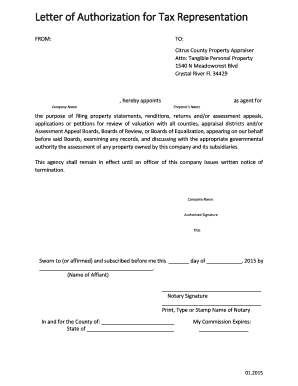
- Click the ‘Get Form’ button to obtain the Letter Of Authorization For Tax Representation and open it in your preferred digital editing tool.
- In the ‘FROM’ section, enter your full company name and address to indicate the entity granting authorization.
- In the ‘TO’ section, confirm the recipient information, which should include ‘Citrus County Property Appraiser’ along with the address provided for proper delivery.
- In the blank field after ‘hereby appoints’, write the full name of the company you are appointing as your agent.
- Next, in the field labeled ‘Preparer’s Name’, input the name of the individual or entity that you authorizing to manage the tax filings and communications.
- Review the purpose statement to ensure it accurately reflects your intent to allow your agent to file documents like property statements and assessments.
- Sign the document in the section marked ‘Authorized Signature’ to validate the authorization.
- Complete the ‘Title’ field with your position within the company to establish your authority in signing this form.
- In the notary section, provide the date of signing and have a notary public notarize the form to ensure its official status.
- Finally, save your changes, and choose to download, print, or share the completed document as needed.
Complete your Letter Of Authorization For Tax Representation online today for a hassle-free experience.
Third-Party Designee PIN: This PIN is also entered on the Main Info sheet of UltimateTax. The taxpayer authorizes the preparer to talk to the IRS about their return. For the designee, you should enter the word "preparer" rather than your actual name in that box.
Industry-leading security and compliance
US Legal Forms protects your data by complying with industry-specific security standards.
-
In businnes since 199725+ years providing professional legal documents.
-
Accredited businessGuarantees that a business meets BBB accreditation standards in the US and Canada.
-
Secured by BraintreeValidated Level 1 PCI DSS compliant payment gateway that accepts most major credit and debit card brands from across the globe.