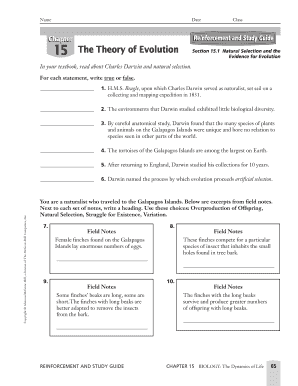
Natural selection. For each statement, write true or false. 1. H.M.S. Beagle, upon which Charles Darwin served as naturalist, set sail on a collecting and mapping expedition in 1831. false 2. The environments that Darwin studied exhibited little biological diversity. false 3. By careful anatomical study, Darwin found that the many species of plants and animals on the Galapagos Islands were unique and bore no relation to species seen in other parts o.
Open form follow the instructions
Easily sign the form with your finger
Send filled & signed form or save
How to fill out the Reinforcement Evolution Answer Key online
This guide provides clear and supportive instructions for users filling out the Reinforcement Evolution Answer Key online. By following these steps, users will ensure accurate and efficient completion of the form.
Follow the steps to complete the Reinforcement Evolution Answer Key online.
- Press the ‘Get Form’ button to retrieve the Reinforcement Evolution Answer Key and access it in your preferred editing tool.
- Begin by entering your name, date, chapter number, and class information in the designated fields at the top of the form.
- Review Section 15.1, which includes statements regarding Charles Darwin and natural selection. For each statement, mark it as 'true' or 'false' based on your understanding and the textbook information.
- Proceed to the section requiring you to write a heading next to excerpts from field notes. Choose from 'Overproduction of Offspring', 'Natural Selection', 'Struggle for Existence', or 'Variation' based on the content of each note.
- Continue to the section describing structural adaptations. For each statement, identify if it is an example of 'mimicry', 'camouflage', or 'both' by filling in the appropriate responses.
- In the final part of the form, complete the chart related to types of evidence for evolution. Carefully check off the correct types (Homologous Structure, Analogous Structure, Vestigial Structure) that apply to each description provided.
- Once all sections are complete, review your answers for accuracy. You may choose to save your changes, download the completed form, print it out, or share it as needed.
Complete your Reinforcement Evolution Answer Key online today and enhance your understanding of evolutionary concepts!
Experience a faster way to fill out and sign forms on the web. Access the most extensive library of templates available.
Related content
Mar 24, 2016 — Nevertheless, empirical data suggest that reinforcement plays a key role...
Reinforcement and Study Guide 16 Primate Evolution Chapter 15: The Theory of Evolution...
Function to Form (or "problem to solution"). The fact that males, but not females, risk...
Get answers to your most pressing questions about US Legal Forms API.
How do you write a footer on a page?
Go to Insert > Header or Footer. Choose from a list of standard headers or footers, go to the list of Header or Footer options, and select the header or footer that you want. Or, create your own header or footer by selecting Edit Header or Edit Footer. When you're done, select Close Header and Footer or press Esc.
How do you make a good footer?
You can use some tips for making a good footer, such as keeping the design simple, including the basic contact information, adding a call-to-action button, using some graphic elements, writing the copyright notice, etc. Adding this data will help you create an appealing footer.
What do you put in a page footer?
Here are 11 elements you can use to create a great footer: Information about your business. Think about the first visit someone has on your website. ... Landing page links. ... Basic navigation. ... Legal information & Copyright. ... Social icons. ... Call to action. ... Search bar. ... Contact information.
How do I add text to my footer?
Try it! Select Insert > Header or Footer. Select one of the built in designs. Type the text you want in the header or footer. Select Close Header and Footer when you're done.
What do I write in the footer?
The website footer is the section of content at the very bottom of a web page. It typically contains a copyright notice, link to a privacy policy, sitemap, logo, contact information, social media icons, and an email sign-up form. In short, a footer contains information that improves a website's overall usability.
What is a footer description?
A footer is a bit of printed text at the very bottom of a page. The most common kind of footer is a page number. In academic writing, page numbers are frequently formatted as footers centered at the bottom — or "foot" — of each page.
How do I put text over a Header in Word?
1:04 2:14 How To Add Text Box In Header In Word - [ SOLVED ] - YouTube YouTube Start of suggested clip End of suggested clip And cut the text box now click on the insert tab. And under the header. Select edit header toMoreAnd cut the text box now click on the insert tab. And under the header. Select edit header to activate the header region. Now paste the text box inside the header.
Use professional pre-built templates to fill in and sign documents online faster. Get access to thousands of forms.
If you believe that this page should be taken down, please follow our DMCA take down process here.