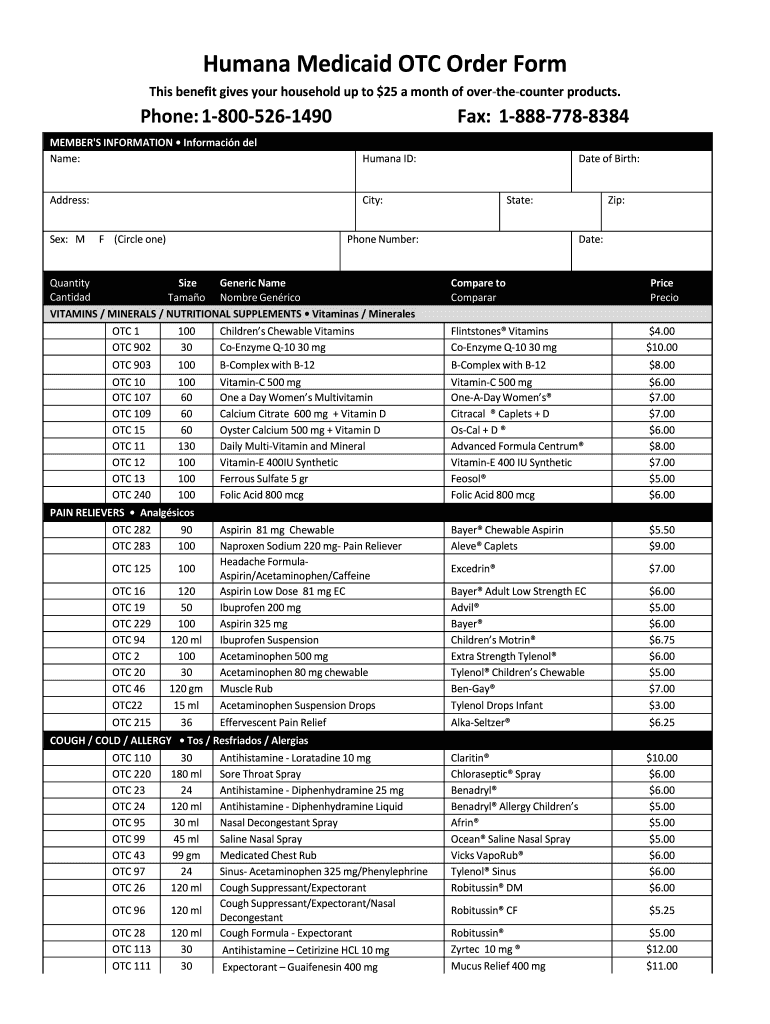
® Preparation H® Prilosec OTC® 20 mg FIRST AID / MEDICAL SUPPLIES / TOPICALS • Primeros Auxilios / Suplementos Médicos OTC 39 120 ml Diaper Rash Ointment Desitin ® OTC 217 30 gm Allergy Cream- Itching and Pain Relief Benadryl® Extra Strength Cream OTC 231 30 gm Triple Antibiotic Ointment- Plus Neosporin® Plus OTC 35 100 Alcohol Prep Pads Alcohol Swabs OTC 36 300 Cotton Swabs Q-Tips® OTC 37 120 ml Calamine Lotion Caladryl® OTC 38 15 gm Clotrimazole Cream 1% - Athlete’s Foot Lotrimin.

Open form follow the instructions

Easily sign the form with your finger

Send filled & signed form or save
How to fill out the Humana OTC Order Form online
Filling out the Humana OTC Order Form online is an essential process for accessing your monthly allowance of over-the-counter products. This guide offers clear, step-by-step instructions to help you successfully complete the form and ensure your order is processed smoothly.
Follow the steps to fill out the form correctly
- Click 'Get Form' button to access the Humana OTC Order Form and open it in your editor.
- Begin by entering your member information in the designated fields. This includes your name, Humana ID, address, city, state, zip code, and phone number.
- Indicate your sex by circling the appropriate option: M for male or F for female.
- Provide your date of birth in the specified field.
- In the products section, review the list of available over-the-counter items. For each product you wish to order, enter the quantity and size as applicable.
- Ensure you fill out any specific requirements such as generic names, if necessary, while selecting products from categories such as vitamins, pain relievers, and topical items.
- Once all required fields are completed, review your order summary to confirm accuracy.
- Finally, save your changes, and choose to download, print, or share the completed form as needed.
Get started today by filling out your Humana OTC Order Form online for easy access to your benefits.
Experience a faster way to fill out and sign forms on the web. Access the most extensive library of templates available.
Related content
Go to Humana.com, sign in/register, click 'Access your ID Card' under 'Tools & forms' or...
This guide will walk you through the Humana OTC order process, addressing common...
Over the course of the past year, we have initiated the production of human protein S by...
Get answers to your most pressing questions about US Legal Forms API.
How do I receive an OTC card?
Receiving your OTC card is straightforward. If you are enrolled in a Humana plan that offers OTC benefits, you will typically receive your card by mail. Ensure your contact information is updated in your Humana account to avoid any delays. If you have further questions, refer to the Humana OTC Order Form for guidance.
How do I apply for an OTC card?
To apply for an OTC card, you need to be enrolled in a Humana health plan that offers this benefit. You can typically find the application form on the Humana website or by contacting their customer service. Once you fill out the required information and submit the application, your card will be mailed to you if approved, allowing you to use it for your OTC purchases.
How do I order OTC items from Humana?
Ordering OTC items from Humana is straightforward. Start by accessing the Humana OTC Order Form online, where you will provide your personal information. You can choose from a wide variety of products that meet your health requirements. Once you complete the form and select your items, submit it, and you will receive your order at your designated address.
Can I buy food with my Humana OTC card?
The Humana OTC card is specifically designed for purchasing over-the-counter health items such as pain relievers, first-aid supplies, and personal care products. Unfortunately, you cannot buy food with your Humana OTC card. It's essential to use the Humana OTC Order Form to make the most of your benefits and choose eligible items that support your health needs.
What is the $1000 allowance for Humana Flex?
The $1000 allowance for Humana Flex offers members a flexible spending option for various health-related purchases. This allowance can be used for different services and products, including OTC items, enhancing your overall well-being. To access and utilize this allowance efficiently, refer to the Humana OTC Order Form and explore the eligible products and services available to you.
Who is eligible for a Humana spending account card?
Eligibility for a Humana spending account card typically includes members of certain Humana plans, such as Medicare Advantage or Humana's Flex plan. To confirm your eligibility, you'll want to check your plan details or contact Humana directly. Having this card allows you to manage your benefits effectively and provides access to your Humana OTC Order Form for purchases.
How often do you get OTC benefits from Humana?
You receive OTC benefits from Humana quarterly. Each quarter, you can utilize your Humana OTC Order Form to order eligible over-the-counter items. This benefit is designed to help you stay stocked up on necessary health supplies conveniently. It's a simple way to manage your health essentials throughout the year.
What is OTC allowance?
This program allows members to save on healthier foods with up to $1,500 a year in discounts on healthier food options in-store at Walmart. Just scan your card at check-out to take advantage of the savings.
What items can you buy with OTC card?
What Can I Buy with an OTC Card? You may purchase approved OTC nonprescription drugs and health-related items (such as aspirin, cold/flu medicine, and bandages) at any participating retailer.
Does Humana have a pharmacy?
Humana Pharmacy® offers secure mail-delivery pharmacy services that aim to provide potential cost savings, safety and accuracy to Humana members. Humana recognizes that members have the sole discretion to choose their pharmacy.
Use professional pre-built templates to fill in and sign documents online faster. Get access to thousands of forms.
If you believe that this page should be taken down, please follow our DMCA take down process here.