Loading
Get Lw210
How it works
-

Open form follow the instructions
-

Easily sign the form with your finger
-

Send filled & signed form or save
How to fill out the Lw210 online
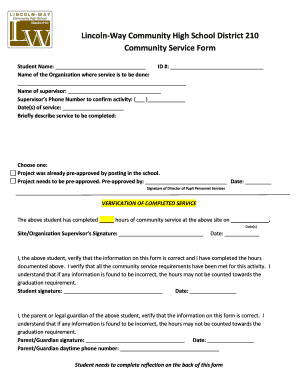
The Lw210 form is essential for students to document their community service hours. Completing this form accurately ensures that students meet their graduation requirements while reflecting on their service experience.
Follow the steps to fill out the Lw210 form online effectively.
- Click ‘Get Form’ button to obtain the form and open it in the editor.
- Enter the student’s full name in the designated field.
- Provide the student’s ID number to associate the form with their records.
- Fill in the name of the organization where the community service will take place.
- Write the name of the supervisor overseeing the community service activities.
- Input the supervisor’s phone number to allow for verification of the service.
- Specify the dates on which the community service will occur.
- Briefly describe the service that will be completed in the provided space.
- Select whether the project was already pre-approved or needs pre-approval, and if applicable, fill in the name and date of the pre-approval.
- Ensure that the Director of Pupil Personnel Services signs the form, if pre-approval is required.
- After completing the service, have the site/organization supervisor sign to verify the hours worked.
- As the student, sign the form and date it, confirming that the information is correct.
- A parent or legal guardian must sign and date the form to affirm the accuracy of the details provided.
- Complete the reflection section on the back of the form, detailing the community service experience.
- Once all sections are filled, save changes, download, print, or share the form as needed.
Start completing your Lw210 form online today!
A bachelor degree is usually 3 years of duration and recognized by UGC and university. After the completion of 3 years a course candidate gets award of a bachelor degree.