Loading
Get Uk Hmrc P60 2018
How it works
-

Open form follow the instructions
-

Easily sign the form with your finger
-

Send filled & signed form or save
How to fill out the UK HMRC P60 online
The UK HMRC P60 form is an essential document that provides a summary of your earnings and tax deductions for the tax year. Understanding how to accurately fill out this form online is crucial for ensuring compliance with tax regulations and for managing your financial records effectively.
Follow the steps to fill out your P60 form online.
- Select the ‘Get Form’ button to access the P60 form online and open it in your preferred document editor.
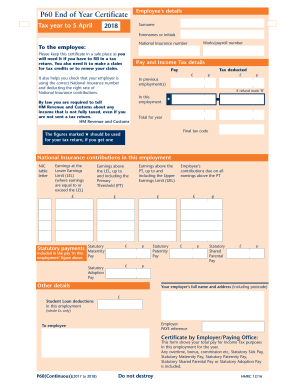
- Enter your surname in the designated field. Ensure that you provide your most current and accurate surname as it appears on your official documents.
- Fill in your forenames or initials in the corresponding section. This should reflect the name you are commonly known by or as listed in your identification.
- Input your works/payroll number. This number helps identify your records in your employer's payroll system.
- Provide your National Insurance number. This is crucial for your tax records and ensures that your contributions are tracked correctly.
- Review the pay and income tax details section. Enter the total pay you received, followed by the tax deducted. Confirm that the tax deducted aligns with your records.
- Complete the sections regarding previous employment. If you had any previous employments resulting in a refund, mark 'R' as indicated.
- Review and enter the figures in the National Insurance contributions sections. This includes earnings below and above the Lower Earnings Limit, up to and including the Primary Threshold, and relate those to the corresponding contributions due.
- Fill in any statutory payments, including statutory maternity pay, statutory adoption pay, statutory paternity pay, and statutory shared parental pay, as applicable.
- Provide your employer's full name and address, including the postcode, to ensure the document is complete and compliant.
- Record any Student Loan deductions if applicable in this employment. Make sure these figures are accurate to avoid any discrepancies.
- Finally, review all entered information for accuracy. After confirming all details are correct, proceed to save your changes. You can then download, print, or share the completed form as needed.
Start filling out your P60 online today to ensure your tax records are accurate and up to date.
Get form
Experience a faster way to fill out and sign forms on the web. Access the most extensive library of templates available.
Related links form
In the UK, National Insurance contributions are not strictly tax-deductible like income tax. However, these contributions are essential for qualifying for certain government benefits. When reviewing your tax documentation, including your UK HMRC P60, it's useful to keep track of your National Insurance contributions and their implications.
Get This Form Now!
Use professional pre-built templates to fill in and sign documents online faster. Get access to thousands of forms.