Loading
Get Interest Authorization Corporate Entity With Seal Affixed - Isc
How it works
-

Open form follow the instructions
-

Easily sign the form with your finger
-

Send filled & signed form or save
How to fill out the Interest Authorization Corporate Entity With Seal Affixed - Isc online
This guide provides clear and supportive instructions on how to fill out the Interest Authorization Corporate Entity With Seal Affixed - Isc form online. By following these steps, you will ensure that your document is completed accurately and efficiently.
Follow the steps to complete the form successfully:
- Click the ‘Get Form’ button to obtain the form and open it in the editor.
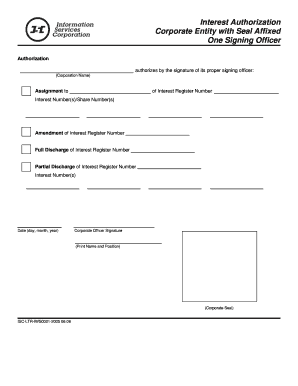
- Enter the official name of the corporation in the designated field for ‘Corporation Name’. Ensure that the name matches the registered name of the entity.
- Fill in the Interest Register Number in the appropriate section. This number identifies the specific register associated with the corporation's interests.
- Indicate the Interest Number(s)/Share Number(s) that you wish to assign in the provided field. Ensure that all relevant interest or share numbers are clearly listed.
- If applicable, complete the Amendment of Interest Register Number section by entering the relevant number here.
- For discharge entries, specify the Full Discharge of Interest Register Number or the Partial Discharge of Interest Register Number as needed, including the respective Interest Number(s).
- Provide the date in the format of day, month, and year as indicated in the form.
- Have the signing officer of the corporation sign in the designated area marked ‘Corporate Officer Signature’.
- Print the name and position of the signing officer below their signature to ensure clarity.
- Affix the corporate seal in the specified section to validate the document.
- Once all sections are filled out, review the form for accuracy. You may then save your changes, download the form, print it, or share it as needed.
Complete your documents online today to ensure a smooth filing process.
Select the cell that contains the formula you want to move. Click Home > Cut (or press Ctrl + X). Select the cell you want the formula to be in, and then click Paste (or press Ctrl + V). Verify that the cell references are still what you want.