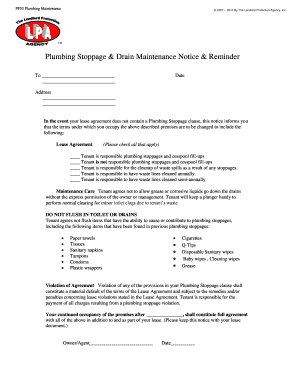
PF53 Plumbing Maintenance 2007 2010 By The Landlord Protection Agency, Inc. Plumbing Stoppage & Drain Maintenance Notice & Reminder To Date Address In the event your lease agreement does not.
Open form follow the instructions
Easily sign the form with your finger
Send filled & signed form or save
How to fill out the Plumbing Stoppage Drain Notice online
Filling out the Plumbing Stoppage Drain Notice is an essential task for ensuring clear communication regarding plumbing responsibilities. This guide offers step-by-step instructions to help you accurately complete the form online.
Follow the steps to complete the Plumbing Stoppage Drain Notice.
- Press the ‘Get Form’ button to access the Plumbing Stoppage Drain Notice and open it in your document editor.
- Begin by entering the date in the designated field. Ensure this reflects the current date or the date you are completing the notice.
- Next, fill in the recipient's name and address in the appropriate fields. This information should clearly identify the person receiving the notice.
- In the Lease Agreement section, check all relevant boxes that apply to the plumbing responsibilities. Choose whether the tenant is responsible for stoppages, cleanup of waste spills, and the frequency of maintenance care.
- Review the maintenance care guidelines. Ensure that the language, including the agreement not to flush certain items down the toilet, is clear and understood.
- Enter any additional items in the violation of agreement section, if necessary. Clearly state any additional points of concern related to plumbing responsibilities.
- Finally, add the owner or agent's signature in the designated area, along with the date to signify agreement with the terms outlined in the notice.
- Once you have completed all sections, save your changes. You may also download, print, or share the completed Plumbing Stoppage Drain Notice as required.
Complete your Plumbing Stoppage Drain Notice online today to ensure clarity in plumbing responsibilities.
Experience a faster way to fill out and sign forms on the web. Access the most extensive library of templates available.
Related content
the wastewater to back up into nearby pipes and drains. Stoppages can occur not only in...
... prior notice to you;; Limit your right to repairs (e.g. plumbing stoppages, and ... by...
standard letter paper. (8.5” X 11”). ... Sewer and Water Pipe Installation. 890.190...
Get answers to your most pressing questions about US Legal Forms API.
What is the footer note on a website?
The website footer is the section of content at the very bottom of a web page. It typically contains a copyright notice, link to a privacy policy, sitemap, logo, contact information, social media icons, and an email sign-up form. In short, a footer contains information that improves a website's overall usability.
How do I add a copyright footer?
To add copyright symbols to web pages, you can use HTML code. The code includes HTML entity names or numbers like © and ©.
Is it necessary to have a copyright footer?
Technically you don't have to, but including a copyright notice on your site serves as a visible reminder to people that the work is your intellectual property. The footer is a good place to put it because it appears on every page. When doing so you should also include the year when the work was first created.
What is an email footer example?
The footer of your email is located at the very end of your email. It comes after all the body content, including your email signature. It may be as basic as your company's address and an unsubscribe link, or it might have useful details like contact information, social links, or legal disclaimers.
What do you put in the footer of a website copyright?
the copyright symbol ©, or the words "Copyright" or "Copr." if the website is published, the year of publication, and. the name of the copyright owner.
What do you put in the footer for copyright?
The copyright notice generally consists of three elements: The symbol © (the letter C in a circle), or the word "Copyright" or the abbreviation "Copr."; The year of first publication of the work; and. The name of the owner of copyright in the work.
What do you write in a copyright footer?
There are only four simple components you need to include: The copyright symbol © or the word “copyright” The name of the copyright owner or author of the work. The year the content was published, which can be different from the year of creation.
How to use footer?
Go to Insert > Header or Footer. Choose from a list of standard headers or footers, go to the list of Header or Footer options, and select the header or footer that you want. Or, create your own header or footer by selecting Edit Header or Edit Footer.
Use professional pre-built templates to fill in and sign documents online faster. Get access to thousands of forms.
If you believe that this page should be taken down, please follow our DMCA take down process here.