Loading
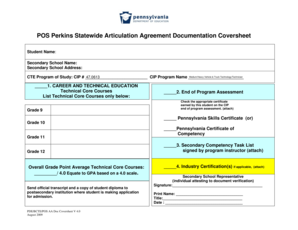
Get Pos Perkins Statewide Articulation Agreement Documentation Coversheet Student Name: Secondary
How it works
-

Open form follow the instructions
-

Easily sign the form with your finger
-

Send filled & signed form or save
How to use or fill out the POS Perkins Statewide Articulation Agreement Documentation Coversheet Student Name: Secondary online
Completing the POS Perkins Statewide Articulation Agreement Documentation Coversheet for students in secondary education is a crucial step in the articulation process. This guide provides clear, step-by-step instructions for filling out the necessary information accurately and thoroughly.
Follow the steps to complete the documentation coversheet successfully.
- Press the ‘Get Form’ button to obtain the form and open it in your preferred online editor.
- Begin filling out the student name field with the full name of the student applying for articulation credit.
- In the secondary school name field, enter the complete name of the student's secondary institution.
- Provide the secondary school address, including street number, street name, city, state, and zip code to ensure proper documentation.
- Select the appropriate CTE program of study by entering the CIP number, in this case, '47.0613' for Medium/Heavy Vehicle & Truck Technology/Technician.
- In the Technical Core Courses section, list the technical core courses that the student has completed in Grade 9.
- Check the box for the end of program assessment certificate that the student has earned, ensuring you attach the appropriate documentation.
- Calculate and fill in the overall grade point average for technical core courses on a 4.0 scale, inputting the result in the provided field.
- Attach any additional documents required, such as the official transcript and the student diploma, for submission to the postsecondary institution.
- Provide the signature of the secondary school representative, including printing their name, title, and the date of signing to authenticate the document.
- Once all fields are completed, and documents are attached, save the changes, and you may download, print, or share the completed form as needed.
Complete your documentation online today to ensure a smooth articulation process.
The initial is a marking on the end of the page. For physical documentation, it is done by ink. Much like a signature, the initial is not something generic but rather, exclusive to the individual using it. It's a small personalisation to acknowledge you have read the page and agreed to the terms on it.
Industry-leading security and compliance
US Legal Forms protects your data by complying with industry-specific security standards.
-
In businnes since 199725+ years providing professional legal documents.
-
Accredited businessGuarantees that a business meets BBB accreditation standards in the US and Canada.
-
Secured by BraintreeValidated Level 1 PCI DSS compliant payment gateway that accepts most major credit and debit card brands from across the globe.