Loading
Get Empire Bcbs Prior Auth Forms To Print
How it works
-

Open form follow the instructions
-

Easily sign the form with your finger
-

Send filled & signed form or save
How to fill out the Empire Bcbs Prior Auth Forms To Print online
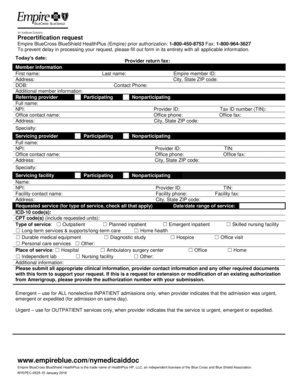
Filling out the Empire Bcbs Prior Auth Forms To Print is a crucial step in ensuring that your precertification request is processed efficiently. This guide provides clear, step-by-step instructions to help you navigate the form with ease.
Follow the steps to complete your precertification request form effectively.
- Press the ‘Get Form’ button to access the form. A new window will open so you can complete the document online.
- Fill in today's date at the top of the form, ensuring it reflects the date of your submission.
- Indicate if your request is nonurgent or urgent (life/limb-threatening) by selecting the appropriate checkbox.
- In the member information section, complete all fields with the member's details, including first name, last name, member ID, address, city, state ZIP code, contact phone, and date of birth (DOB). Also, add any additional member information as necessary.
- For the referring provider, select whether they are participating or nonparticipating. Fill in their full name, TIN, NPI, Provider ID, office contact name, office phone, office fax, address, city, state ZIP code, and specialty.
- In the servicing provider section, also indicate if they are participating or nonparticipating and provide their full name, NPI, office contact name, address, specialty, Provider ID, office phone, city, state ZIP code, TIN, and office fax.
- Complete the servicing facility information in a similar manner, including whether the facility is participating or nonparticipating, as well as the name, NPI, Provider ID, TIN, facility contact name, facility phone, facility fax, address, city, state ZIP code.
- In the requested service section, check all applicable types of services and fill in the date or date range of service. Include the ICD-10 code(s) and CPT code(s), noting the requested units.
- Specify the place of service by checking the relevant option(s) such as hospital, ambulatory surgery center, or home.
- Provide any additional information relevant to your request, ensuring that all appropriate clinical information, provider contact information, and required documents are attached.
- If applicable, submit the authorization number for extensions or modifications of existing authorizations.
- Review all entered information for completeness and accuracy before finalizing the document.
- Once completed, you can save changes, download, print, or share the form as needed.
Take the next step now and complete your forms online to ensure timely processing.
No pre-authorization is required for outpatient emergency services as well as Post-stabilization Care Services (services that the treating physician views as medically necessary after the emergency medical condition has been stabilized to maintain the patient's stabilized condition) provided in any Emergency Department ...