Loading
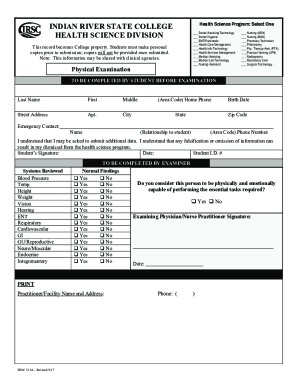
Get Irsc 515 2017-2026
How it works
-

Open form follow the instructions
-

Easily sign the form with your finger
-

Send filled & signed form or save
How to fill out the IRSC 515 online
Filling out the IRSC 515 form is an essential step for students entering health science programs at Indian River State College. This guide will walk you through the necessary steps to complete the form accurately and efficiently online.
Follow the steps to complete the IRSC 515 form online.
- Press the ‘Get Form’ button to acquire the IRSC 515 form and open it in your preferred online editor.
- Complete the top section of the form, which will require personal details such as your last name, first name, and middle name, along with your street address, apartment number, city, state, zip code, and home phone number.
- Include your birth date, along with emergency contact information, such as the name of the contact person, their relationship to you, and their phone number.
- Read and understand the statement regarding the submission of additional data and falsification or omission of information before providing your signature and the date.
- Proceed to the back of the form, where your healthcare provider will need to fill out the Tuberculin Test section, indicating the method of testing and results.
- Ensure that your healthcare provider documents the MMR, Tetanus/Diphtheria/Pertussis, Hepatitis B vaccinations, and Varicella status according to the requirements listed.
- Have your healthcare provider initial each completed section and sign at the bottom of the form, including their name, address, and contact number.
- Once everything is filled out, review the entire form for accuracy, then save your changes, download a copy, print it for your records, or share it as necessary.
Complete your IRSC 515 form online today to ensure a smooth enrollment process.
To obtain an unofficial transcript from UNM, access the student portal on the UNM website. From there, you can navigate to the academic records section, where you can view and download your unofficial transcript. For any assistance, the registrar's office is available to help you with this process.