Loading
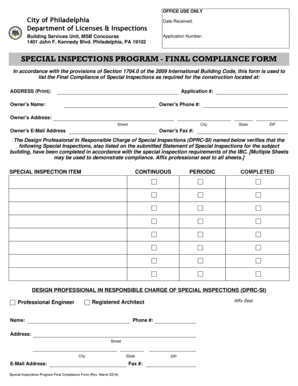
Get Special Inspections Final Compliance Form
How it works
-

Open form follow the instructions
-

Easily sign the form with your finger
-

Send filled & signed form or save
How to fill out the Special Inspections Final Compliance Form online
Completing the Special Inspections Final Compliance Form online is an essential step for compliance with building regulations. This guide provides clear, step-by-step instructions to help users navigate the form accurately and efficiently.
Follow the steps to complete the form online with ease.
- Click the ‘Get Form’ button to obtain the Special Inspections Final Compliance Form and open it for editing.
- Begin by entering the date received and the application number. This information is critical for tracking and processing your submission.
- Provide the address of the construction site in the designated field. Ensure that you print this information clearly.
- Fill in the owner's name, phone number, address, email address, and fax number. This section ensures that the appropriate contacts are on record.
- Identify the Design Professional in Responsible Charge of Special Inspections (DPRC-SI). Include their name, phone number, address, email, and ensure that they affix their professional seal to the form.
- List the special inspection items corresponding to the work performed. Indicate whether these inspections were continuous or periodic and tick the 'completed' box for items that have been satisfactorily completed.
- Review the entire form for accuracy and completeness. Ensure all required sections are filled correctly.
- Once satisfied with the information provided, save any changes made to the document. You may also download, print, or share the form as needed.
Complete your documents online today for a smoother compliance process.
Related links form
A special inspection is performed after a flight through severe turbulence. Emphasis is placed upon inspecting the upper and lower wing surfaces for excessive buckles or wrinkles with permanent set.