Loading
Form preview
  • US Legal Forms
  • Form Library
  • Other Forms
  • Pennsylvania Other Forms
  • Pa Psrs-27 2012

Get Pa Psrs-27 2012-2026

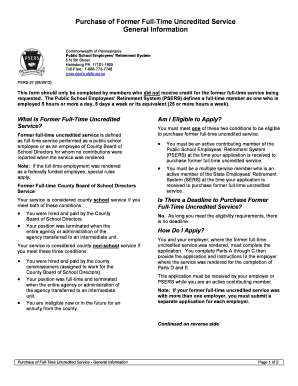
48 www.psers.state.pa.us PSRS-27 (08/2012) This form should only be completed by members who did not receive credit for the former full-time service being requested. The Public School Employees’ Retirement System (PSERS) defines a full-time member as one who is employed 5 hours or more a day, 5 days a week or its equivalent (25 or more hours a week). What Is Former Full-Time Uncredited Service? Former full-time uncredited service is defined as full-time service performed as a public school e.

How it works

  1. Open form

    Open form follow the instructions

  2. Easily sign form

    Easily sign the form with your finger

  3. Share form

    Send filled & signed form or save

How to fill out the PA PSRS-27 online

The PA PSRS-27 form is necessary for members of the Public School Employees’ Retirement System seeking to purchase former full-time uncredited service. This guide provides step-by-step instructions to help users complete the form accurately and effectively.

Follow the steps to ensure your PA PSRS-27 form is completed correctly.

  1. Click ‘Get Form’ button to obtain the form and open it in the editor.
  2. Write your Social Security number and daytime phone number in the designated boxes at the top of your form to assist PSERS in identifying your account.
  3. Select the type of former full-time uncredited service you wish to purchase by checking the appropriate box.
  4. If you previously worked for more than one employer, complete a separate application for each employer.
  5. In Part A, verify or enter your name, mailing address, date of birth, gender, and evening phone number. If any information is pre-filled and incorrect, contact your employer for corrections.
  6. In Part B, provide the name of your current employer and your current employment status.
  7. In Part C, sign and date your application to certify that you have not received retirement credit for this service in another system and that you're requesting the cost to purchase it.
  8. Provide the application to your employer for their completion of Parts D and E.
  9. Ensure the employer fills out information regarding your former service in Part D, including school years and salary details.
  10. The employer must complete Part E, certifying the accuracy of the information provided.
  11. Submit the completed form to PSERS to ensure it is received while you are an active member.
  12. After submission, await your Statement of Amount Due or a notification regarding the status of your application.

Complete your PA PSRS-27 form online to ensure you can purchase your former uncredited service.

Get form

Experience a faster way to fill out and sign forms on the web. Access the most extensive library of templates available.
Get form

Related content

Purchasing Service Credit | Public School...
Application to Purchase Credit for Full-Time Service (PSRS-27)(opens in a new tab). Former...
Learn more
Diagnostic Error: A Patient Safety Imperative
Estimated that between 44,000 and. 98,000 patients die in hospitals each year as a result...
Learn more
PSR-S970/S770 Owner's Manual - Yamaha
Thank you for purchasing this Yamaha Digital Workstation! We recommend that you read this...
Learn more

Related links form

Client Feedback Form Building Permit Application - Town Of Grand Chute Abrasive Blasting Permit Application - Allegheny County Health ... - Achd Sarasota Tree Permit Form

Questions & Answers

Get answers to your most pressing questions about US Legal Forms API.

Contact support

To report a nursing home in Pennsylvania, you can contact the Department of Health or use the online reporting system provided by the state. It is important to detail your concerns clearly, as this allows for prompt investigation. Understanding the nuances of PA PSRS-27 can also be beneficial when addressing issues tied to nursing home care.

Engaging with a patient safety organization offers various benefits, such as access to a network of healthcare providers and shared learning experiences. It fosters a culture of safety while allowing organizations to implement best practices. By integrating PA PSRS-27 into their operations, healthcare facilities can enhance patient care and minimize risks effectively.

The Patient Safety and Quality Improvement Act (PSQIA) aims to improve healthcare quality by encouraging the reporting of patient safety events. It provides legal protections for data shared with patient safety organizations. Knowing how PA PSRS-27 aligns with PSQIA can help healthcare professionals navigate safety reporting with confidence.

A patient safety program aims to establish systematic approaches to prevent harm to patients during their care. This includes identifying risks and implementing strategies to mitigate them. Programs like PA PSRS-27 enhance these efforts by providing a structured way to report and analyze safety incidents.

The primary purpose of a patient safety organization (PSO) is to gather and analyze data concerning patient safety events. This organization aims to create a safe environment by promoting best practices and reducing preventable harm. With the framework provided by PA PSRS-27, PSOs can empower healthcare facilities to learn from adverse events and improve care delivery.

The PA retired employees health program provides healthcare benefits to teachers and other public employees who have retired from service. This program helps retirees manage their medical expenses, ensuring they have access to necessary healthcare services in their retirement years. Utilizing resources related to the PA PSRS-27 can further assist retirees in navigating their health program effectively.

The PA teacher pension multiplier is a factor used to calculate retirement benefits for educators within the Pennsylvania Public School Retirement System. This multiplier is applied to the educator's total years of service and final average salary to determine pension payouts. Understanding the pension multiplier enables educators to optimize their benefits when planning for retirement through the PA PSRS-27.

The Safe Staffing Act in Pennsylvania is legislation aimed at ensuring that healthcare facilities maintain adequate staffing levels to provide safe and effective patient care. This act establishes specific staffing ratios to promote quality healthcare and accountability in medical facilities. Understanding the implications of the Safe Staffing Act is crucial for healthcare professionals who want to align with the standards set forth by PA PSRS-27.

PA PSRS stands for Pennsylvania Patient Safety Reporting System. It serves as a confidential system for healthcare providers to report and examine safety incidents. This initiative aims to reduce medical errors and improve patient outcomes statewide. Engaging with the PA PSRS-27 further emphasizes the importance of this reporting system in enhancing healthcare quality.

To file a complaint against a nursing home in Pennsylvania, you should gather relevant information about the facility and the issue. Then, contact the PA Department of Health to initiate the process. You can also use resources available on the US Legal Forms platform to streamline your filing. Keeping the PA PSRS-27 in mind can help you understand the necessary steps involved.

Get This Form Now!

Use professional pre-built templates to fill in and sign documents online faster. Get access to thousands of forms.
Get form
If you believe that this page should be taken down, please follow our DMCA take down processhere.

Industry-leading security and compliance

US Legal Forms protects your data by complying with industry-specific security standards.
  • In businnes since 1997
    25+ years providing professional legal documents.
  • Accredited business
    Guarantees that a business meets BBB accreditation standards in the US and Canada.
  • Secured by Braintree
    Validated Level 1 PCI DSS compliant payment gateway that accepts most major credit and debit card brands from across the globe.
Get PA PSRS-27
Get form
  • Adoption
  • Bankruptcy
  • Contractors
  • Divorce
  • Home Sales
  • Employment
  • Identity Theft
  • Incorporation
  • Landlord Tenant
  • Living Trust
  • Name Change
  • Personal Planning
  • Small Business
  • Wills & Estates
  • Packages A-Z
  • Affidavits
  • Bankruptcy
  • Bill of Sale
  • Corporate - LLC
  • Divorce
  • Employment
  • Identity Theft
  • Internet Technology
  • Landlord Tenant
  • Living Wills
  • Name Change
  • Power of Attorney
  • Real Estate
  • Small Estates
  • Wills
  • All Forms
  • Forms A-Z
  • Form Library
  • Legal Hub
  • About Us
  • Help Portal
  • Legal Resources
  • Blog
  • Affiliates
  • Contact Us
  • Delete My Account
  • Site Map
  • Industries
  • Forms in Spanish
  • Localized Forms
  • State-specific Forms
  • Forms Kit
  • Real Estate Handbook
  • All Guides
  • Notarize
  • Incorporation services
  • For Consumers
  • For Small Business
  • For Attorneys
  • USLegal
  • FormsPass
  • pdfFiller
  • signNow
  • altaFlow
  • DocHub
  • Instapage
Form Packages
  • Adoption
  • Bankruptcy
  • Contractors
  • Divorce
  • Home Sales
  • Employment
  • Identity Theft
  • Incorporation
  • Landlord Tenant
  • Living Trust
  • Name Change
  • Personal Planning
  • Small Business
  • Wills & Estates
  • Packages A-Z
Form Categories
  • Affidavits
  • Bankruptcy
  • Bill of Sale
  • Corporate - LLC
  • Divorce
  • Employment
  • Identity Theft
  • Internet Technology
  • Landlord Tenant
  • Living Wills
  • Name Change
  • Power of Attorney
  • Real Estate
  • Small Estates
  • Wills
  • All Forms
  • Forms A-Z
  • Form Library
Customer Service
  • Legal Hub
  • About Us
  • Help Portal
  • Legal Resources
  • Blog
  • Affiliates
  • Contact Us
  • Delete My Account
  • Site Map
  • Industries
  • Forms in Spanish
  • Localized Forms
  • State-specific Forms
  • Forms Kit
Legal Guides
  • Real Estate Handbook
  • All Guides
Prepared for you
  • Notarize
  • Incorporation services
Our Customers
  • For Consumers
  • For Small Business
  • For Attorneys
Our Sites
  • USLegal
  • FormsPass
  • pdfFiller
  • signNow
  • altaFlow
  • DocHub
  • Instapage
Social Media
Call us now toll free:
+1 833 426 79 33
As seen in:
© Copyright 1999-2026 airSlate Legal Forms, Inc. 3720 Flowood Dr, Flowood, Mississippi 39232
  • Your Privacy Choices
  • Terms of Service
  • Privacy Notice
  • Content Takedown Policy
  • Bug Bounty Program