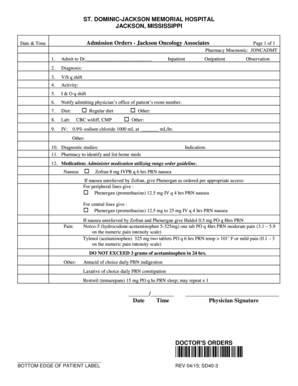
ST. DOMINICJACKSON MEMORIAL HOSPITAL JACKSON, MISSISSIPPI Admission Orders Jackson Oncology Associates Page 1 of 1 Pharmacy Mnemonic: JONCADMT Date & Time 1. Admit to Dr. 2. Diagnosis: 3. V/S.

How it works
  • Open form

    Open form follow the instructions

  • Easily sign form

    Easily sign the form with your finger

  • Share form

    Send filled & signed form or save

How to fill out the Admission Orders - Jackson Oncology Associates online

Completing the Admission Orders - Jackson Oncology Associates form is a crucial step in ensuring effective patient care. This guide provides clear, step-by-step instructions to help users fill out the form accurately and efficiently.

Follow the steps to complete the Admission Orders form successfully.

  1. Press ‘Get Form’ button to access the Admission Orders form and open it in the editor.
  2. Fill in the 'Date & Time' field with the appropriate date and time of admission.
  3. In the 'Admit to Dr.' section, enter the name of the admitting physician.
  4. Specify the 'Diagnosis' for the patient in the designated field.
  5. Indicate vital signs frequency by entering 'V/S q shift' to monitor the patient's condition.
  6. Select the 'Activity' level for the patient (e.g., Inpatient, Outpatient, or Observation).
  7. Complete the 'I & O q shift' section to ensure appropriate intake and output monitoring.
  8. Notify the admitting physician’s office of the patient's room number as indicated.
  9. Fill in the 'Diet' section with the appropriate dietary plan, such as regular diet or other specifications.
  10. In the 'Lab' section, specify any necessary laboratory tests, for example, CBC w/diff and CMP.
  11. For the 'IV' section, indicate the IV fluid to be administered, such as 0.9% sodium chloride, and the rate (mL/hr).
  12. Outline any required 'Diagnostic studies' in the respective section.
  13. Document any home medications to be identified and listed by the pharmacy along with their indications.
  14. In the 'Medication' section, list medications and their administration details as per range orders for nausea and pain management.
  15. Finally, ensure to include the physician signature, date, and time to finalize the Admission Orders.
  16. After completing the form, save the changes, download, print, or share as needed.

Complete your Admission Orders online today to ensure efficient patient care.

Get form

Experience a faster way to fill out and sign forms on the web. Access the most extensive library of templates available.

Related content

Civil Monetary Penalties and Affirmative...

Associate Counsel Jonathan Culpepper represented OIG. ... OIG's investigation revealed...

Learn more
Cancer programs add cardio-oncology services...

Nov 11, 2019 — Some therapies and new drugs may put cancer patients at greater risk of...

Learn more
Leading Lawyers - International Financial Law...

Aug 29, 2014 — +852 2842 6970. Associate publisher: Roberto Miranda ... and proprietary...

Learn more
Questions & Answers

Get answers to your most pressing questions about US Legal Forms API.

Contact support

How do I remove a signature block from a PDF?

Open the Tools Panel. Expand the Forms section on the Tools Panel. Click the Edit button. Right mouse click on the signature field and then select Delete from the pop-up menu. Click the Close Form Editing button on the toolbar. Click the Save File toolbar button.

How to unlock a PDF to remove password security: Open the PDF in Acrobat. Use the “Unlock” tool: Choose “Tools” > “Protect” > “Encrypt” > “Remove Security.” Remove Security: The options vary depending on the type of password security attached to the document.

In the top righthand corner click on your account, then click preferences. Click on my signature and clear any saved signatures.

Remove digital signatures from Word or Excel Open the document or worksheet that contains the visible signature you want to remove. Right-click the signature line. Click Remove Signature. Click Yes.

To remove your signature, right-click the signature and then choose Clear Signature. If you got a signed PDF, you can request the signer to remove the signature and share the PDF or send an unsigned copy of the PDF.

For security reasons, you're only allowed to remove your own signature. If someone else has already signed the PDF, the only way to remove their signature is to ask the signer to edit the document. If you're having trouble removing your own signature, try updating your Digital ID in your PDF editor.

How it works Download a new copy of the PDF (with the new sealer password applied) Open the PDF. Click the 'Lock' icon in the upper-left corner of the page. Click the link labeled: Permission Details. In the "Security Method' drop down, select: No Security. Enter your unlock password and click the OK button three times.

Delete a signature from a document. Navigate to your signature. Right-click. Select Clear Signature.

Get This Form Now!

Use professional pre-built templates to fill in and sign documents online faster. Get access to thousands of forms.

If you believe that this page should be taken down, please follow our DMCA take down process here.

Get Admission Orders - Jackson Oncology Associates