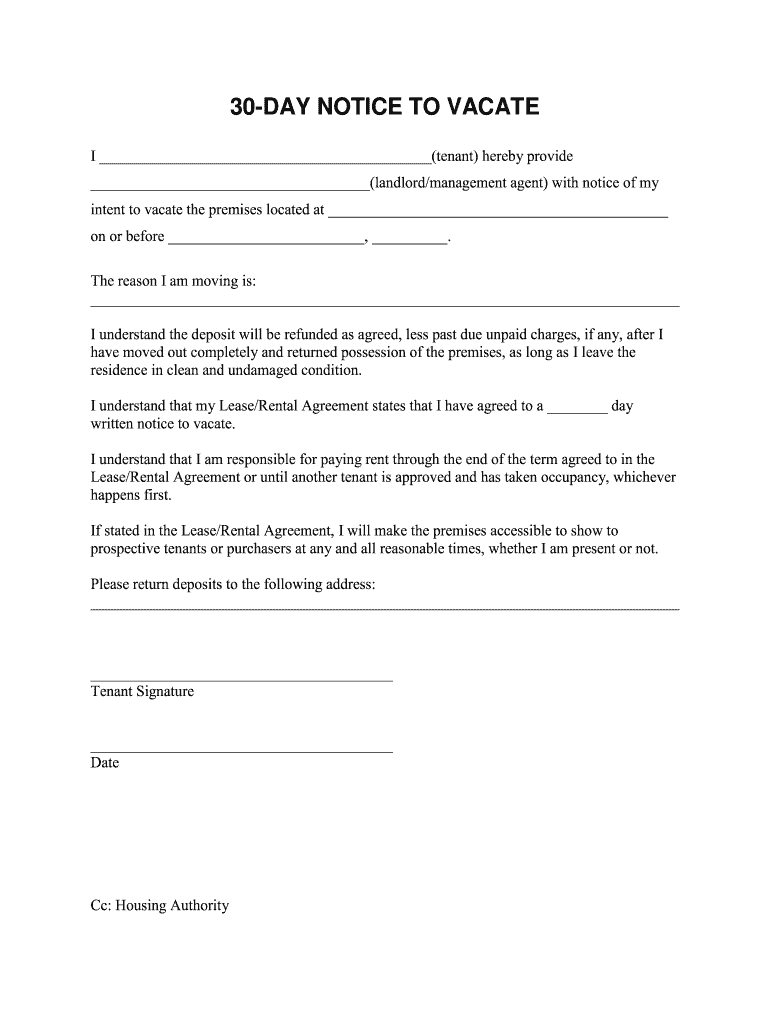
premises located at _____________________________________________ on or before __________________________, __________. The reason I am moving is: ______________________________________________________________________________ I understand the deposit will be refunded as agreed, less past due unpaid charges, if any, after I have moved out completely and returned possession of the premises, as long as I leave the residence in clean and undamaged condition. I understand that my Lease/Rental Agreeme.
Loading

Open form follow the instructions

Easily sign the form with your finger

Send filled & signed form or save
How to fill out the MCS 30-Day Notice to Vacate online
Filling out the MCS 30-Day Notice to Vacate form online can be a streamlined process when you know what to do. This guide provides you with clear steps to ensure your notice is filled out correctly and submitted efficiently.
Follow the steps to complete the MCS 30-Day Notice to Vacate.
- Press the ‘Get Form’ button to access the MCS 30-Day Notice to Vacate form and open it in your preferred editor.
- Begin by filling in your full name as the tenant in the first blank section, ensuring accuracy for identification purposes.
- In the next blank, input the name of your landlord or management agent to whom the notice is directed.
- Provide the complete address of the premises you intend to vacate in the designated area.
- Fill in the expected date by which you will vacate the premises, making sure to choose a date at least 30 days from the date you submit the notice.
- Clearly state your reason for moving in the designated area, providing as much detail as you're comfortable sharing.
- Acknowledge the terms regarding the lease deposit in the provided statement, ensuring you understand that the deposit will be returned as agreed upon.
- Indicate your understanding of your leasing obligations concerning rent payment as mentioned in the lease/rental agreement.
- If required, note your commitment to make the premises accessible for showing to prospective tenants as necessary.
- Include your preferred address for refunding the deposit in the specified area.
- Conclude the form by signing it as the tenant and noting the date of signing to validate your notice.
- Finally, ensure you save the completed form, download it for your records, print it, or share it with the necessary parties as required.
Take the next step towards a smooth transition by completing the MCS 30-Day Notice to Vacate online today.
Experience a faster way to fill out and sign forms on the web. Access the most extensive library of templates available.
Related content
May 20, 2023 — Complete and submit either an updated MCS-150 or MCS-150B form (for...
... move out inspection. 30 days notice in writing must be given to the Facilities...
• The self-signed certificate is expired (within 30 day window). The self-signed...
Get answers to your most pressing questions about US Legal Forms API.
What happens if you don't give 30 days notice before moving out?
Failing to give a 30-day notice can result in financial repercussions, including losing your deposit or facing additional charges. A proper MCS 30-Day Notice to Vacate ensures you comply with your lease agreement and can help avoid these complications. Always consider your options and consequences before making a decision.
Is 30 days notice enough to move out?
In most cases, a 30-day notice is sufficient to move out. This time frame aligns with the MCS 30-Day Notice to Vacate standard, allowing tenants and landlords to manage responsibilities effectively. Always make sure to confirm any lease-specific conditions that might extend this time.
How do I fill out a 30 day eviction notice?
Filling out a 30-day eviction notice is straightforward. You need to include your name, the tenant's name, the address of the property, and the date you wish them to vacate. Utilizing a template, like those offered by US Legal Forms, can simplify this process significantly.
How much notice should you give someone before moving out?
Most agreements require a 30-day notice before moving out. The MCS 30-Day Notice to Vacate serves this purpose and ensures that your landlord has adequate time to prepare for your departure. Always check your lease for any specific requirements.
Does a 30 day notice need to be notarized?
Typically, a MCS 30-Day Notice to Vacate does not need notarization. It simply requires your written communication to be clear and direct. However, verifying requirements specific to your state or lease agreement is always wise.
Does a 30 day notice to vacate go on your record?
Generally, an MCS 30-Day Notice to Vacate does not appear on your rental history. However, if you do not meet your lease obligations, this might lead to a negative mark. Always try to provide proper notice to maintain a positive relationship with your landlord.
How do I write a notice to vacate?
Writing a notice to vacate involves a straightforward format. Begin by addressing your landlord, then state your intent to leave the property. It is advisable to include the date of notice and the anticipated move-out date, making it clear that you are providing an MCS 30-Day Notice to Vacate.
How to give a professional 30 day notice?
To give a professional MCS 30-Day Notice to Vacate, start by clearly stating your intention to vacate the property. Include the current date, your address, and the date you plan to move out. Make sure to communicate this notice directly to your landlord or property manager in writing, ensuring they receive a copy.
What's the soonest you can evict a tenant?
The soonest you can evict a tenant usually depends on the reason for eviction and local laws. In Vermont, after delivering an MCS 30-Day Notice to Vacate, landlords must wait for the notice period to end before filing for eviction in court. It’s essential to follow these legal steps to protect your rights as a landlord. Understanding these procedures can help ensure a fair process.
What are the rules for eviction in Vermont?
In Vermont, eviction rules require a valid reason, such as non-payment of rent or lease violations. The landlord must provide an MCS 30-Day Notice to Vacate before starting the eviction process. Additionally, landlords must follow specific timelines and document requirements when filing in court. Staying informed about these rules helps both parties uphold their rights.
Use professional pre-built templates to fill in and sign documents online faster. Get access to thousands of forms.
If you believe that this page should be taken down, please follow our DMCA take down process here.