Loading
Form preview
  • US Legal Forms
  • Form Library
  • More Forms
  • More Uncategorized Forms
  • Final Bill And Refund Request - Official Website - Tamarac

Get Final Bill And Refund Request - Official Website - Tamarac

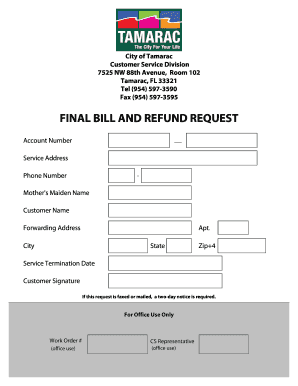
City of Tamarac Customer Service Division 7525 NW 88th Avenue, Room 102 Tamarac, FL 33321 Tel (954) 5973590 Fax (954) 5973595 FINAL BILL AND REFUND REQUEST Account Number Service Address Phone Number.

How it works

  1. Open form

    Open form follow the instructions

  2. Easily sign form

    Easily sign the form with your finger

  3. Share form

    Send filled & signed form or save

How to fill out the FINAL BILL AND REFUND REQUEST - Official Website - Tamarac online

Filling out the Final Bill and Refund Request form is a straightforward process that allows users to request their final bill or a refund efficiently. This guide provides clear, step-by-step instructions to assist you in completing the form online.

Follow the steps to complete your request seamlessly.

  1. Click ‘Get Form’ button to access the form and open it in the editor.
  2. Fill in the 'Account Number' field with the unique identifier associated with your account. This ensures the request is linked to the correct account.
  3. Enter your 'Service Address' where the service was provided, including street number and name.
  4. Provide your 'Phone Number', ensuring to include the area code separated by a hyphen.
  5. Input your 'Mother's Maiden Name' as a security measure, if required, for identification purposes.
  6. Enter the 'Customer Name' as it appears on your account to verify your identity.
  7. If you have moved, list your 'Forwarding Address' to ensure future communications reach you. Include apartment number, city, state, and ZIP+4 code.
  8. Specify the 'Service Termination Date', indicating the date on which you wish your service to end.
  9. Sign the form in the 'Customer Signature' section to confirm the accuracy of the information provided.
  10. If you choose to fax or mail this request, remember that a two-day notice is required for processing.
  11. After completing the form, you may save changes, download, print, or share it as needed.

Complete your FINAL BILL AND REFUND REQUEST online to ensure a swift processing of your request.

Get form

Experience a faster way to fill out and sign forms on the web. Access the most extensive library of templates available.
Get form

Related content

Utility Billing & Services | Oakland Park, FL...
If the deposit covers the final bill, a refund will be mailed. Water Quality Report. Our...
Learn more
Refund of Charges, Tuition, and Fees at NSU
Learn about how to obtain refunds of charges, tuition, and fees at NSU. ... Students...
Learn more
09495090.tif 753 067 206262204 201206 990PF
N/A If "Yes ," has It filed a tax return on Form 990-T for this year? ... TRUST (a) Corpus...
Learn more

Related links form

HHS-520 2006 HHS-687 2012 HHS-697 2014 HHS-700 2008

Questions & Answers

Get answers to your most pressing questions about US Legal Forms API.

Contact support

Subject lines using the recipient's name Hi, [name], I'd like to introduce myself. ... Hello, [name], I'm [your name] I'd love to connect with you, [name]! ... This is [your name] from [event] ... It was nice meeting you at [event] ... Thanks for chatting with me at [event] ... A quick follow-up after [event]

“Thinking of you and hoping to reconnect” – This subject line works because it's friendly and personal, and it conveys a sense of genuine interest in reconnecting with the recipient.

Additional subject lines for reconnection networking emails Checking in since we last spoke. [Your name] from [your company], seeking meeting. Let's catch up! Can I buy you a coffee? Hello again! Happy [season]!

Here are a few examples of follow-up email subject lines that work: “Quick follow-up on our meeting” “Just wanted to touch base on [topic]” “Checking in on your progress” “Friendly reminder: [Action needed]” “Don't miss out: Last chance to [offer]”

How to write email subject lines that get opened Know your audience. ... Set clear expectations. ... Don't mislead the reader. ... Keep it short and snappy. ... Stand out in the inbox. ... Emojis have their place. ... Show some personality. ... Urgency and scarcity work wonders.

Ways to personalize your subject line are by including the recipient's name, their job title, mutual interests, events you've both attended, topics the recipient is interested in, where you met the recipient if relevant or a networking event the recipient attended or will be attending.

You can add field merges to the subject line of the email. to open the Settings panel. Select Insert > Field Merge.

Subject lines that use words like “urgent,” “breaking,” “important,” or “alert” have higher open rates. By communicating a known start and end date for a special sale or promotion, viewers scrolling through their inbox will click to see what they can get in that window of time.

Get This Form Now!

Use professional pre-built templates to fill in and sign documents online faster. Get access to thousands of forms.
Get form
If you believe that this page should be taken down, please follow our DMCA take down processhere.
Get FINAL BILL AND REFUND REQUEST - Official Website - Tamarac
Get form
  • Adoption
  • Bankruptcy
  • Contractors
  • Divorce
  • Home Sales
  • Employment
  • Identity Theft
  • Incorporation
  • Landlord Tenant
  • Living Trust
  • Name Change
  • Personal Planning
  • Small Business
  • Wills & Estates
  • Packages A-Z
  • Affidavits
  • Bankruptcy
  • Bill of Sale
  • Corporate - LLC
  • Divorce
  • Employment
  • Identity Theft
  • Internet Technology
  • Landlord Tenant
  • Living Wills
  • Name Change
  • Power of Attorney
  • Real Estate
  • Small Estates
  • Wills
  • All Forms
  • Forms A-Z
  • Form Library
  • Legal Hub
  • About Us
  • Help Portal
  • Legal Resources
  • Blog
  • Affiliates
  • Contact Us
  • Delete My Account
  • Site Map
  • Industries
  • Forms in Spanish
  • Localized Forms
  • State-specific Forms
  • Forms Kit
  • Real Estate Handbook
  • All Guides
  • Notarize
  • Incorporation services
  • For Consumers
  • For Small Business
  • For Attorneys
  • USLegal
  • FormsPass
  • pdfFiller
  • signNow
  • altaFlow
  • DocHub
  • Instapage
Form Packages
  • Adoption
  • Bankruptcy
  • Contractors
  • Divorce
  • Home Sales
  • Employment
  • Identity Theft
  • Incorporation
  • Landlord Tenant
  • Living Trust
  • Name Change
  • Personal Planning
  • Small Business
  • Wills & Estates
  • Packages A-Z
Form Categories
  • Affidavits
  • Bankruptcy
  • Bill of Sale
  • Corporate - LLC
  • Divorce
  • Employment
  • Identity Theft
  • Internet Technology
  • Landlord Tenant
  • Living Wills
  • Name Change
  • Power of Attorney
  • Real Estate
  • Small Estates
  • Wills
  • All Forms
  • Forms A-Z
  • Form Library
Customer Service
  • Legal Hub
  • About Us
  • Help Portal
  • Legal Resources
  • Blog
  • Affiliates
  • Contact Us
  • Delete My Account
  • Site Map
  • Industries
  • Forms in Spanish
  • Localized Forms
  • State-specific Forms
  • Forms Kit
Legal Guides
  • Real Estate Handbook
  • All Guides
Prepared for you
  • Notarize
  • Incorporation services
Our Customers
  • For Consumers
  • For Small Business
  • For Attorneys
Our Sites
  • USLegal
  • FormsPass
  • pdfFiller
  • signNow
  • altaFlow
  • DocHub
  • Instapage
Social Media
Call us now toll free:
+1 833 426 79 33
As seen in:
© Copyright 1999-2026 airSlate Legal Forms, Inc. 3720 Flowood Dr, Flowood, Mississippi 39232
  • Your Privacy Choices
  • Terms of Service
  • Privacy Notice
  • Content Takedown Policy
  • Bug Bounty Program