E 2 of 7 Year Month Day Read Instructions 6 Period of Validity (see Instructions, section C) 5-year or Choose one (1) of the following periods of validity: 7 10-year Additional Personal Information Note: If insufficient space, attach a separate signed and dated sheet. A Addresses in the last two (2) years Same as current home address Different from current home address (complete below) From Year Month Year Month To Year Month Year Month 1. From 2. B Occupation in the last .

Open form follow the instructions

Easily sign the form with your finger

Send filled & signed form or save
How to fill out the Canada PPTC 153 online
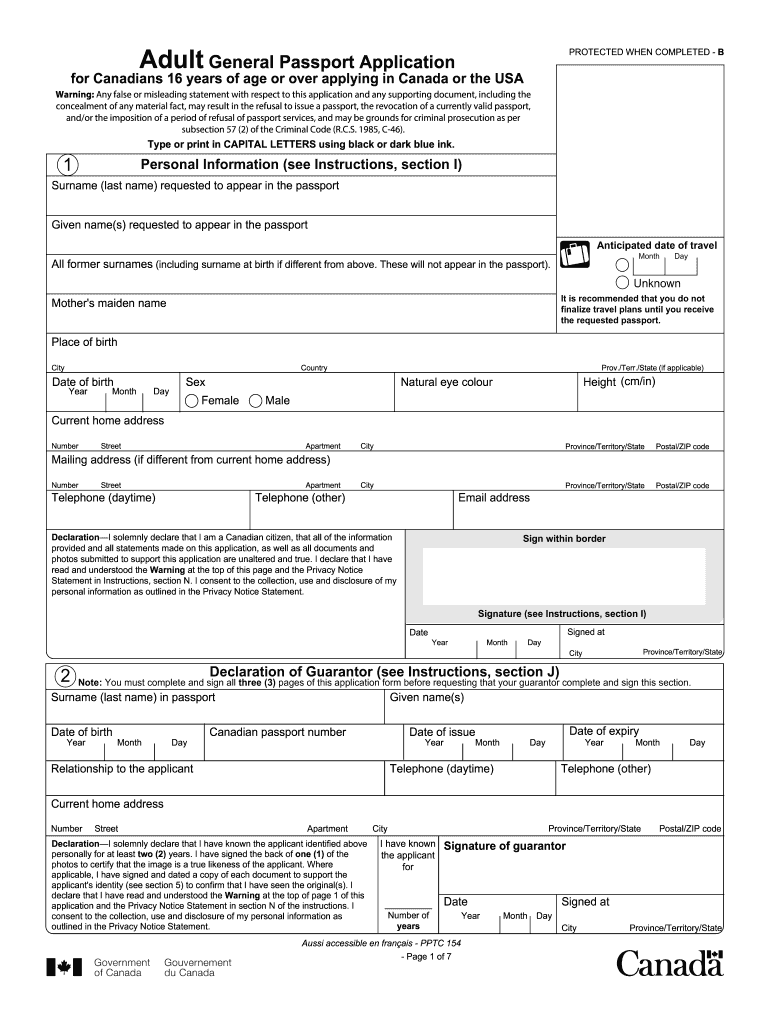
This guide is designed to assist users in completing the Canada PPTC 153 form online for the adult general passport application. By following these instructions, you will ensure that your application is filled out correctly and submitted efficiently.
Follow the steps to complete your application effortlessly.
- Click ‘Get Form’ button to obtain the form and open it in the editor.
- Fill in your personal information in the relevant sections. This includes your surname, given names, anticipated date of travel, all former surnames, and mother's maiden name, as well as place of birth, date of birth, height, eye color, and sex. Ensure all information is accurate and in capital letters, using black or dark blue ink.
- Provide your current home address and, if different, a mailing address. Include your contact numbers and email address so that you can be reached if there are questions regarding your application.
- Carefully read and sign the declaration, confirming that all information provided is truthful and complete. Make sure to include the date and your usual signature in the designated area.
- For the declaration of the guarantor, ensure that you have completed all required fields. Your guarantor must confirm their identity and relationship, sign the declaration, and certify one of your passport photos.
- If applicable, declare any previous Canadian travel documents and indicate if you would like a previous passport returned to you.
- Submit proof of Canadian citizenship and ensure that all supporting identity documents are included, either original copies or certified duplicates as instructed.
- Select the period of validity for your passport—either a 5-year or 10-year option. Ensure that the fee associated with the application is calculated correctly based on your choice and payment method.
- Provide information on addresses and occupations over the last two years, references, and optional emergency contact information. Ensure all details are accurate and clearly presented.
- Review the completed form thoroughly for any errors or missing information. Once satisfied, save your changes, and proceed to download or print the application as needed for submission.
Begin filling out your Canada PPTC 153 application online now to ensure timely processing of your passport.
Experience a faster way to fill out and sign forms on the web. Access the most extensive library of templates available.
Related content
by J Liu · 2025 · Cited by 1 — It is crucial to recognize that off-target toxicity...
This document outlines necessary information such as personal details, identity...
Notice: The Industry Canada label identifies certified equipment. This certification means...
Get answers to your most pressing questions about US Legal Forms API.
What is PPTC 132 statutory declaration in lieu of guarantor for Canadians?
The PPTC 132 is another form that permits Canadians to use a statutory declaration in place of a standard guarantor for travel document applications. This form is especially useful for people who cannot secure a traditional guarantor but still need to prove their identity and intention. By using the PPTC 132 when applying for the Canada PPTC 153, you can effectively navigate the documentation process without unnecessary obstacles.
Who can be a guarantor for a Canadian travel document?
A guarantor for a Canadian travel document must meet specific criteria, including being a Canadian citizen over the age of 18. They should also have known the applicant for at least two years and must be someone who is not a family member. If you find yourself needing documentation like the Canada PPTC 153, ensure that your chosen guarantor fits these requirements to avoid delays.
What is PPTC 326 Statutory Declaration in lieu of guarantor for a Canadian travel document?
The PPTC 326 is a specific form that allows applicants to provide a statutory declaration in place of a guarantor when applying for a Canadian travel document. This form is helpful for individuals who may lack a traditional guarantor due to various reasons. If you are pursuing the Canada PPTC 153 and don't have a guarantor, the PPTC 326 can be a valuable alternative to proceed with your application.
What is a declaration of guarantor?
A declaration of guarantor is a formal statement that verifies a person's identity and their willingness to act as a guarantor for a passport or travel document. This document plays a crucial role in the application processes for travel documentation. For those applying for the Canada PPTC 153, having a reliable guarantor can streamline your application and ensure your travel plans are secure.
Can I go to Canada with i551 stamp?
The i551 stamp indicates that you are a lawful permanent resident of the United States. If you hold this stamp, you may travel to Canada, but it’s essential to verify your eligibility with Canadian authorities before you go. Keep in mind that the Canada PPTC 153 may be required if you plan to apply for or renew a Canadian travel document while you’re there.
What is Statutory Declaration form Canada?
The Statutory Declaration form in Canada is a written statement declared to be true in the presence of an authorized official. This can be vital for a variety of legal processes, addressing issues from identity verification to declarations of fact. When dealing with travel documents like the Canada PPTC 153, you may encounter this form to affirm certain facts about your eligibility or situation.
How to get Canadian citizenship by descent?
To obtain Canadian citizenship by descent, you need to apply through the Citizenship and Immigration Canada. You must provide proof that at least one of your parents is a Canadian citizen. This includes documents such as your birth certificate and your parent's citizenship certificate. The Canada PPTC 153 can also be relevant, especially if you require a travel document during this process.
How many EOI can I submit in Canada?
You can submit one EOI profile to Canada at a time. If circumstances change or you gain new qualifications, you may update your existing EOI instead of creating a new one. It's essential to keep your profile current to reflect your best qualifications and experience. Submitting multiple EI profiles could lead to issues or confusion, hence keep it simple and streamlined.
How to fill EOI for Canada?
To fill an EOI for Canada, begin by gathering your personal and professional information. You can use the online system to guide you through the process, ensuring you complete all required fields accurately. Focus on providing clear and concise details about your skills and qualifications to enhance your chances. Platforms like USLegalForms can assist you in understanding each step and maintaining compliance with requirements.
How to fill a passport application form?
Filling out a passport application form involves providing personal information, including your name, date of birth, and current address. You will need to include details about your citizenship, such as your previous passport information, if applicable. It's best to follow the guidelines closely, carefully reviewing each section for accuracy. The Canada PPTC 153 form can be obtained online and ensures you have the necessary documentation for travel.
Use professional pre-built templates to fill in and sign documents online faster. Get access to thousands of forms.
If you believe that this page should be taken down, please follow our DMCA take down process here.
This form is available in several versions. Select the version you need from the drop-down list below.