Loading
Get Ca Imm-75lk 2008-2026
How it works
-

Open form follow the instructions
-

Easily sign the form with your finger
-

Send filled & signed form or save
How to fill out the CA IMM-75LK online
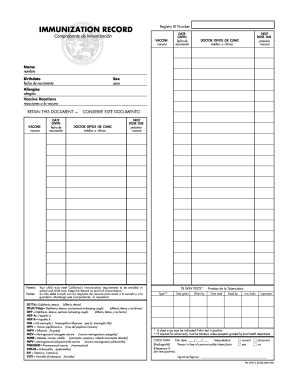
The CA IMM-75LK is an essential immunization record that ensures compliance with California's vaccination requirements for school and child care enrollment. This guide will clearly outline how to fill out the form online step by step, making the process accessible for all users.
Follow the steps to successfully complete the CA IMM-75LK online.
- Click 'Get Form' button to access the form and open it in an online editor.
- Enter the registry ID number at the top of the form to identify the immunization record.
- For each vaccine, fill in the 'Vaccine' section with the name of the vaccine received, followed by the date it was given in the 'Date Given' field.
- Indicate the next dose due for the vaccine in the 'Next Dose Due' section to keep track of upcoming vaccinations.
- Complete the 'Doctor Office or Clinic' section by providing the name of the healthcare provider administering the vaccinations.
- Fill in the personal information including the user's name, birthdate, and sex in the appropriate fields.
- Document any allergies and vaccine reactions in the designated fields to ensure safety and health.
- If required, complete the 'TB Skin Tests' section, including the date given and results to track potential tuberculosis exposure.
- Finally, review all entries for accuracy and completeness. Save any changes made, and download, print, or share the form as necessary.
Complete your immunization records online to ensure you meet all required health standards.
To obtain a religious exemption for vaccines in California, you must fill out a specific form provided by your local school district or health department. Make sure to state your beliefs clearly, as this is a legal requirement. Resources such as CA IMM-75LK can guide you through the necessary paperwork and help you understand your rights.