Loading
Get Ebiz Meezan
How it works
-

Open form follow the instructions
-

Easily sign the form with your finger
-

Send filled & signed form or save
How to fill out the Ebiz Meezan online
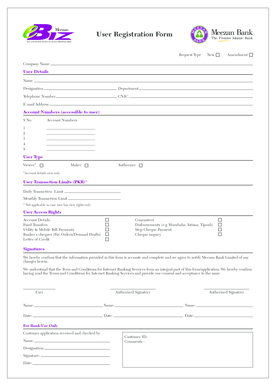
The Ebiz Meezan form is an essential tool for managing eBanking needs within Meezan Bank. This guide provides a clear and comprehensive approach to completing the form online, ensuring that users can navigate each section with confidence.
Follow the steps to successfully complete the Ebiz Meezan form online.
- Press the ‘Get Form’ button to access the Ebiz Meezan form and open it in your preferred editor.
- Begin with the 'Request Type' section; select whether you are submitting a 'New' request or an 'Amendment'.
- Next, provide the 'Company Name' in the designated field.
- In the 'User Details' section, fill out the following fields: 'Name', 'Designation', 'Department', 'Telephone Number', 'CNIC', and 'E-mail Address'.
- In the 'Account Numbers' section, list the account numbers that the user will have access to, entering them sequentially from S No. 1 to S No. 5.
- Choose the 'User Type' from the available options: 'Viewer', 'Maker', or 'Authorizer'. Remember, if you select 'Viewer', certain transaction limits do not apply.
- Set the 'User Transaction Limits' in PKR for both the 'Daily Transaction Limit' and 'Monthly Transaction Limit', applicable only if the user is not a viewer.
- In the 'User Access Rights' section, indicate the permissions being granted by checking the appropriate options such as 'Guarantees', 'Disbursements', 'Stop Cheque Payment', and 'Cheque inquiry'.
- Complete the 'Account Details' section by indicating permissions for 'Fund Transfers', 'Utility & Mobile Bill Payments', 'Banker’s cheques', and 'Letter of Credit'.
- In the 'Signatures' area, confirm the accuracy of the information provided by signing where indicated, including the names and dates for the authorized signatories.
- On completion, review all entries for accuracy. Finally, save your changes, download a copy of the form, print it, or share it as needed.
Start filling out your Ebiz Meezan form online today to manage your eBanking needs efficiently.
FAQs You can download the Meezan Mobile App from Google Play Store/Apple Store/Huawei App Gallery and register or you can register by using the following link: ... You can simply use "Forgot Username" and "Forgot Password" on Meezan Mobile App login screen or use the following link to recover your credentials: