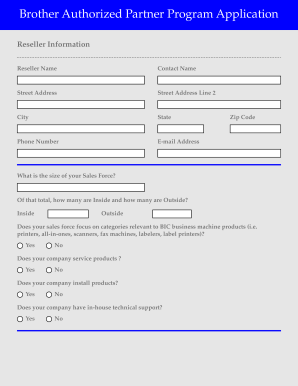
S the size of your Sales Force? Of that total, how many are Inside and how many are Outside? Inside Outside Does your sales force focus on categories relevant to BIC business machine products (i.e. printers, all-in-ones, scanners, fax machines, labelers, label printers)? Yes No Does your company service products ? Yes No Does your company install products? Yes No Does your company have in-house technical support? Yes No Are you willing to provide monthly end-user POS to Brother cover.
Loading
Open form follow the instructions
Easily sign the form with your finger
Send filled & signed form or save
How to fill out the Brother Authorized Partner Program Application online
This guide provides clear and supportive instructions on completing the Brother Authorized Partner Program Application online. Follow these steps to ensure a smooth application process that meets the partner program's requirements.
Follow the steps to successfully complete your application.
- Press the ‘Get Form’ button to access the Brother Authorized Partner Program Application form and open it in the designated digital editor.
- Begin by filling in the reseller information. Enter the reseller name, contact name, street address (including line 2 if necessary), city, state, phone number, email address, and zip code in their respective fields.
- Indicate the size of your sales force. Specify how many are inside sales personnel and how many are outside by filling in the respective fields.
- Respond to questions regarding your sales force's focus on BIC business machine products by selecting 'Yes' or 'No' as appropriate.
- Indicate whether your company services products, performs installations, and has in-house technical support by choosing 'Yes' or 'No' for each question.
- Confirm if you are willing to provide monthly end-user point of sale data to Brother for all BIC products related to sales contracts and pricing programs.
- State whether your business operates a consumer-focused retail sales location, and if so, provide the address.
- Answer if you currently sell products online and provide your website address if applicable.
- Answer whether the majority of your sales are processed through your website.
- If applicable, specify if your company does business under any other names and provide the necessary details.
- Select the distributors you wish to be authorized through by checking the respective boxes.
- Indicate how you learned about the Brother Authorized Partner Program and provide any additional details required.
- Once all fields are completed, review your entries for accuracy and completeness before submitting the application.
- After submitting the application, you can save your changes, download a copy, print it, or share it as needed.
Complete your Brother Authorized Partner Program Application online today to take advantage of partnership benefits.
Experience a faster way to fill out and sign forms on the web. Access the most extensive library of templates available.
Related content
Jan 13, 2023 — Applicants will annually select NYSMBK Fellows, current 11th graders, to...
Age: Be between 16-18 years old on July 21, 2024 (first day of Session III). • English...
Mar 15, 2017 — The Brother Workhorse series models, HL-L9310CDW and MFC-L9570CDW are...
Get answers to your most pressing questions about US Legal Forms API.
Where is Brother headquarters?
Brother's headquarters is located in Bridgewater, New Jersey. This location serves as the central hub for operations, support, and innovation within the U.S. If you're interested in deeper collaboration, consider the benefits of the Brother Authorized Partner Program Application to engage with the brand at a higher level.
How do I become a Brother authorized service center?
To become a Brother authorized service center, you need to apply through the Brother Authorized Partner Program Application. This program provides resources, training, and support to ensure you can effectively service Brother products. By completing the application process, you can access all necessary tools to enhance your service capabilities and grow your business.
Where can I sell my Brother printer?
You can sell your Brother printer through various online platforms such as eBay, Craigslist, or Facebook Marketplace. Additionally, local electronics or office supply stores may also accept used printers for trade or resale. When selling, ensure you mention the benefits of joining the Brother Authorized Partner Program Application to highlight its value to potential buyers.
Where can I sell a Brother printer?
You can sell your Brother printer online through marketplaces like eBay, Amazon, or Facebook Marketplace, where you can reach a broad audience. Local classifieds or community boards are also viable options. If you are a part of the Brother Authorized Partner Program Application, utilize this network to connect with potential buyers.
What do I do with my old Brother printer?
With your old Brother printer, you have several options. You can recycle it through a local e-waste program, donate it to schools or charities, or sell it to retrieve some value. Additionally, if your printer meets the requirements, consider leveraging the Brother Authorized Partner Program Application to potentially upgrade to a new model.
Who can I sell my printer to?
You can sell your printer to various individuals or businesses including colleagues, friends, or family members looking for a good deal. Online marketplaces such as eBay or Craigslist offer a broader audience. Additionally, businesses may seek used printers, thus making the Brother Authorized Partner Program Application a potential avenue for networking and sales.
How to get Brother printer online mac?
To get your Brother printer online with a Mac, start by ensuring your printer is connected to the same network as your computer. Navigate to ‘System Preferences,’ then click on ‘Printers & Scanners.’ From there, select your Brother printer and make sure it is set as the default printer. If you experience any issues, refer to the Brother Authorized Partner Program Application for additional support.
How to become a Brother authorized service center?
To become a Brother authorized service center, start by filling out the Brother Authorized Partner Program Application. You will need to demonstrate your ability to provide excellent service and support. Upon approval, you will gain access to specialized training and materials to help you succeed.
Do I need to register my Brother's sewing machine?
Yes, registering your Brother sewing machine is beneficial. Registration allows you to receive important updates, warranty information, and promotional offers directly from Brother. Additionally, it can streamline support and service requests, making the process easier for you in case you need assistance.
How do I add a Brother printer to my PC?
To add a Brother printer to your PC, start by connecting the printer to your computer via USB or your network. Next, go to the Brother support page to download and install the necessary drivers for your specific printer model. After installation, follow the on-screen instructions to complete the setup. This ensures your printer works seamlessly with your applications.
Use professional pre-built templates to fill in and sign documents online faster. Get access to thousands of forms.
If you believe that this page should be taken down, please follow our DMCA take down process here.