Loading
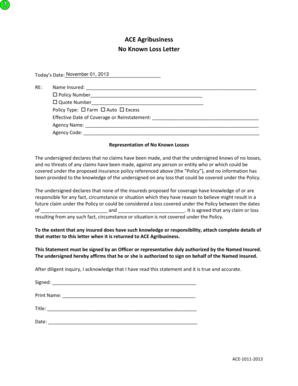
Get No Loss Letter Sample
How it works
-

Open form follow the instructions
-

Easily sign the form with your finger
-

Send filled & signed form or save
How to fill out the No Loss Letter Sample online
This guide provides clear and supportive instructions for users filling out the No Loss Letter Sample online. Understanding each component of the letter will help ensure accurate completion and submission.
Follow the steps to fill out the No Loss Letter Sample effectively.
- Click the ‘Get Form’ button to obtain the No Loss Letter Sample. This action opens the form in the editor for you to begin filling it out.
- In the section labeled 'Today’s Date,' enter the current date in the specified format. This is essential as it reflects the time of submission.
- For the 'Name Insured' field, input the name of the person or entity insured under the policy. Ensure this is accurate and matches any relevant documentation.
- Fill in the 'Policy Number' with the relevant policy identification number. If applicable, complete the 'Quote Number' field as well.
- Select the 'Policy Type' by checking the appropriate box for Farm, Auto, or Excess. This specifies the type of coverage being referenced.
- Enter the 'Effective Date of Coverage or Reinstatement.' This date marks when the insurance coverage goes into effect or when it was reinstated.
- In the 'Agency Name' section, provide the name of the agency handling the insurance policy. Following this, complete the 'Agency Code' field, if applicable.
- Read through the representation section carefully. Ensure that you understand that you are declaring no known losses or claims against the policy. This statement is critical for the accuracy of the documentation.
- In the section regarding knowledge of claims or losses, provide any relevant dates if you have knowledge of potential claims affecting the policy from the specified time frame.
- The form must be signed by an authorized officer or representative of the named insured. Enter the 'Signed' field, then 'Print Name' and 'Title.'
- Finally, enter the date of signing in the 'Date' field. Once you have completed all sections and ensured the accuracy of the information, you can save changes, download, print, or share the form.
Complete your No Loss Letter Sample online now for an efficient and streamlined insurance process.
Related links form
What is a “no-loss statement? A no-loss statement is a statement signed by you in which you represent and promise that you have not had any loss or claim (either liability or property damage) between the time your policy canceled and the time you're applying for reinstatement (your “lapse period”).
Industry-leading security and compliance
US Legal Forms protects your data by complying with industry-specific security standards.
-
In businnes since 199725+ years providing professional legal documents.
-
Accredited businessGuarantees that a business meets BBB accreditation standards in the US and Canada.
-
Secured by BraintreeValidated Level 1 PCI DSS compliant payment gateway that accepts most major credit and debit card brands from across the globe.