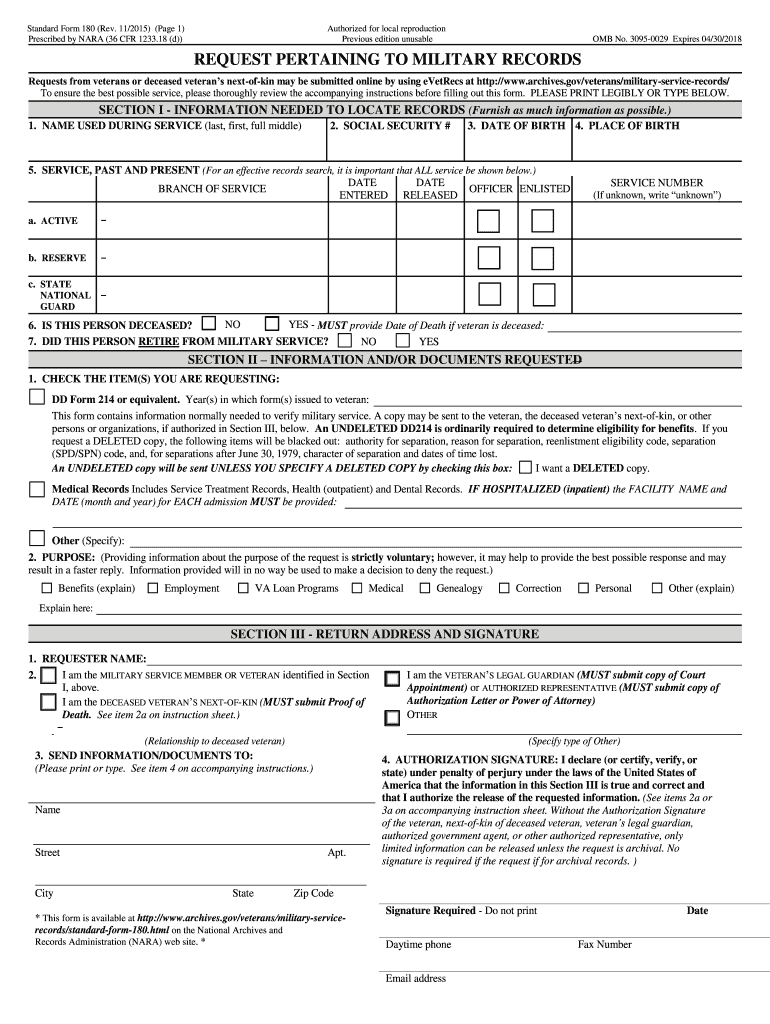
information from military records. Certain identifying information is necessary to determine the location of an individual's record of military service. Please try to answer each item on the SF 180. If you do not have and cannot obtain the information for an item, show "NA," meaning the information is "not available". Include as much of the requested information as you can. Incomplete information may delay response time. To determine where to mail this request see Page 2 of the SF180 for record.
Loading

Open form follow the instructions

Easily sign the form with your finger

Send filled & signed form or save
How to fill out the NARA SF 180 online
The Standard Form 180 (SF 180) is essential for requesting military records. This guide provides clear instructions on how to fill out this form online, ensuring a smooth process for requesting your military information.
Follow the steps to successfully complete the NARA SF 180 online.
- Press the ‘Get Form’ button to obtain the SF 180 and access it within your editing platform.
- Complete Section I by providing the necessary information to locate military records, including names used during service, social security number, date and place of birth, and service details.
- In Section II, specify the type of information or documents you are requesting. This includes options like DD Form 214 and the purpose of the request.
- Fill out Section III, which requires information about the requester, their relationship to the veteran, and the return address for the requested documents. Ensure to include the legal guardian or next-of-kin authorization if applicable.
- Review all sections for completeness and accuracy. It is crucial to provide as much information as possible to avoid delays.
- Finally, save your changes, download a copy of the completed form, or print it for mailing to the appropriate address found on page 2 of the SF 180.
Start completing your NARA SF 180 online today to access your military records.
Experience a faster way to fill out and sign forms on the web. Access the most extensive library of templates available.
Related content
Order copies of WWI Draft Registration Cards online. Requesters can use the online...
Dec 6, 2022 — Use GSA Form SF180 to request your military service records, like your...
Feb 8, 2019 — Pre-determination agency actions: Determinations, Releasing Records...
Get answers to your most pressing questions about US Legal Forms API.
Who can see my military record?
Generally, only authorized individuals can access military records, such as the service member, next of kin, or those with proper authorization. The NARA SF 180 helps you manage these requests while ensuring that privacy and security laws are adhered to. To learn more about who can access these records and how to navigate these regulations, consider browsing our platform for comprehensive resources.
Can I request my deceased father's military records?
Yes, you can request your deceased father's military records using the NARA SF 180. As the next of kin, you will need to provide specific information to verify your relationship and your father's service details. Our platform offers resources and support to assist you throughout the request process, making it easier for you to access these important documents.
How can I get a copy of my father's military discharge papers?
To obtain a copy of your father's military discharge papers, you need to submit the NARA SF 180 to the National Archives. This form requires specific details about your father’s service, which will help expedite your request. You can also access our platform for user-friendly tools and guidance on gathering the required information and submitting it correctly.
What is SF 180 used for?
The NARA SF 180 is primarily used to request military service records and information, including discharge papers. Veterans, next of kin, or authorized representatives can submit this form to obtain essential records for benefits, employment, or personal reasons. Understanding the purpose of this form can help you ensure you acquire the necessary information efficiently.
How do I send SF-180?
You can send the NARA SF 180 by filling it out and mailing it to the appropriate address provided on the form. Make sure to carefully follow the instructions to ensure your request is processed correctly. Additionally, you may submit the form online via the National Archives website for convenience. Using our platform, you can find resources that guide you through this process effectively.
How to find out if someone is lying about military service?
Finding out if someone is lying about their military service involves verifying their claims through official channels. You can use the NARA SF 180 form to request detailed military records. This verification process will provide you with the accurate service history you need to confirm or challenge someone's assertions.
How do I submit an SF-180?
To submit an SF-180, visit the official National Archives website where you can download the form. After filling it out with the necessary details, send it to the appropriate address listed for your specific request. The NARA SF 180 is straightforward and designed to make obtaining military records an easy task.
How to tell if someone is faking being a veteran?
Identifying someone who is faking being a veteran can be challenging. However, you might consider obtaining their military records through the NARA SF 180 form. Genuine veterans have official documentation, and the SF 180 process can help confirm or refute their claims about military service.
How to check if someone is lying about military service?
To check if someone is lying about their military service, you can request their military records using the NARA SF 180 form. This official request will provide you with reliable information regarding their service. By reviewing the records, you can determine the authenticity of their claims and address any inconsistencies.
Can you verify someone's military service?
Yes, you can verify someone's military service through the NARA SF 180 form. This form allows you to request military records from the National Archives and Records Administration. By completing and submitting the SF 180, you can obtain essential information about an individual's service history, ensuring you have accurate documentation.
Use professional pre-built templates to fill in and sign documents online faster. Get access to thousands of forms.
If you believe that this page should be taken down, please follow our DMCA take down process here.