Loading
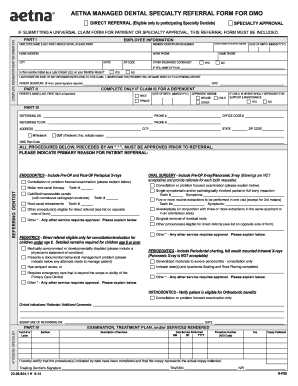
Get Aetna 23.09.804.1 H 2014-2026
How it works
-

Open form follow the instructions
-

Easily sign the form with your finger
-

Send filled & signed form or save
How to fill out the Aetna 23.09.804.1 H online
The Aetna 23.09.804.1 H form is essential for managing dental specialty referrals effectively. This guide offers a clear and concise walkthrough to help users fill out the form online, ensuring all necessary information is provided correctly.
Follow the steps to accurately complete the Aetna 23.09.804.1 H form.
- Press the ‘Get Form’ button to access the Aetna 23.09.804.1 H form and open it in your preferred editor.
- In Part I, complete the employee information section. Provide the employee's name, member identification number, home address, and group number or control number. Ensure that the date of birth is entered in the format MM/DD/YYYY and indicate the home and work phone numbers.
- Indicate if there is other insurance coverage by selecting yes or no. If yes, include the name of the plan. Specify if the member is listed as a Late Entrant on your Monthly Roster.
- Sign the authorization for the release of information related to the claim, and if the patient is a minor, ensure the parent or guardian signature is provided along with the date.
- If the referral is for a dependent, complete Part II with the patient's name, date of birth, and dependent status (spouse or child). For children, specify if they are wholly dependent for support and maintenance.
- In Part III, fill in the referring doctor’s information, including name, phone number, and the specialty dentist referred to. Specify whether the referral is in-network or out-of-network and provide the necessary documentation.
- Select the primary reason for the patient referral from the options available and provide any additional information required for the chosen procedures.
- Complete Part IV by detailing the examination, treatment plan, and services rendered, including the description of services, dates, procedure number, and fees.
- Review the form for completeness, ensuring all sections are filled out accurately. Save any changes made, and you may download, print, or share the form as needed.
Complete your Aetna documents online for seamless processing and compliance.
To find out details about your Aetna plan, you can log in to your Aetna account online or use their mobile app. Additionally, checking your insurance card will provide you with key information regarding your plan name and benefits. If you're looking for specific details about the Aetna 23.09.804.1 H plan, reaching out to customer support can also be very helpful.