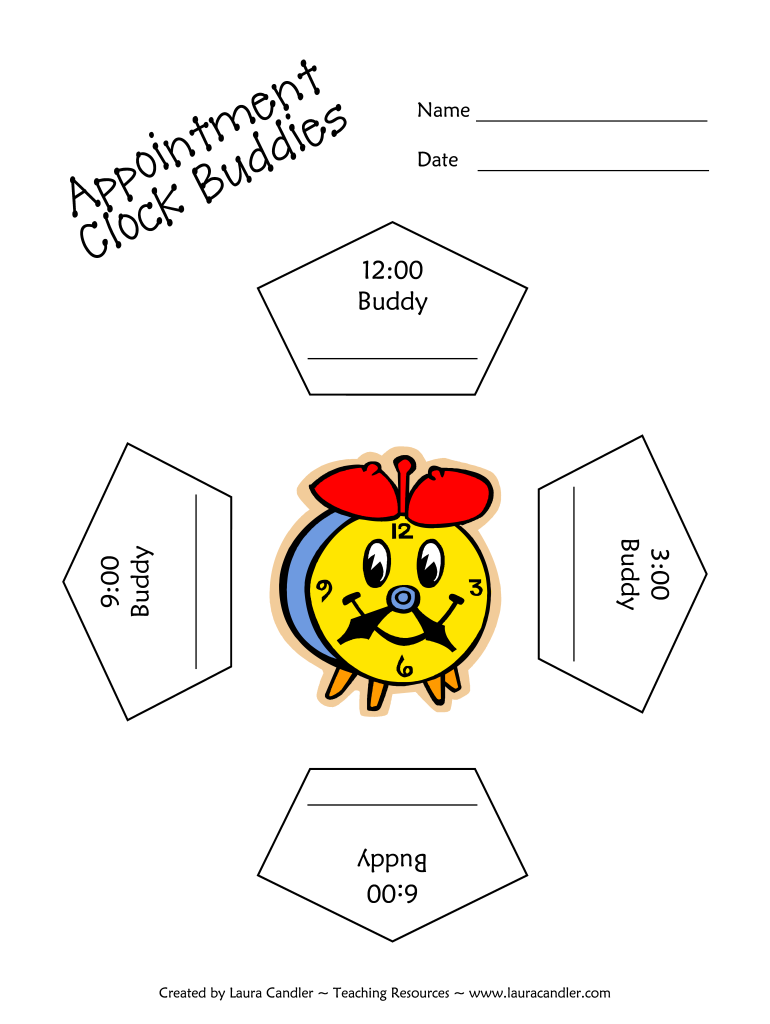
Name Date 12:00 Buddy 6:00 Buddy Created by Laura Candler Teaching Resources www.lauracandler.com 3:00 Buddy 9:00 Buddy Appointment Clock Buddies Teacher Directions Overview: This activity is a fun.

Open form follow the instructions

Easily sign the form with your finger

Send filled & signed form or save
How to fill out the Clock Buddies Pdf online
Filling out the Clock Buddies Pdf online is a straightforward process that enhances cooperative learning activities. This guide will walk you through each section of the form to ensure you complete it effectively.
Follow the steps to successfully complete the Clock Buddies Pdf online.
- Click ‘Get Form’ button to access the Clock Buddies Pdf and open it for editing.
- Begin by entering your name and the date at the top of the form. Ensure this information is accurate as it identifies your document.
- Locate the designated time slots which are marked as 3:00, 6:00, 9:00, and 12:00. These slots are where your partner's names will be recorded.
- After engaging in the partner activities as per the teacher directions, write the names of your partners in the corresponding time slots on your clock.
- Review your entries for accuracy. It's important that you have one partner for each time slot.
- Once all fields are filled out, save your changes. You can then download, print, or share the completed Clock Buddies Pdf as needed.
Complete your Clock Buddies Pdf online today for an engaging classroom experience.
Experience a faster way to fill out and sign forms on the web. Access the most extensive library of templates available.
Related content
Paraphrase Passport. • Round the Clock Learning. Partners. • Roving Charts. •...
tamp of the earliest scheduled Steppable, advances the clock to that time, then ... bitmap...
Get answers to your most pressing questions about US Legal Forms API.
How do you make a clock partner?
Here's how Clock Partners works: Students take their page, walk around the room and find 12 different partners. They each write their partner's name on the same line. For example, if I'm partnering with you at 12, I write my name on your page at 12, and you write your name on my page at 12.
What is the clock buddies strategy?
Clock Buddies is meant to be a quick and easy way to create pairs for partnered activities while avoiding the problem of kids always having the SAME partners. It begins with a clock face, with slots for names extending from each hour on the dial.
How do you pair kids up?
A simple and useful way to match learners together in pairs or small groups is to get them lined up and then ask them to go in order of height (from smallest to tallest – a good way to review superlatives). You can then put them together with the student next to them or reorganise them into small groups.
What is an alternative to clock buddies?
An alternative to clock buddies, fraction partners is useful in upper elementary and middle school math classes. It gets students excited about partner work, and it helps reinforce equivalent fractions! Edit to fit your classroom needs (fewer fractions, decimals, integers only, negative numbers, etc.).
Use professional pre-built templates to fill in and sign documents online faster. Get access to thousands of forms.
If you believe that this page should be taken down, please follow our DMCA take down process here.