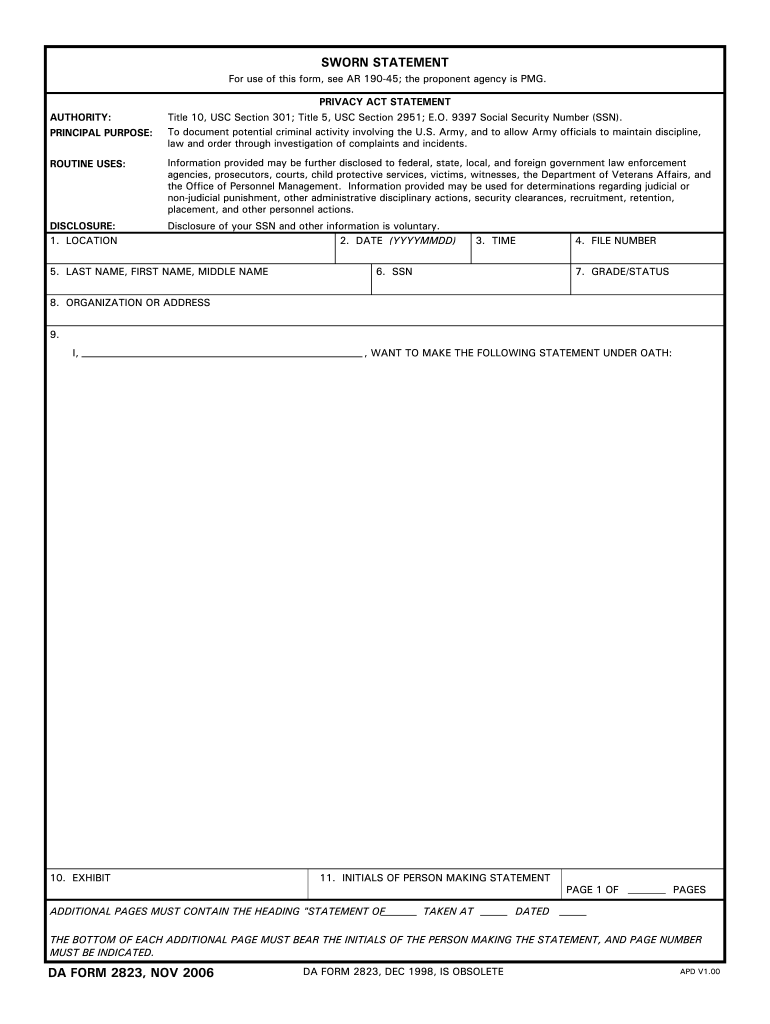
DA FORM 2823 NOV 2006 DA FORM 2823 DEC 1998 IS OBSOLETE APD V1. 00 USE THIS PAGE IF NEEDED. IF THIS PAGE IS NOT NEEDED PLEASE PROCEED TO FINAL PAGE OF THIS FORM. SWORN STATEMENT For use of this form see AR 190-45 the proponent agency is PMG. AUTHORITY PRINCIPAL PURPOSE PRIVACY ACT STATEMENT Title 10 USC Section 301 Title 5 USC Section 2951 E.O. 9397 Social Security Number SSN. To document potential criminal activity involving the U.S. Army and to allow Army officials to maintain discipline law and order through investigation of complaints and incidents. SWORN STATEMENT For use of this form see AR 190-45 the proponent agency is PMG* AUTHORITY PRINCIPAL PURPOSE PRIVACY ACT STATEMENT Title 10 USC Section 301 Title 5 USC Section 2951 E*O. 9397 Social Security Number SSN. To document potential criminal activity involving the U*S* Army and to allow Army officials to maintain discipline law and order through investigation of complaints and incidents. ROUTINE USES Information provided may be f....
Loading

Open form follow the instructions

Easily sign the form with your finger

Send filled & signed form or save
How to fill out the DA 2823 online
The DA 2823 form, also known as the sworn statement, is essential in documenting potential criminal activity involving the U.S. Army. This guide provides step-by-step instructions on how to effectively fill out this form online, ensuring that you understand each component and field.
Follow the steps to fill out the DA 2823 accurately.
- Press the ‘Get Form’ button to access the DA 2823 form and open it in the editor.
- Enter the location where the statement is being taken. This information helps to provide context for the sworn statement.
- Fill in the date in the format YYYYMMDD. This ensures clarity regarding when the statement was completed.
- Provide your last name, first name, and middle name. Use full names to avoid confusion.
- Input your Social Security Number (SSN) if required. Remember that disclosing this information is voluntary.
- Enter the file number, which serves as a unique identifier for your case.
- Indicate your grade or status within the organization to clarify your position.
- List your organization or address to provide additional context.
- Begin your statement by clearly expressing your intent to make a statement under oath. Follow this by detailing your statement.
- Include your initials on every page of the additional statements if necessary, along with the page number.
- Upon completion, review your statement. Ensure you understand its contents and initial any corrections made.
- In the affidavit section, confirm that you have read or have had the statement read to you, and sign it as a formal acknowledgment.
- Complete the section for witnesses, if applicable, and ensure that the person administering the oath also provides their signature and information.
- Finally, save your changes, download, print, or share the completed DA 2823 form as needed.
Now that you have the information, fill out your documents online to ensure compliance and accuracy.
Experience a faster way to fill out and sign forms on the web. Access the most extensive library of templates available.
Related content
Disclosure of your SSN and other information is voluntary. Page 2. APD LC v1.01ES. DA FORM...
Jun 23, 2003 — MUST BE BE INDICA TED. DA FORM 2823. DEC 1998. DA FORM 2823, JUL 72, IS...
Read the instructions in conjunction with the illustrations (pages 3 and 34) before using...
Get answers to your most pressing questions about US Legal Forms API.
How to fill up a sworn statement?
Filling up a sworn statement involves clearly entering your personal details, followed by a descriptive account relevant to the statement's purpose. It's crucial to maintain clarity and accuracy throughout, especially when stating facts or events. Using the DA 2823 can significantly aid in ensuring that all critical elements are included in your statement.
How do you fill out a sworn statement in proof of loss?
Filling out a sworn statement in proof of loss requires you to describe the item or property that has been lost and provide details about how the loss occurred. Include personal information and a declaration stating that the contents are true and accurate. The DA 2823 can guide you in structuring the statement to meet necessary legal standards.
What is DA form 2823 used for?
The DA Form 2823 is essential for documenting sworn statements in various military situations, particularly when personal accounts need to be recorded. This form serves to formalize testimonies that might be relevant in investigations and claims. By using DA 2823, parties ensure their statements are accepted in military legal contexts.
How to fill out sworn statement of loss?
To fill out a sworn statement of loss, you start by providing your personal information, followed by a detailed description of the lost item. Be sure to clearly explain how, when, and where the loss occurred, ensuring all relevant details are included. You can reference the DA 2823 to understand the required structure for effective communication.
How to write an army sworn statement?
Writing an army sworn statement involves stating your full name, details of the event you are recounting, and confirming that the information is accurate to the best of your knowledge. Ensure you follow the specific format required for the DA 2823 and include a concluding statement affirming your signature under oath. Creating a sworn statement correctly is essential for military procedures.
What is an example of a sworn statement?
An example of a sworn statement could be a document where an individual describes what they witnessed during a specific incident, particularly if it involves legal matters. Typically, this statement will start with your personal details, followed by a detailed account of the events. Using DA 2823 as a guide can help you format your statement appropriately.
How do I start off a sworn statement?
To begin a sworn statement, you should clearly state your name, address, and relationship to the matter at hand. Then, provide a brief introduction explaining the purpose of the statement. Make sure to include a declaration that you are writing under penalty of perjury, which adds to the formality and authenticity of the DA 2823.
What regulation covers DA Form 2823?
DA Form 2823 is covered under Army Regulation 15-6, which outlines procedures for investigating and reporting matters affecting the Army. Understanding this regulation ensures that you are following proper protocols when filling out and submitting your sworn statement. Familiarizing yourself with AR 15-6 will enhance your compliance with army standards.
How to properly fill out a DA form 2823?
To properly fill out DA Form 2823, start with the identification section. Make sure to include your full name, rank, and contact information. Then, state the facts of your case in a clear, organized manner. Finally, ensure to sign the form in front of a witness, as this adds authenticity and validity to your statement.
How to write a sworn statement in Army?
When writing a sworn statement in the Army, begin with the relevant details about the incident including date, time, and location. Utilize DA Form 2823 to structure your statement correctly. Write clearly and stick to factual information. Review the completed form to ensure it reflects your account accurately before submission.
Use professional pre-built templates to fill in and sign documents online faster. Get access to thousands of forms.
If you believe that this page should be taken down, please follow our DMCA take down process here.