Loading
Form preview
  • US Legal Forms
  • Form Library
  • More Forms
  • More Uncategorized Forms
  • Uap Login

Get Uap Login

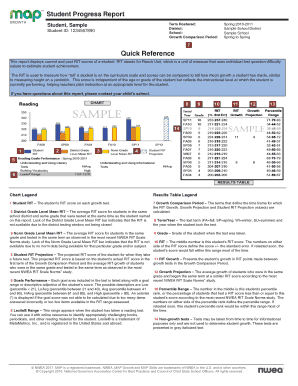
Student Progress Report Term Rostered: District: School: Growth Comparison Period:Student, Sample Student ID: 1234567890Spring 20102011 Sample School District Sample School Spring to SpringQuick Reference This.

How it works

  1. Open form

    Open form follow the instructions

  2. Easily sign form

    Easily sign the form with your finger

  3. Share form

    Send filled & signed form or save

How to fill out the Uap Login online

The Uap Login is a crucial document for accessing essential student progress information. This guide will provide you with a step-by-step approach to efficiently complete the form and ensure all necessary information is included accurately.

Follow the steps to fill out the Uap Login online:

  1. Click ‘Get Form’ button to obtain the form and open it in your preferred editor.
  2. Fill in the 'Term Rostered' field. This is where you will indicate the academic term associated with the report.
  3. Enter the 'District' information. Provide the name of the school district where the student is enrolled.
  4. Complete the 'School' section by entering the name of the school the student attends.
  5. For the 'Growth Comparison Period', specify the timeframe during which the student's growth was measured. This typically refers to the terms used in the assessment.
  6. In the 'Student' section, fill in the name of the student completing the assessment.
  7. Provide the 'Student ID' number, a unique identifier for the student, which ensures accurate data representation.
  8. After filling in all the required fields, review the information for accuracy.
  9. Once confirmed, save your changes. You may choose to download, print, or share the form based on your needs.

Start filling out your Uap Login online today!

Get form

Experience a faster way to fill out and sign forms on the web. Access the most extensive library of templates available.
Get form

Related content

ODJFS Login
The Ohio Department of Job & Family Services.
Learn more
UAP EMS LogIn
IMG. LOGIN. Forgot Your Password ?
Learn more
UAPAC UAP AC User Manual UniFi AP-AC Quick Start...
UAP AC User Manual details for FCC ID SWX-UAPAC made by Ubiquiti Networks, ... A login...
Learn more

Related links form

DD 2836 2000 DD 2854 2010 DD 2910 2014 DD 2911 2011

Questions & Answers

Get answers to your most pressing questions about US Legal Forms API.

Contact support

Warranty Start Date means, with respect to any Product, the date of purchase of such Product under this Agreement. Warranty Start Date means the date of shipment of the applicable Product, as designated by Warrantor.

Here are three ways to find it: Check your manual or packaging. Check your product manual or original packaging, as warranties are usually included there. Search online. Use an internet search engine to look up the manufacturer and model number of your product. Contact us.

How to check Samsung warranty status? Step 1: Go to the Samsung website. Step 2: Click on 'Support'. Step 3: Select 'Product Support'. Step 4: Select the device you want to check the warranty status of. Step 5: Enter the IMEI or serial number. Step 6: Click on 'Check'.

How to Find Out if Your Appliance Is Under Warranty Still Consider Typical Appliance Warranty Periods. ... Check Your Receipt or Owner's Manual. ... Check the Manufacturer's Website. ... Contact the Retailer. ... Look into Your Credit Card's Consumer Protection Package. ... Check Your Home Warranty.

Some phone warranties are as short as 90 days, while others may last as long as two years. You can find out just how long the warranty on your new phone is by checking the manufacturer's website. Here are a few of the most popular mobile phone manufacturer's warranty sites.

If you still have the phone's retail box and purchase invoice, you should easily find the date there. Another speedy way to tell how long you've been using your phone is through its IMEI number.

Check the sticker on the back of the box. Check the sticker of the paper warranty card in the device box.

Originally Answered: How can I check a phone's warranty by the IMEI number? Search Warranty on Product. Check the warranty on your product by entering the serial number/IMEI number. For mobile phone, please enter the IMEI number.

Get This Form Now!

Use professional pre-built templates to fill in and sign documents online faster. Get access to thousands of forms.
Get form
If you believe that this page should be taken down, please follow our DMCA take down processhere.

Industry-leading security and compliance

US Legal Forms protects your data by complying with industry-specific security standards.
  • In businnes since 1997
    25+ years providing professional legal documents.
  • Accredited business
    Guarantees that a business meets BBB accreditation standards in the US and Canada.
  • Secured by Braintree
    Validated Level 1 PCI DSS compliant payment gateway that accepts most major credit and debit card brands from across the globe.
Get Uap Login
Get form
Form Packages
Adoption
Bankruptcy
Contractors
Divorce
Home Sales
Employment
Identity Theft
Incorporation
Landlord Tenant
Living Trust
Name Change
Personal Planning
Small Business
Wills & Estates
Packages A-Z
Form Categories
Affidavits
Bankruptcy
Bill of Sale
Corporate - LLC
Divorce
Employment
Identity Theft
Internet Technology
Landlord Tenant
Living Wills
Name Change
Power of Attorney
Real Estate
Small Estates
Wills
All Forms
Forms A-Z
Form Library
Customer Service
Your Privacy Choices
Terms of Service
Privacy Notice
Legal Hub
Content Takedown Policy
Bug Bounty Program
About Us
Help Portal
Legal Resources
Blog
Affiliates
Contact Us
Delete My Account
Site Map
Industries
Forms in Spanish
Localized Forms
State-specific Forms
Forms Kit
Legal Guides
Real Estate Handbook
All Guides
Prepared for You
Notarize
Incorporation services
Our Customers
For Consumers
For Small Business
For Attorneys
Our Sites
US Legal Forms
USLegal
FormsPass
pdfFiller
signNow
altaFlow
DocHub
Instapage
Social Media
Call us now toll free:
+1 833 426 79 33
As seen in:
  • USA Today logo picture
  • CBC News logo picture
  • LA Times logo picture
  • The Washington Post logo picture
  • AP logo picture
  • Forbes logo picture
© Copyright 1997-2026
airSlate Legal Forms, Inc.
3720 Flowood Dr, Flowood, Mississippi 39232
Form Packages
Adoption
Bankruptcy
Contractors
Divorce
Home Sales
Employment
Identity Theft
Incorporation
Landlord Tenant
Living Trust
Name Change
Personal Planning
Small Business
Wills & Estates
Packages A-Z
Form Categories
Affidavits
Bankruptcy
Bill of Sale
Corporate - LLC
Divorce
Employment
Identity Theft
Internet Technology
Landlord Tenant
Living Wills
Name Change
Power of Attorney
Real Estate
Small Estates
Wills
All Forms
Forms A-Z
Form Library
Customer Service
Your Privacy Choices
Terms of Service
Privacy Notice
Legal Hub
Content Takedown Policy
Bug Bounty Program
About Us
Help Portal
Legal Resources
Blog
Affiliates
Contact Us
Delete My Account
Site Map
Industries
Forms in Spanish
Localized Forms
State-specific Forms
Forms Kit
Legal Guides
Real Estate Handbook
All Guides
Prepared for You
Notarize
Incorporation services
Our Customers
For Consumers
For Small Business
For Attorneys
Our Sites
US Legal Forms
USLegal
FormsPass
pdfFiller
signNow
altaFlow
DocHub
Instapage
Social Media
Call us now toll free:
+1 833 426 79 33
As seen in:
  • USA Today logo picture
  • CBC News logo picture
  • LA Times logo picture
  • The Washington Post logo picture
  • AP logo picture
  • Forbes logo picture
© Copyright 1997-2026
airSlate Legal Forms, Inc.
3720 Flowood Dr, Flowood, Mississippi 39232