Loading
Get Change The Email On Your Credit Karma Account
How it works
-

Open form follow the instructions
-

Easily sign the form with your finger
-

Send filled & signed form or save
How to fill out the Change the email on your Credit Karma account online
Changing the email associated with your Credit Karma account is an important step in managing your account information securely. This guide will provide you with clear and detailed instructions to help you through the process of completing the Change the email on your Credit Karma account form online.
Follow the steps to successfully update your email address.
- Press the ‘Get Form’ button to access the Change the email on your Credit Karma account form and open it in the appropriate editor.
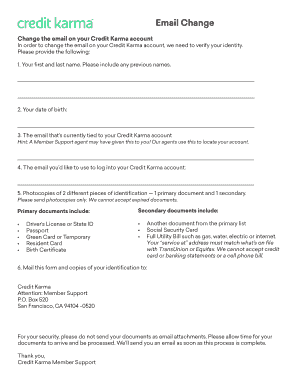
- Begin by entering your first and last name in the designated fields. Be sure to include any previous names you may have used.
- Provide your date of birth in the specified format. This information helps to verify your identity.
- Enter the current email address linked to your Credit Karma account. If you have been assisted by a Member Support agent, they may have provided this email to you.
- Input the new email address you wish to associate with your Credit Karma account in the following field.
- Prepare photocopies of two different pieces of identification. You must provide one primary document and one secondary document. Ensure these documents are not expired.
- Select your primary and secondary identification documents from the acceptable options listed. Primary documents may include a Driver’s License, Passport, or Green Card, while secondary documents may include a Social Security Card or a utility bill that matches your service address on file with TransUnion or Equifax.
- Once all fields have been filled out and your identification documents are ready, mail the completed form along with your photocopies to Credit Karma, Attention: Member Support, P.O. Box 520, San Francisco, CA 94104-0520.
- For your security, refrain from emailing your documents as attachments. After mailing your submission, allow time for processing. You will receive an email confirmation when your request has been completed.
Complete your document online today to ensure your email information is up to date.
Most email services do not allow you to change your existing email address. In order to change your email address, you'll need to create a new account. You can use the same email service you've been using, or you can take this opportunity to switch to a service that better meets your needs. Decide on an email service.