Loading
Form preview
  • US Legal Forms
  • Form Library
  • More Forms
  • More Uncategorized Forms
  • Borang Perkeso

Get Borang Perkeso

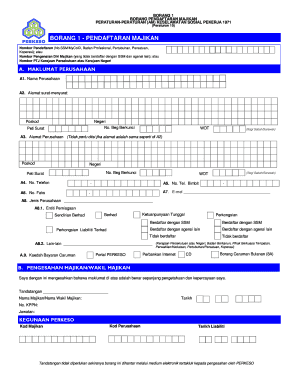
BORANG 1 BORANG PENDAFTARAN MAJIKAN PERATURANPERATURAN (AM) KESELAMATAN SOSIAL PEKERJA 1971 (Peraturan 10)BORANG 1 PENDAFTARAN MAJIKAN Nombor Pendaftaran (No.SSM/MyColD, Badan Profesional, Pertubuhan,.

How it works

  1. Open form

    Open form follow the instructions

  2. Easily sign form

    Easily sign the form with your finger

  3. Share form

    Send filled & signed form or save

How to fill out the Borang Perkeso online

Borang Perkeso is an essential form for employer registration that contributes to the social security system in the country. This guide provides a comprehensive overview and step-by-step instructions on completing the form online effectively.

Follow the steps to complete your Borang Perkeso online.

  1. Click ‘Get Form’ button to obtain the form and open it in the editor.
  2. In Section A, begin by entering your company's information. Fill in the registration number (SSM/MyColD), or the employer's identity number if not registered.
  3. In A1, input the name of your company exactly as it appears in official documents.
  4. For A2, provide the correspondence address. Make sure to include the postal code and state, along with any P.O. Box number if applicable.
  5. If your company's address differs from the correspondence address, fill in Section A3 with the relevant details. Otherwise, you may skip this step.
  6. In A4 and A5, include your telephone number and mobile number respectively. Ensure numbers are accurate for communication.
  7. For A6, if applicable, provide your fax number. This step may be relevant specifically for Sabah/Sarawak.
  8. Input your email address in A7. This will be essential for receiving notifications.
  9. In A8, select the type of entity your business represents, ensuring to check the options that fit your registration status.
  10. Complete A9 by choosing your preferred payment method for contributions, such as portal options or internet banking.
  11. In Section B, confirm the accuracy of your information by signing your name, stating your position, and providing the date of submission.
  12. Finally, save your changes and choose to download, print, or share the form as required.

Take action now to fill out your Borang Perkeso online and contribute to the social security system.

Get form

Experience a faster way to fill out and sign forms on the web. Access the most extensive library of templates available.
Get form

Related content

Borang Pembaharuan Kontraktor Kerja Awam Dan ......
It will categorically ease you to see guide borang pembaharuan kontraktor kerja awam dan...
Learn more
Socso form 8a
borang 8a bercetak dari perkeso 3 pendaftaran pekerja sedemikian hendaklah juga dibuat...
Learn more
#perkesoprihatin hasgtag on Instagram post photo...
Makluman Temuduga Terbuka 2020 Anjuran Pejabat PERKESO Muar Majikan ... dengan jawatan...
Learn more

Related links form

KS VS-237 2014 KSHSAA Libero Tracking Sheet KY 62A013 2009 KY Application for Licensed Professional Clinical Counselor and Licensing via Endorsement for Reciprocity 2011

Questions & Answers

Get answers to your most pressing questions about US Legal Forms API.

Contact support

To resolve a comment, chose the comment you want to resolve. Select the Review tab on the ribbon. Select the Resolve button. Comments can also be resolved by right-clicking them and selecting Resolve Comment from the contextual menu.

Tap Review > Display for Review. Tap any changed text, and in the review pane, tap one of the arrow buttons. Tap any changed text, and in the review pane, tap the Accept or Reject button.

Using comments Select the text you want to comment on, or click an insertion point in the text, and then do one of the following to make ​​​​​a new comment appear in the right margin: On the Review tab, click New Comment. In the Comments pane, click New. ... Select the Post comment button or press Ctrl + Enter.

On your computer, open a document, spreadsheet, or presentation. Click the comment you want to close. In the top corner of the comment, click Resolve.

Comments can be added to a document that do not change the document. You can insert a comment inside balloons that will appear in the document margins. They can also be hidden until you want to edit your paper.

From the Review tab, click Show Markup > Balloons > Show Revisions in Balloons. Most revisions will appear in the right margin, although any added text will still appear inline.

In the Desktop App, the ordinary search in the Navigation pane will find text in comments, including the author's name. Ctrl+F to get to the search box and type your name.

Add a comment from the context menu or from Review > New Comment. Type @ and the first few letters of the person's first or last name, and then pick the name you want (If they don't already have permission to open the document, you'll be asked to provide that).

Get This Form Now!

Use professional pre-built templates to fill in and sign documents online faster. Get access to thousands of forms.
Get form
If you believe that this page should be taken down, please follow our DMCA take down processhere.

Industry-leading security and compliance

US Legal Forms protects your data by complying with industry-specific security standards.
  • In businnes since 1997
    25+ years providing professional legal documents.
  • Accredited business
    Guarantees that a business meets BBB accreditation standards in the US and Canada.
  • Secured by Braintree
    Validated Level 1 PCI DSS compliant payment gateway that accepts most major credit and debit card brands from across the globe.
Get Borang Perkeso
Get form
  • Adoption
  • Bankruptcy
  • Contractors
  • Divorce
  • Home Sales
  • Employment
  • Identity Theft
  • Incorporation
  • Landlord Tenant
  • Living Trust
  • Name Change
  • Personal Planning
  • Small Business
  • Wills & Estates
  • Packages A-Z
  • Affidavits
  • Bankruptcy
  • Bill of Sale
  • Corporate - LLC
  • Divorce
  • Employment
  • Identity Theft
  • Internet Technology
  • Landlord Tenant
  • Living Wills
  • Name Change
  • Power of Attorney
  • Real Estate
  • Small Estates
  • Wills
  • All Forms
  • Forms A-Z
  • Form Library
  • Legal Hub
  • About Us
  • Help Portal
  • Legal Resources
  • Blog
  • Affiliates
  • Contact Us
  • Delete My Account
  • Site Map
  • Industries
  • Forms in Spanish
  • Localized Forms
  • State-specific Forms
  • Forms Kit
  • Real Estate Handbook
  • All Guides
  • Notarize
  • Incorporation services
  • For Consumers
  • For Small Business
  • For Attorneys
  • USLegal
  • FormsPass
  • pdfFiller
  • signNow
  • altaFlow
  • DocHub
  • Instapage
Form Packages
  • Adoption
  • Bankruptcy
  • Contractors
  • Divorce
  • Home Sales
  • Employment
  • Identity Theft
  • Incorporation
  • Landlord Tenant
  • Living Trust
  • Name Change
  • Personal Planning
  • Small Business
  • Wills & Estates
  • Packages A-Z
Form Categories
  • Affidavits
  • Bankruptcy
  • Bill of Sale
  • Corporate - LLC
  • Divorce
  • Employment
  • Identity Theft
  • Internet Technology
  • Landlord Tenant
  • Living Wills
  • Name Change
  • Power of Attorney
  • Real Estate
  • Small Estates
  • Wills
  • All Forms
  • Forms A-Z
  • Form Library
Customer Service
  • Legal Hub
  • About Us
  • Help Portal
  • Legal Resources
  • Blog
  • Affiliates
  • Contact Us
  • Delete My Account
  • Site Map
  • Industries
  • Forms in Spanish
  • Localized Forms
  • State-specific Forms
  • Forms Kit
Legal Guides
  • Real Estate Handbook
  • All Guides
Prepared for you
  • Notarize
  • Incorporation services
Our Customers
  • For Consumers
  • For Small Business
  • For Attorneys
Our Sites
  • USLegal
  • FormsPass
  • pdfFiller
  • signNow
  • altaFlow
  • DocHub
  • Instapage
Social Media
Call us now toll free:
+1 833 426 79 33
As seen in:
© Copyright 1999-2026 airSlate Legal Forms, Inc. 3720 Flowood Dr, Flowood, Mississippi 39232
  • Your Privacy Choices
  • Terms of Service
  • Privacy Notice
  • Content Takedown Policy
  • Bug Bounty Program