Loading
Form preview
  • US Legal Forms
  • Form Library
  • More Forms
  • More Uncategorized Forms
  • Krs 389a 010

Get Krs 389a 010

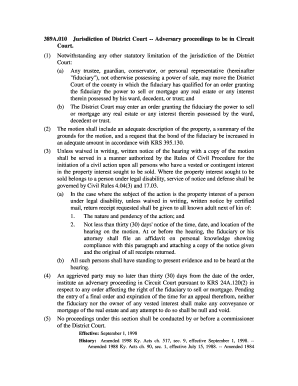
389A.010 Jurisdiction of District Court Adversary proceedings to be in Circuit Court. (1)(2)(3)(4)(5)Notwithstanding any other statutory limitation of the jurisdiction of the District Court: (a) Any.

How it works

  1. Open form

    Open form follow the instructions

  2. Easily sign form

    Easily sign the form with your finger

  3. Share form

    Send filled & signed form or save

How to fill out the Krs 389a 010 online

Filling out the Krs 389a 010 form online is a crucial step for fiduciaries seeking to obtain the power to sell or mortgage property on behalf of their wards, decedents, or trusts. This guide provides clear and detailed steps to assist users through the process.

Follow the steps to successfully complete the Krs 389a 010 form online.

  1. Press the ‘Get Form’ button to access the Krs 389a 010 form and open it in your preferred browser.
  2. Begin by entering your name and contact information in the designated fields. Ensure that all provided information is accurate to avoid delays.
  3. Detail the property being affected, including an adequate description that specifies the location and nature of the interest involved.
  4. Summarize the grounds for your motion clearly. This information should justify why you are seeking the power to sell or mortgage the property.
  5. Indicate whether you request an increase in the bond of the fiduciary in accordance with KRS 395.130. Specify the proposed amount if applicable.
  6. Prepare a notice of hearing to be served to all interested parties, ensuring that it complies with the Rules of Civil Procedure.
  7. If applicable, include information about providing notice to the adult next of kin of any individuals under legal disability, detailing the intended notification methods.
  8. Before submitting the form, review all entries for accuracy and completeness.
  9. Once everything is in order, you can save changes, download the completed form for your records, or print it to share as needed.

Complete your Krs 389a 010 form online today for a smoother process.

Get form

Experience a faster way to fill out and sign forms on the web. Access the most extensive library of templates available.
Get form

Related content

389A.010 Jurisdiction of District Court...
389A.010 Jurisdiction of District Court -- Adversary proceedings to be in Circuit. Court...
Learn more
Kentucky Law Survey: Real Property - UKnowledge
KRS section 389A.035 as it was in Blackaby. Fiduciaries and real estate practitioners...
Learn more

Related links form

PA DPW-ARL 2005 PA FP-001 2010 PA Montoursville Youth Football and Cheer Participant Application PA PFBC-168R 2013

Questions & Answers

Get answers to your most pressing questions about US Legal Forms API.

Contact support

Section 508 addresses every aspect of electronic documents. This includes ensuring content is tagged in correct order, as well as properly identifying section headings, bulleted and numbered lists, and footnotes and endnotes. Guidelines for the accessibility of PDF are also part of the PDF/UA ISO standard 14289-1.

Section 508 of the Rehabilitation Act requires federal agencies to ensure that their information and communication technology (ICT) is accessible to people with disabilities, unless certain exceptions apply.

To tag a PDF in Acrobat, choose Tools > Accessibility > Add Tags To Document. This command works on any untagged PDF, such as one created with Adobe PDF Printer. Acrobat analyzes the content of the PDF to interpret the individual page elements, their hierarchical structure, and the intended reading order of each page.

It requires all Federal electronic content to be accessible. The U.S. Access Board is an independent Federal agency which develops and maintains standards that must be met to achieve 508 compliance. HHS reviews are directly based on these standards.

To run the Adobe Acrobat Pro Accessibility Check on a PDF, select the Accessibility Tool in the Tools panel. Select Accessibility Check in the Accessibility Tool panel on the right. The Accessibility Checker panel on the left lists the 508 compliance issues.

PDF tags make it possible to identify content as headings, lists, tables, etc., and to include alternate text for images. Without tags, none of these accessibility features are possible. Unfortunately, not all PDFs are tagged, and many document authoring tools are not capable of creating them.

Tags provide a logical structure that governs how the content of the PDF is presented through assistive technology. A properly tagged PDF, therefore, becomes accessible to everyone.

0:00 1:14 PDF Accessibility: Tagging Footnotes - YouTube YouTube Start of suggested clip End of suggested clip Order then click show order panel to keep track of footnotes. Once you do this locate the firstMoreOrder then click show order panel to keep track of footnotes. Once you do this locate the first footnote indicator in your document. Once you've found it double-click the indicator.

Get This Form Now!

Use professional pre-built templates to fill in and sign documents online faster. Get access to thousands of forms.
Get form
If you believe that this page should be taken down, please follow our DMCA take down processhere.

Industry-leading security and compliance

US Legal Forms protects your data by complying with industry-specific security standards.
  • In businnes since 1997
    25+ years providing professional legal documents.
  • Accredited business
    Guarantees that a business meets BBB accreditation standards in the US and Canada.
  • Secured by Braintree
    Validated Level 1 PCI DSS compliant payment gateway that accepts most major credit and debit card brands from across the globe.
Get Krs 389a 010
Get form
  • Adoption
  • Bankruptcy
  • Contractors
  • Divorce
  • Home Sales
  • Employment
  • Identity Theft
  • Incorporation
  • Landlord Tenant
  • Living Trust
  • Name Change
  • Personal Planning
  • Small Business
  • Wills & Estates
  • Packages A-Z
  • Affidavits
  • Bankruptcy
  • Bill of Sale
  • Corporate - LLC
  • Divorce
  • Employment
  • Identity Theft
  • Internet Technology
  • Landlord Tenant
  • Living Wills
  • Name Change
  • Power of Attorney
  • Real Estate
  • Small Estates
  • Wills
  • All Forms
  • Forms A-Z
  • Form Library
  • Legal Hub
  • About Us
  • Help Portal
  • Legal Resources
  • Blog
  • Affiliates
  • Contact Us
  • Delete My Account
  • Site Map
  • Industries
  • Forms in Spanish
  • Localized Forms
  • State-specific Forms
  • Forms Kit
  • Real Estate Handbook
  • All Guides
  • Notarize
  • Incorporation services
  • For Consumers
  • For Small Business
  • For Attorneys
  • USLegal
  • FormsPass
  • pdfFiller
  • signNow
  • altaFlow
  • DocHub
  • Instapage
Form Packages
  • Adoption
  • Bankruptcy
  • Contractors
  • Divorce
  • Home Sales
  • Employment
  • Identity Theft
  • Incorporation
  • Landlord Tenant
  • Living Trust
  • Name Change
  • Personal Planning
  • Small Business
  • Wills & Estates
  • Packages A-Z
Form Categories
  • Affidavits
  • Bankruptcy
  • Bill of Sale
  • Corporate - LLC
  • Divorce
  • Employment
  • Identity Theft
  • Internet Technology
  • Landlord Tenant
  • Living Wills
  • Name Change
  • Power of Attorney
  • Real Estate
  • Small Estates
  • Wills
  • All Forms
  • Forms A-Z
  • Form Library
Customer Service
  • Legal Hub
  • About Us
  • Help Portal
  • Legal Resources
  • Blog
  • Affiliates
  • Contact Us
  • Delete My Account
  • Site Map
  • Industries
  • Forms in Spanish
  • Localized Forms
  • State-specific Forms
  • Forms Kit
Legal Guides
  • Real Estate Handbook
  • All Guides
Prepared for you
  • Notarize
  • Incorporation services
Our Customers
  • For Consumers
  • For Small Business
  • For Attorneys
Our Sites
  • USLegal
  • FormsPass
  • pdfFiller
  • signNow
  • altaFlow
  • DocHub
  • Instapage
Social Media
Call us now toll free:
+1 833 426 79 33
As seen in:
© Copyright 1999-2026 airSlate Legal Forms, Inc. 3720 Flowood Dr, Flowood, Mississippi 39232
  • Your Privacy Choices
  • Terms of Service
  • Privacy Notice
  • Content Takedown Policy
  • Bug Bounty Program