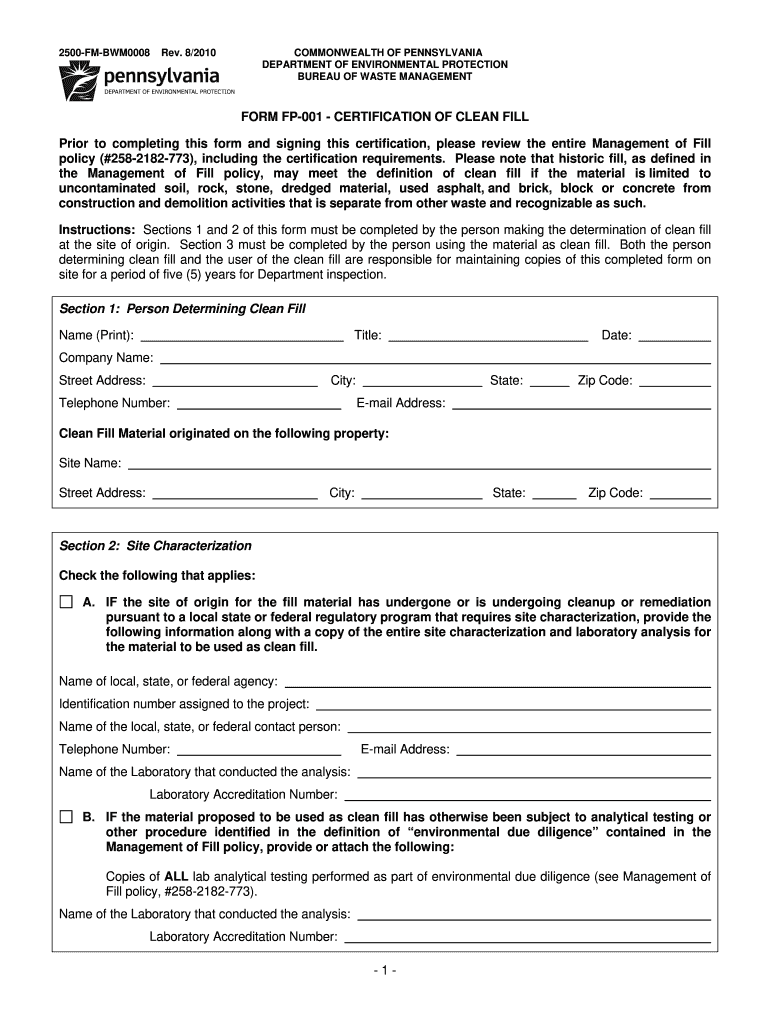
Ss: The quantity of clean fill to be placed on the property is: <3,000 cubic yards 3,000 cubic yards to 20,000 cubic yards >20,000 cubic yards I, the undersigned, certify under penalty of law (18 Pa. C.S.A. §4904) that the information provided is true and correct to the best of my knowledge, information and belief. Signature: * * * * * Prior to placement of the clean fill, the owner of the property receiving fill material shall provide a copy of this completed form and attachments to the D.
Loading

Open form follow the instructions

Easily sign the form with your finger

Send filled & signed form or save
How to fill out the PA FP-001 online
Filling out the PA FP-001 form properly is essential for certifying clean fill in Pennsylvania. This guide offers a clear and structured approach to assist users in completing the form online with confidence.
Follow the steps to complete the PA FP-001 form online.
- Click ‘Get Form’ button to access the PA FP-001 and open it in your chosen editor.
- In Section 1, provide the details of the person determining clean fill. This includes their name, title, date, company name, address, city, state, zip code, telephone number, and email address. Ensure accurate information is entered to maintain clarity.
- Indicate the clean fill material's origin by entering the site's name, city, street address, state, and zip code. This information is crucial for tracking and compliance purposes.
- In Section 2, select the appropriate checkbox that applies to the site characterization. If the site has undergone cleanup, provide details as requested, including agency name, project identification number, contact person's name, and their contact information.
- If the material proposed for clean fill underwent analytical testing, attach copies of all lab analytical testing results. Include the laboratory's name and accreditation number for verification.
- For any alternative environmental due diligence procedures regarding the proposed material, provide a clear description as required.
- Sign and date the certification at the end of Section 2, confirming that the information provided is accurate to the best of your knowledge.
- In Section 3, fill in the details of the person receiving or placing the clean fill, including their name, mailing address, city, state, telephone number, and email address.
- Provide the property address for where the clean fill will be placed, along with the current owner's information and an estimate of the quantity of clean fill to be placed.
- Lastly, the person completing the form must sign and date Section 3, asserting that all provided information is true and correct.
- Once all sections are complete, save changes, download the form, print it, or share it as necessary. Ensure that copies of the form are maintained on-site for five years for department inspection.
Complete your PA FP-001 form online today and ensure compliance with environmental regulations.
Experience a faster way to fill out and sign forms on the web. Access the most extensive library of templates available.
Related content
If a property receives fill from multiple sources, a separate Form FP-001 is required for...
by TR Reyes-Amigo · 2023 — The main findings revealed that the examined PA program had...
En la Parte 1 se proporcionan datos esenciales con respecto al tipo de información...
Get answers to your most pressing questions about US Legal Forms API.
What is the definition of clean fill?
Clean fill is defined as inert, uncontaminated material that conforms to established environmental regulations. In the framework of PA FP-001, clean fill must not introduce pollutants or hazardous substances to the environment. Utilizing clean fill in your construction projects not only ensures compliance but also promotes sustainable practices that benefit the community and ecosystem.
What is the difference between clean fill and topsoil?
Clean fill and topsoil serve different purposes in construction and landscaping. While clean fill consists of inert materials that provide stability and support, topsoil is a nutrient-rich layer organic material vital for plant growth. Understanding the distinctions between these materials is important for selecting the right one for your project, especially under the guidelines of PA FP-001.
What is a clean fill in PA DEP?
In the context of the Pennsylvania Department of Environmental Protection (PA DEP), clean fill is defined as non-hazardous material that meets specific criteria for environmental safety. This includes materials like uncontaminated soil and crushed concrete. Complying with PA FP-001 requirements helps protect public health and the environment during construction activities.
What is the difference between fill and clean fill?
The primary difference between fill and clean fill lies in the content and safety of the materials. Fill can include a wide range of earth materials, which may contain contaminants, while clean fill specifically refers to uncontaminated materials that comply with PA FP-001 standards. Using clean fill is crucial for ensuring a safe and environmentally friendly site for construction.
What is considered clean fill?
Clean fill refers to solid, inert materials that do not contaminate the environment. In the context of PA FP-001, clean fill materials may include soil, rock, and concrete, provided they meet the regulatory standards. These materials are essential for construction and landscaping projects, as they help create stable foundations without introducing harmful substances.
What is the PA DEP emergency response number?
The emergency response number for the Pennsylvania DEP is 1-800-424-8802. This line is critical for urgent environmental issues, including spills and incidents requiring immediate attention. Understanding how to use this resource effectively can make a difference in situations related to PA FP-001 compliance. Keep this number close, as timely communication can help protect both public health and the environment.
How do I report a DEP spill in PA?
To report a spill in Pennsylvania, you should contact the Pennsylvania DEP's Emergency Response number at 1-800-424-8802. Prompt reporting ensures that action can be taken to minimize environmental damage. If your situation involves compliance with PA FP-001, this reporting mechanism is crucial. Make sure to gather all relevant information about the spill for accurate reporting.
How do I contact DEP in PA?
You can contact the Pennsylvania Department of Environmental Protection (DEP) by calling their main office at 1-866-255-5158. For specific inquiries regarding the PA FP-001 process, reaching out directly helps ensure you receive the most relevant information. Additionally, you can visit their official website to find local offices and resources that can assist you. Don't hesitate to reach out for support.
How do I amend my PA tax return on TurboTax?
To amend your PA tax return on TurboTax, first open the program and locate your previous filings. Navigate to the 'Amend' section and choose the option to amend your Pennsylvania state return, such as using the PA FP-001 form. Carefully follow the prompts to enter your corrections, review the changes, and submit the amended return to ensure it is processed smoothly.
How long do you have to amend a PA tax return?
You generally have up to three years from the original filing date to amend your PA tax return. If you discover an error or need to make corrections, don’t hesitate to file amendments promptly. Utilizing the PA FP-001 form ensures that your changes are accurately reflected within this time frame, allowing you to avoid potential penalties.
Use professional pre-built templates to fill in and sign documents online faster. Get access to thousands of forms.
If you believe that this page should be taken down, please follow our DMCA take down process here.