Loading
Form preview
  • US Legal Forms
  • Other Templates
  • Miscellaneous Forms
  • Monthly Profit & Loss Statement

Get Monthly Profit & Loss Statement

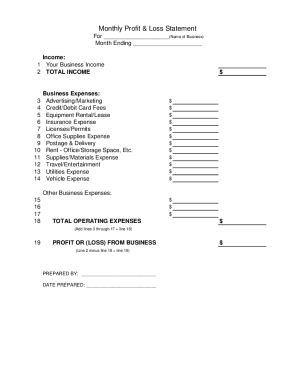
3 4 5 6 7 8 9 10 11 12 13 14 Business Expenses: Advertising/Marketing Credit/Debit Card Fees Equipment Rental/Lease Insurance Expense Licenses/Permits Office Supplies Expense Postage & Delivery Rent - Office/Storage Space, Etc. Supplies/Materials Expense Travel/Entertainment Utilities Expense Vehicle Expense $ $ $ $ $ $ $ $ $ $ $ $ $ Other Business Expenses: 15 16 17 18 $ $ $ TOTAL OPERATING EXPENSES $ (Add lines 3 through 17 = line 18) 19 PROFIT OR (LOSS) FROM BUSINESS (Line 2 minus.

How it works

  1. Open form

    Open form follow the instructions

  2. Easily sign form

    Easily sign the form with your finger

  3. Share form

    Send filled & signed form or save

How to fill out the Monthly Profit & Loss Statement online

This guide provides a comprehensive overview of how to successfully complete the Monthly Profit & Loss Statement online. By following these clear and supportive instructions, users can accurately report their business income and expenses.

Follow the steps to complete your Monthly Profit & Loss Statement

  1. Press the ‘Get Form’ button to obtain the Monthly Profit & Loss Statement and open it in the online editor.
  2. Enter the name of your business in the designated field at the top of the form.
  3. Indicate the month ending date for the report, ensuring it reflects the correct period of financial activity.
  4. In the 'Income' section, provide the total amount of your business income in line 1. This figure should represent all income generated during the reporting month.
  5. Calculate the total income by ensuring line 2 accurately reflects the amount from line 1. Simply input this value in line 2.
  6. In the 'Business Expenses' section, list each type of expense in the respective lines, filling in dollars amounts next to each category such as Advertising/Marketing and Insurance Expense.
  7. In the 'Other Business Expenses' section, fill the designated lines with any additional expenses not previously listed, entering dollar amounts as necessary.
  8. Calculate the total operating expenses by summing all the expenses listed in lines 3 through 17, and input this total in line 18.
  9. Determine the profit or loss by subtracting the total operating expenses (line 18) from the total income (line 2). Write this result in line 19.
  10. Fill in the 'Prepared By' section with your name and include the date prepared to finalize the document.
  11. Once all fields are completed and reviewed for accuracy, choose to save changes, download, print, or share the completed form as needed.

Start filling out your Monthly Profit & Loss Statement online today to ensure accurate financial reporting!

Get form

Experience a faster way to fill out and sign forms on the web. Access the most extensive library of templates available.
Get form

Related content

Monthly Profit & Loss Statement
Monthly Profit & Loss Statement. Complete one form for each month...
Learn more
How to Prepare an Income Statement
Dec 9, 2021 — Steps to Prepare an Income Statement · 1. Choose Your Reporting Period ·...
Learn more
FINANCIAL STATEMENTS REPORTS OF THE EXTERNAL ...
The IPSAS Board, the body that issues IPSAS, encourages early adoption of these standards...
Learn more

Related links form

CA REG 1000 2013 CA REG 119 2016 CA REG 5045 2011 CO DR 2314 2016

Questions & Answers

Get answers to your most pressing questions about US Legal Forms API.

Contact support

An example of a Monthly Profit & Loss Statement would detail monthly sales totaling $10,000, with expenses of $7,000. This example highlights a net profit of $3,000 for the month. Utilizing this format allows you to see where your business stands financially and can guide your future budgeting decisions.

Writing a profit and loss account statement involves outlining your monthly revenues and expenses clearly. Start by listing your income sources, followed by your costs, to calculate your net profit. This process provides a snapshot of your business's financial performance, helping you identify trends and improve profitability.

Preparing for a Monthly Profit & Loss Statement requires gathering all financial data from the month, including sales, expenses, and any other relevant information. Organizing your receipts and invoices helps ensure accuracy. By utilizing tools available on platforms like US Legal Forms, you can streamline this process and generate a detailed P&L statement efficiently.

To lay out a Monthly Profit & Loss Statement effectively, start with revenues at the top, followed by the costs of goods sold, leading to gross profit. Next, list operating expenses and any additional income or expenses to arrive at net profit. Ensuring a structured layout enhances readability and allows stakeholders to understand your financial health quickly.

The basic formula for a Monthly Profit & Loss Statement involves calculating total revenues and subtracting total expenses. This equation provides a clear overview of your financial performance for the month. Understanding this formula helps you gauge profitability and make informed business decisions moving forward.

Filing a Monthly Profit & Loss Statement typically involves submitting it to your accountant or financial advisor for analysis. If you run a business, it may also require inclusion in your tax filings or financial reports. Ensure your statement is accurate and clearly formatted to facilitate easy review. Using US Legal Forms can help you create a properly structured statement that meets all necessary requirements.

To do a Monthly Profit & Loss Statement, gather all your financial data, including income and expenses. Organize this data into categories to ensure clarity. After listing everything, calculate your total revenue and total expenses, then apply the basic formula to find your net profit or loss. Using an organized approach will help you track your financial performance effectively.

Yes, you can absolutely do your own Monthly Profit & Loss Statement. By gathering your income and expenses in one place, you can accurately represent your financial standing. It’s essential to stay organized and consistent in recording data. Resources available on US Legal Forms can assist you in creating a professional document, ensuring you don’t miss any crucial details.

To make a Monthly Profit & Loss Statement, start by listing all sources of revenue you earned during the month. Next, detail all expenses, from fixed costs to variable ones. After entering all figures, perform the subtraction to calculate your net profit or loss. Using tools from US Legal Forms can simplify this task, providing templates that make the process quick and efficient.

The IRS does not explicitly require a Profit & Loss Statement for all businesses; however, it is a key part of annual tax reporting for many. Having this document can provide clarity on your earnings and expenses, ultimately facilitating your tax preparation. Using resources from uslegalforms can help you prepare this statement accurately, ensuring compliance and organization in your financial records.

Get This Form Now!

Use professional pre-built templates to fill in and sign documents online faster. Get access to thousands of forms.
Get form
If you believe that this page should be taken down, please follow our DMCA take down processhere.
Get Monthly Profit & Loss Statement
Get form
  • Adoption
  • Bankruptcy
  • Contractors
  • Divorce
  • Home Sales
  • Employment
  • Identity Theft
  • Incorporation
  • Landlord Tenant
  • Living Trust
  • Name Change
  • Personal Planning
  • Small Business
  • Wills & Estates
  • Packages A-Z
  • Affidavits
  • Bankruptcy
  • Bill of Sale
  • Corporate - LLC
  • Divorce
  • Employment
  • Identity Theft
  • Internet Technology
  • Landlord Tenant
  • Living Wills
  • Name Change
  • Power of Attorney
  • Real Estate
  • Small Estates
  • Wills
  • All Forms
  • Forms A-Z
  • Other Templates
  • Legal Hub
  • About Us
  • Help Portal
  • Legal Resources
  • Blog
  • Affiliates
  • Contact Us
  • Delete My Account
  • Site Map
  • Industries
  • Forms in Spanish
  • Localized Forms
  • State-specific Forms
  • Forms Kit
  • Real Estate Handbook
  • All Guides
  • Notarize
  • Incorporation services
  • For Consumers
  • For Small Business
  • For Attorneys
  • USLegal
  • FormsPass
  • pdfFiller
  • signNow
  • altaFlow
  • DocHub
  • Instapage
Form Packages
  • Adoption
  • Bankruptcy
  • Contractors
  • Divorce
  • Home Sales
  • Employment
  • Identity Theft
  • Incorporation
  • Landlord Tenant
  • Living Trust
  • Name Change
  • Personal Planning
  • Small Business
  • Wills & Estates
  • Packages A-Z
Form Categories
  • Affidavits
  • Bankruptcy
  • Bill of Sale
  • Corporate - LLC
  • Divorce
  • Employment
  • Identity Theft
  • Internet Technology
  • Landlord Tenant
  • Living Wills
  • Name Change
  • Power of Attorney
  • Real Estate
  • Small Estates
  • Wills
  • All Forms
  • Forms A-Z
  • Other Templates
Customer Service
  • Legal Hub
  • About Us
  • Help Portal
  • Legal Resources
  • Blog
  • Affiliates
  • Contact Us
  • Delete My Account
  • Site Map
  • Industries
  • Forms in Spanish
  • Localized Forms
  • State-specific Forms
  • Forms Kit
Legal Guides
  • Real Estate Handbook
  • All Guides
Prepared for you
  • Notarize
  • Incorporation services
Our Customers
  • For Consumers
  • For Small Business
  • For Attorneys
Our Sites
  • USLegal
  • FormsPass
  • pdfFiller
  • signNow
  • altaFlow
  • DocHub
  • Instapage
Social Media
Call us now toll free:
+1 833 426 79 33
As seen in:
© Copyright 1999-2026 airSlate Legal Forms, Inc. 17 Station Street, Ste. 203, Brookline, MA 02445
  • Your Privacy Choices
  • Terms of Service
  • Privacy Notice
  • Content Takedown Policy
  • Bug Bounty Program