Loading
Get Co Dr 2314 2016-2026
How it works
-

Open form follow the instructions
-

Easily sign the form with your finger
-

Send filled & signed form or save
How to fill out the CO DR 2314 online
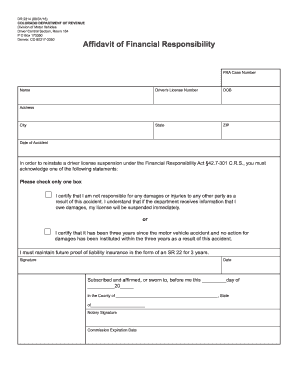
Filling out the CO DR 2314 is an essential step for individuals looking to reinstate their driver license suspension under the Financial Responsibility Act. This guide will provide you with clear, step-by-step instructions to complete the form online effectively.
Follow the steps to complete your CO DR 2314 online.
- Click the ‘Get Form’ button to obtain the CO DR 2314 and access the online editor.
- Begin by entering your name in the designated field. Ensure your name is spelled correctly as it appears on your driver’s license.
- Fill in your driver’s license number in the corresponding field to help link your information with the Colorado Department of Revenue.
- Provide your date of birth (DOB) in the specified format. This is important for verifying your identity.
- Enter your state and ZIP code in the respective fields to ensure accurate location information.
- Complete the address section by providing your full street address, including the city.
- In the section for the date of the accident, enter the exact date when the incident occurred.
- You must acknowledge one of the two statements regarding your responsibility for damages. Select only one option by checking the appropriate box.
- If you certify that you are not responsible for damages, note that your license may still be suspended if the department receives evidence of such damages.
- Alternatively, if three years have passed since the accident without any claims for damages, affirm this by selecting the relevant option.
- Remember to indicate your commitment to maintain future proof of liability insurance in the form of an SR 22 for three years if required.
- Sign the document at the designated signature field. Make sure your signature is clear.
- Enter the date when you are signing the form to validate your submission.
- You will find a notary section that requires affirmation. Arrange for a notary to witness your signature.
- Once all necessary information is complete, review the form for accuracy and clarity. Then, you can save changes, download, print, or share the completed document as needed.
Complete your CO DR 2314 online today to ensure compliance and expedite your driver license reinstatement!
In Colorado, both parties do not have to be present to transfer a title. However, proper documentation, including the signed title and possibly a CO DR 2314 statement, is necessary. To streamline this transaction, consider leveraging the resources on the US Legal Forms platform, which provide all the needed forms and instructions for a successful title transfer.