Loading
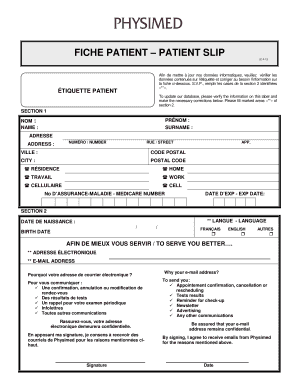
Get Fiche Patient Patient Slip
How it works
-

Open form follow the instructions
-

Easily sign the form with your finger
-

Send filled & signed form or save
How to fill out the FICHE PATIENT PATIENT SLIP online
The FICHE PATIENT PATIENT SLIP is an essential form for updating patient information in a medical database. Filling it out accurately ensures that healthcare providers have the most current information to serve users effectively.
Follow the steps to complete the FICHE PATIENT PATIENT SLIP online.
- Press the ‘Get Form’ button to access the form, and open it in the online editor for completion.
- Begin by entering your name in the appropriate field, ensuring that you provide your full name as indicated.
- Fill in your surname in the designated section below your name, making sure it matches your official identification.
- Complete your address by entering your street number and street name in the 'Address' section.
- Provide the city where you reside in the specified field next to 'City'.
- Enter your postal code in the designated area following 'Postal Code'.
- List your primary phone numbers by checking one or more options for residence, work, and cell, as applicable.
- Fill in your Medicare number in the provided field, ensuring it is accurate.
- Indicate the expiration date of your Medicare number in the appropriate section.
- For section 2, select your preferred language by marking one of the options: French, English, or Other.
- Input your birth date in the specified format to ensure correct record-keeping.
- In the next marked section, provide your email address to facilitate communication regarding appointments and other important information.
- Read the privacy statement about your email address usage, and if you agree, ensure you sign in the designated space.
- Once all sections are complete, review your information for accuracy before saving your changes, and proceed to download, print, or share the form as needed.
Complete your documents online today for a smoother healthcare experience.