Loading
Get Irp Form T-139 Georgia Irp Mileage Schedule B 2
How it works
-

Open form follow the instructions
-

Easily sign the form with your finger
-

Send filled & signed form or save
How to fill out the IRP Form T-139 Georgia IRP Mileage Schedule B 2 online
Filling out the IRP Form T-139 is an essential step for users applying for Georgia IRP registration. This guide provides a straightforward approach to completing the form effectively and accurately online.
Follow the steps to complete the form successfully.
- Click ‘Get Form’ button to obtain the form and open it in your editor.
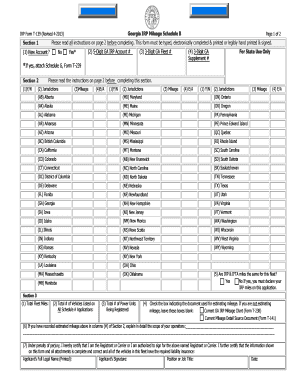
- Section 1: Determine if this is a new account. Check 'Yes' if you are applying for Georgia IRP registration for the first time or 'No' if not. If you checked 'Yes', attach Schedule G, Form T-239. Record your 5-digit Georgia IRP account number if applicable and provide your 3-digit Georgia fleet number.
- Section 2: Mark 'Y' for Yes or 'N' for No in the first column (Y/N) to indicate if the vehicles in this fleet traveled in the jurisdictions provided in column (2). Complete columns (2), (3), and (4) for each jurisdiction: enter actual or estimated mileage in column (3) and mark 'E' for estimated or 'A' for actual in column (4).
- In Section 3, calculate and enter the total fleet miles from section 2. Add the total number of vehicles listed across all Schedule A applications. Enter the total number of power units being registered.
- Indicate the document used for estimating mileage, if applicable. If you have entered estimated mileage, you must explain the scope of your operations in detail.
- Finally, certify the information by printing your full legal name, signing, entering your position or job title, and dating the form.
- Once completed, save your changes, download the form, print it, or share it as needed.
Begin filling out your documents online for a more efficient process.
Step 1: Start Add Vehicle Supplement Log in to the IRP application. From the Applications tab, select IRP. From the Supplement tab, select Add Vehicle. From the Supplement Search screen, click Proceed (do not enter information in the empty fields)
Industry-leading security and compliance
US Legal Forms protects your data by complying with industry-specific security standards.
-
In businnes since 199725+ years providing professional legal documents.
-
Accredited businessGuarantees that a business meets BBB accreditation standards in the US and Canada.
-
Secured by BraintreeValidated Level 1 PCI DSS compliant payment gateway that accepts most major credit and debit card brands from across the globe.