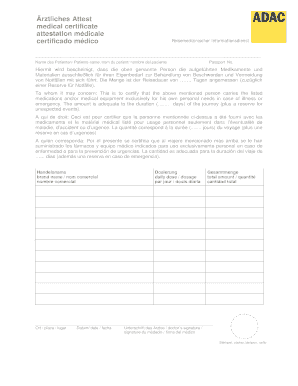
Rztliches Attest medical certificate attestation mdicale certificado mdico Reisemedizinischer Informationsdienst Name des Patienten/ Patients name /nom du patient/ nombre del paciente Passport No.

How it works
  • Open form

    Open form follow the instructions

  • Easily sign form

    Easily sign the form with your finger

  • Share form

    Send filled & signed form or save

How to fill out the Adac Medical Certificate online

Completing the Adac Medical Certificate online is a straightforward process that ensures you have the necessary documentation for your travel health needs. This guide provides step-by-step instructions to help you fill out the form accurately and efficiently.

Follow the steps to complete the Adac Medical Certificate online.

  1. Click ‘Get Form’ button to obtain the document and open it in your preferred digital editor.
  2. Begin by entering the patient's name in the designated field. Ensure the spelling is correct, as this will be used for identification purposes.
  3. Next, input the passport number of the patient. This is important for verifying the identity and travel details.
  4. Proceed to list the medications and medical equipment the patient will carry. Each item should be clearly specified to avoid any misunderstandings.
  5. Indicate the duration of the journey in days, ensuring that the amount of medication is adequate for this period, plus an emergency reserve.
  6. Fill out the brand names of the medications. Be precise to facilitate compatibility and recognition by authorities.
  7. Enter the place where the medication will be used. This contextualizes the travel and medical needs.
  8. Input the date when the certificate is being filled out, ensuring that it is current and relevant.
  9. Specify the daily dosage for each medication listed. This is critical for proper compliance with treatment regimens.
  10. Calculate and state the total amount of each medication the patient will carry. This should correspond to the length of the trip.
  11. Lastly, ensure the doctor signs the certificate and affixes their official stamp. This validates the document and its contents.
  12. After completing all sections, ensure to save any changes made, download the form for your records, and print or share as required.

Take action now and complete your Adac Medical Certificate online to ensure a hassle-free travel experience.

Get form

Experience a faster way to fill out and sign forms on the web. Access the most extensive library of templates available.

Related content

Advance Directive Adoption Committee (ADAC)...

The Advance Directive Adoption Committee (ADAC) provides guidance to the ... Health...

Learn more
Alcohol & Drug Abuse Counseling - Midland College

The associate of applied science (AAS) degree in ADAC is a technical ... a fully licensed...

Learn more
32-Bit Microcontrollers TX00/TX03/TX04 Series...

the first product in the Asia-Pacific region to obtain tool certification (by TUV SUD...

Learn more
Questions & Answers

Get answers to your most pressing questions about US Legal Forms API.

Contact support

How do you format numbers in react?

If you're working with large numbers in React, formatting them with commas for readability is often helpful. Fortunately, there's a simple way to do this using the built-in Intl. NumberFormat and toLocaleString() method.

1 Answer. If that currency symbol is not included on the "Format" tab, then you have to write a custom format script or use the builtin "AFNumber_Format" built-in to Acrobat/Reader.

For US dollars, the symbol '$' is sufficient abbreviation, unless there is a mixture of dollar currencies in the text. For other dollar currencies, '$' should be prefixed with the country abbreviation. For all other currencies, write the figure first followed by the currency name, for example, '100 million yuan'.

In JavaScript, the most prevalent and the easiest method to format numbers as currency strings is using the Intl. NumberFormat() method.

To format a text field as currency Right-click Cost and select Format. The Format Objects dialog box opens. On the Number tab, select Currency from the Category list. The default settings use a dollar sign and two decimal places.

One of the best ways in JavaScript to format the number as a currency string is to use Intl. NumberFormat() method. You can pass the locale to the method as a parameter and set the dollar sign before the number and format number.

Default value is none. Custom renderText method. Format with pattern : Format credit card as text. 4.Prefix and thousand separator : Format currency in input. Maintaining change value on state. Format with pattern : Format credit card in an input. 6.Format with mask : Format credit card in an input. Format with mask as array.

Default value is none. Custom renderText method. Format with pattern : Format credit card as text. 4.Prefix and thousand separator : Format currency in input. Maintaining change value on state. Format with pattern : Format credit card in an input. 6.Format with mask : Format credit card in an input. Format with mask as array.

Get This Form Now!

Use professional pre-built templates to fill in and sign documents online faster. Get access to thousands of forms.

If you believe that this page should be taken down, please follow our DMCA take down process here.

Get Adac Medical Certificate