Loading
Get Government Spending Theme 1 Lesson 1
This website is not affiliated with IRS
How it works
-

Open form follow the instructions
-

Easily sign the form with your finger
-

Send filled & signed form or save
How to fill out the Government Spending Theme 1 Lesson 1 online
This guide will assist you in completing the Government Spending Theme 1 Lesson 1 form online. By following the detailed instructions provided, you will be able to understand each section and fill it out with confidence.
Follow the steps to fill out the form accurately and efficiently.
- Press the ‘Get Form’ button to access the form and open it in your preferred editor.
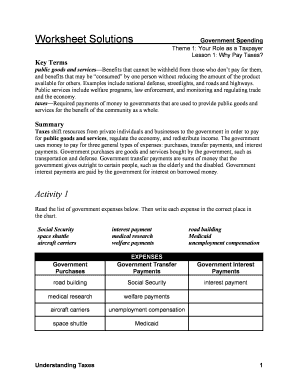
- Begin with the key terms section. Carefully read and understand each term described, such as 'public goods and services' and 'taxes.' This foundational knowledge will help you fill out the subsequent sections.
- Look at Activity 1. You will notice a chart that requires you to categorize various government expenses. Analyze the list of expenses provided and place each one in the correct column: Government Purchases, Government Transfer Payments, or Government Interest Payments.
- Proceed to Activity 2. Here, you will answer questions based on the government spending table. Make sure to review the revenue and spending figures for the years listed and perform the necessary calculations.
- For Activity 3, you will answer a reflective question regarding future government revenue and spending. Provide your thoughts in the space provided, ensuring to explain your reasoning clearly.
- After completing the form, make sure to review all your entries for any errors or omissions. Once you are satisfied with your responses, save your changes, and you can choose to download, print, or share the completed form.
Complete your Government Spending Theme 1 Lesson 1 form online today for a clearer understanding of your role as a taxpayer.
Related links form
The federal budget comprises three primary components: revenues, discretionary spending, and direct spending.