We use cookies to improve security, personalize the user experience, enhance our marketing activities (including cooperating with our marketing partners) and for other business use.
Click "here" to read our Cookie Policy. By clicking "Accept" you agree to the use of cookies. Read less
Read more
Accept
Loading
Form preview
  • US Legal Forms
  • Form Library
  • More Forms
  • More Uncategorized Forms
  • Harvest Timesheet

Get Harvest Timesheet

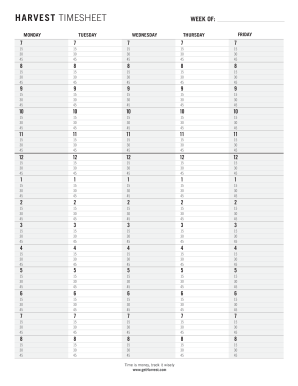
HARVEST TIMESHEET MONDAY WEEK OF: TUESDAY WEDNESDAY FRIDAY THURSDAY 7 7 7 7 7 15 30 45 15 30 45 15 30 45 15 30 45 15 30 45 8 8 8 8 8 15 30 45 15 30 45 15 30 45 15 30 45 15 30 45 9 9 9 9 9 15 30 45.

How it works

  1. Open form

    Open form follow the instructions

  2. Easily sign form

    Easily sign the form with your finger

  3. Share form

    Send filled & signed form or save

How to fill out the HARVEST TIMESHEET online

The HARVEST TIMESHEET is a vital tool for tracking work hours and ensuring accurate record-keeping. This guide provides step-by-step instructions to assist users in completing the timesheet efficiently and accurately.

Follow the steps to complete your HARVEST TIMESHEET online.

  1. Click the ‘Get Form’ button to access the HARVEST TIMESHEET and open it for editing.
  2. Locate the date fields at the top of the timesheet, and input the week commencing date to provide context for the entries.
  3. Fill in the hours worked for each day of the week by selecting appropriate time blocks under each weekday column. Choose between the options of 15, 30, or 45 minutes as needed.
  4. Ensure that the total hours for each day are accurately reflected in the designated fields to maintain an accurate record.
  5. Review the filled timesheet for any errors or omissions before finalizing your entry.
  6. Once the timesheet is complete and reviewed, proceed to save your changes. You may also choose to download, print, or share the completed form as required.

Start filling out your HARVEST TIMESHEET online today to track your time effectively.

Get form

Experience a faster way to fill out and sign forms on the web. Access the most extensive library of templates available.
Get form

Related content

Iridesco LLC, d/b/a Harvest - Privacy Shield
... we receive and process Customer Personal Data that is collected through our online...
Learn more
Everhour – Project Time Management System for...
All-in-one time tracking and scheduling solution. Perfect for Jira, Asana, Trello...
Learn more
2017 Fruit Chemical Use Survey - UserManual.wiki
Harvest aids are used to regulate growth or cause fruit to ripen more uniformly. 6. How...
Learn more

Related links form

NY SCDADSDP Application 2014 NY SCDADSDP Application 2014 NY Uniform Uncontested Divorce Packet 2019 OH General Warranty Deed

Questions & Answers

Get answers to your most pressing questions about US Legal Forms API.

Contact support

Harvest is a cloud-based time tracking tool designed for businesses of all sizes. The solution provides timesheet and invoicing features for small businesses and freelancers.

On the Upgrade your Harvest plan screen, click the switch to the free version link at the bottom of the page. If you've enabled sample data in your trial account, any sample items will be removed when you make the switch.

No. Harvest does not take screenshots or video recordings of your computer.

When you first sign up for a Harvest account, you get a free 30-day trial that is fully featured—that is, it's the same as it would be if you were paying for the account. This is different from the free plan, which you're welcome to use as long as you'd like and which has some limitations.

Adding time in the Day view Click the Track time button. Choose your project and task. ... If you want to keep any Notes on your work, you can add those here, too. Start a timer by clicking Start timer, or enter a duration (or start and end times, if your timesheet is set up that way) and click Save entry.

To add or change time for a project/task on a particular day: Click into the field in question and change it. Your timesheet will autosave in a few seconds, or you can manually save it. To delete a week's worth of time for a project/task: Click the x to the right of the row.

Entering Time Manually on a Task Go to the Pod and Task you want to start working on. Select the Task name to open up the Task details. On the right side, click Add Time to Harvest. Fill out the information Harvest requires for the tracked time. ... Click Save Entry.

If hours have been invoiced, you need to mark those hours as uninvoiced to unlock the timesheet. This won't change your invoice, but it will allow you to modify locked hours on your timesheet. Go to Reports > Detailed time. Set your filters to include the hours that you want to unlock and click Run report.

Get This Form Now!

Use professional pre-built templates to fill in and sign documents online faster. Get access to thousands of forms.
Get form
If you believe that this page should be taken down, please follow our DMCA take down processhere.

Industry-leading security and compliance

US Legal Forms protects your data by complying with industry-specific security standards.
  • In businnes since 1997
    25+ years providing professional legal documents.
  • Accredited business
    Guarantees that a business meets BBB accreditation standards in the US and Canada.
  • Secured by Braintree
    Validated Level 1 PCI DSS compliant payment gateway that accepts most major credit and debit card brands from across the globe.
Get HARVEST TIMESHEET
Get form
Form Packages
Adoption
Bankruptcy
Contractors
Divorce
Home Sales
Employment
Identity Theft
Incorporation
Landlord Tenant
Living Trust
Name Change
Personal Planning
Small Business
Wills & Estates
Packages A-Z
Form Categories
Affidavits
Bankruptcy
Bill of Sale
Corporate - LLC
Divorce
Employment
Identity Theft
Internet Technology
Landlord Tenant
Living Wills
Name Change
Power of Attorney
Real Estate
Small Estates
Wills
All Forms
Forms A-Z
Form Library
Customer Service
Terms of Service
Privacy Notice
Legal Hub
Content Takedown Policy
Bug Bounty Program
About Us
Blog
Affiliates
Contact Us
Delete My Account
Site Map
Industries
Forms in Spanish
Localized Forms
State-specific Forms
Forms Kit
Legal Guides
Real Estate Handbook
All Guides
Prepared for You
Notarize
Incorporation services
Our Customers
For Consumers
For Small Business
For Attorneys
Our Sites
US Legal Forms
USLegal
FormsPass
pdfFiller
signNow
airSlate WorkFlow
DocHub
Instapage
Social Media
Call us now toll free:
+1 833 426 79 33
As seen in:
  • USA Today logo picture
  • CBC News logo picture
  • LA Times logo picture
  • The Washington Post logo picture
  • AP logo picture
  • Forbes logo picture
© Copyright 1997-2025
airSlate Legal Forms, Inc.
3720 Flowood Dr, Flowood, Mississippi 39232
Form Packages
Adoption
Bankruptcy
Contractors
Divorce
Home Sales
Employment
Identity Theft
Incorporation
Landlord Tenant
Living Trust
Name Change
Personal Planning
Small Business
Wills & Estates
Packages A-Z
Form Categories
Affidavits
Bankruptcy
Bill of Sale
Corporate - LLC
Divorce
Employment
Identity Theft
Internet Technology
Landlord Tenant
Living Wills
Name Change
Power of Attorney
Real Estate
Small Estates
Wills
All Forms
Forms A-Z
Form Library
Customer Service
Terms of Service
Privacy Notice
Legal Hub
Content Takedown Policy
Bug Bounty Program
About Us
Blog
Affiliates
Contact Us
Delete My Account
Site Map
Industries
Forms in Spanish
Localized Forms
State-specific Forms
Forms Kit
Legal Guides
Real Estate Handbook
All Guides
Prepared for You
Notarize
Incorporation services
Our Customers
For Consumers
For Small Business
For Attorneys
Our Sites
US Legal Forms
USLegal
FormsPass
pdfFiller
signNow
airSlate WorkFlow
DocHub
Instapage
Social Media
Call us now toll free:
+1 833 426 79 33
As seen in:
  • USA Today logo picture
  • CBC News logo picture
  • LA Times logo picture
  • The Washington Post logo picture
  • AP logo picture
  • Forbes logo picture
© Copyright 1997-2025
airSlate Legal Forms, Inc.
3720 Flowood Dr, Flowood, Mississippi 39232