Loading
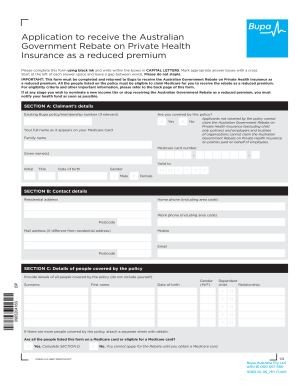
Get Government Rebate Application Form - Bupa
How it works
-

Open form follow the instructions
-

Easily sign the form with your finger
-

Send filled & signed form or save
How to fill out the Government Rebate Application Form - Bupa online
This guide provides a comprehensive overview of how to fill out the Government Rebate Application Form - Bupa online. By following these steps, users can ensure that their application is completed accurately and efficiently, facilitating the process of receiving a rebate on private health insurance premiums.
Follow the steps to complete your application effectively.
- Click ‘Get Form’ button to obtain the form and open it in the editing interface.
- Fill out SECTION A: Claimant’s details. Enter your existing Bupa policy or membership number if it is applicable. Indicate if you are covered by this policy by marking the appropriate box with a cross. Provide your full name as it appears on your Medicare card, followed by your Medicare card number, date of birth, and gender.
- Proceed to SECTION B: Contact details. Fill in your residential address, home phone number (including area code), work phone number (including area code), mobile number, email address, and any different mailing address along with the relevant postcode.
- In SECTION C: Details of people covered by the policy, provide details about all individuals covered by the policy, excluding yourself. Fill out their gender, surname, first name, date of birth, and relationship to you. If additional space is needed for more individuals, attach a separate sheet.
- Move to SECTION D: To receive the Australian Government Rebate on private health insurance as a reduced premium. Choose the appropriate rebate tier based on your estimated income for the financial year. Mark only one box corresponding to your income range.
- In subsection under SECTION D, ensure all individuals listed are on a Medicare card or are eligible for one. If not, note that you cannot apply for the rebate until obtaining a Medicare card.
- Complete SECTION E: Claimant’s declaration. Read the privacy notice and ensure that you understand the requirements. Sign and date the declaration, affirming that all information provided is accurate.
- Once all sections are filled out, review the entire form to ensure accuracy. Save your changes, then download, print, or share the form as needed.
Complete your application for the Government rebate online today to enjoy your benefits.
You can do so in four easy steps. Get hospitalised to get the necessary treatment and inform Niva Bupa within 48 hours. Pay directly to the hospital or doctor. Collect all medical reports, prescriptions, bills, payment receipts and the discharge certificate. Upload the documents on the Niva Bupa website.