Loading
Form preview
  • US Legal Forms
  • Form Library
  • More Forms
  • More Uncategorized Forms
  • Dodea Form 4700 3 F1

Get Dodea Form 4700 3 F1

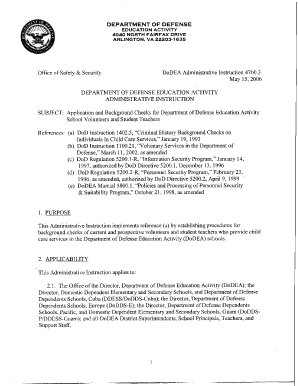
DEPARTMENT OF DEFENSE EDUCATION ACTIVITY 4 0 4 0 NORTH FAIRFAX DRIVE ARLINGTON, VA 22203-1 6 3 5 Office of Safety & Security DoDEA Administrative Instruction 4700.3 May 15,2006 DEPARTMENT OF DEFENSE.

How it works

  1. Open form

    Open form follow the instructions

  2. Easily sign form

    Easily sign the form with your finger

  3. Share form

    Send filled & signed form or save

How to fill out the Dodea Form 4700 3 F1 online

Filling out the Dodea Form 4700 3 F1 online can be a straightforward process when you have clear guidance. This comprehensive guide will walk you through each section of the form, ensuring that you understand what information is required and how to submit your application successfully.

Follow the steps to complete the Dodea Form 4700 3 F1 online.

  1. Click the ‘Get Form’ button to obtain the form and open it in the editor.
  2. Begin by entering your personal information in the designated fields, including your name, mailing address, and contact information. Ensure all details are accurate to avoid processing delays.
  3. List the schools where you wish to apply as a volunteer, checking all relevant boxes for the services you are interested in, such as classroom activities or field trips.
  4. Complete the questionnaire section honestly. If you answer 'yes' to any question, provide the requested details in the space provided or attach a separate sheet if necessary.
  5. Review your responses carefully to ensure all information is complete and accurate. Confirm that your contact details are up to date.
  6. Sign and date the form to certify the accuracy of your information. Ensure your signature is legible.
  7. Once all sections are complete, save your changes. You can then choose to download, print, or share the form as needed.

Complete your Dodea Form 4700 3 F1 online today for a smooth application process.

Get form

Experience a faster way to fill out and sign forms on the web. Access the most extensive library of templates available.
Get form

Related content

Volume 10 - Under Secretary of Defense...
Apr 1, 2019 — the compliance process (see Volume 1, Chapter 3);. C. ... forward a DoD...
Learn more
DoDEA-Form-4700-3-F-1-Volunteer-Application.pdf
Page 1. Page 2. Page 3.Missing: F1 ‎| Must include: F1
Learn more
47BT021 NCS COMMERCIALCATALOG - UserManual.wiki
... 2 YEAR DEPOT REPAIR DESKTOP WARRANTY ADD NCS EXTENDED 3 YEAR ... X93X 1 TRAY CABINET...
Learn more

Related links form

30304 20670 Vehicle Warning Lights Electronic Sirens And Light Bars, Statewide - Award (updated) Alternative Minimum Tax 2012 Calculation - Minnesota Department ... RUDE, DOUGLAS W - Ftp Txdps State Tx "Unknowingly" Operating A Motor Vehicle Without Insurance

Questions & Answers

Get answers to your most pressing questions about US Legal Forms API.

Contact support

For best results, hang your diploma at eye level, which is typically about 60 inches above the floor. If you're not completely sure about the wall placement, hang it on the high side. It'll be more noticeable if placed slightly above eye level rather than hanging it too low on the wall.

Take the diploma with your left hand and shake the presenter's hand with your right. While you're on stage, keep the diploma raised up after you've accepted it and shaken hands. Shake your presenter's hand firmly.

A minor is not a degree. It's a concentration that you get in addition to your primary field of study, known as your major. Although minors can often round out your degree and provide depth and context to your education, they are not considered to be stand-alone degrees or certifications.

How to List a Minor on a Resume. A minor should be listed on your resume after the major, either on the same line or one line below your major. The key is to ensure clean formatting and easy readability.

If you opt to complete a minor, it likely won't show up on your diploma. Instead, it will typically be listed on your transcripts. As you begin applying for jobs, you can include both your major and minor on your resume, showing employers the extra work you put into your degree.

The high school principal or the college president presents the diplomas or degrees. Students may then shake hands with school board members or other faculty. This process gives students a moment when the stage belongs to them. Large schools may not give out individual diplomas but mail them to the students.

Although concentrations are only a defined course of study and not listed on a diploma, many students still find them beneficial. Concentrations are a great feature to highlight in an internship, on a resume, and in a job interview.

Walk across the stage once your name is called. Shake the Chancellor's hand with your right hand. Take your cylinder/diploma in your left hand.

Just before you cross the stage, you'll give the card to the announcer, walk across the stage, accept your diploma tube with the left hand, and shake with the right hand.

Answer: As a general rule for diploma display ideas, the highest degree earned should appear at the top. Therefore, your high school diploma (or middle school diploma) should appear at the bottom. For left-to-right diploma hanging ideas, the highest degree earned should be on the left.

Get This Form Now!

Use professional pre-built templates to fill in and sign documents online faster. Get access to thousands of forms.
Get form
If you believe that this page should be taken down, please follow our DMCA take down processhere.
Get Dodea Form 4700 3 F1
Get form
  • Adoption
  • Bankruptcy
  • Contractors
  • Divorce
  • Home Sales
  • Employment
  • Identity Theft
  • Incorporation
  • Landlord Tenant
  • Living Trust
  • Name Change
  • Personal Planning
  • Small Business
  • Wills & Estates
  • Packages A-Z
  • Affidavits
  • Bankruptcy
  • Bill of Sale
  • Corporate - LLC
  • Divorce
  • Employment
  • Identity Theft
  • Internet Technology
  • Landlord Tenant
  • Living Wills
  • Name Change
  • Power of Attorney
  • Real Estate
  • Small Estates
  • Wills
  • All Forms
  • Forms A-Z
  • Form Library
  • Legal Hub
  • About Us
  • Help Portal
  • Legal Resources
  • Blog
  • Affiliates
  • Contact Us
  • Delete My Account
  • Site Map
  • Industries
  • Forms in Spanish
  • Localized Forms
  • State-specific Forms
  • Forms Kit
  • Real Estate Handbook
  • All Guides
  • Notarize
  • Incorporation services
  • For Consumers
  • For Small Business
  • For Attorneys
  • USLegal
  • FormsPass
  • pdfFiller
  • signNow
  • altaFlow
  • DocHub
  • Instapage
Form Packages
  • Adoption
  • Bankruptcy
  • Contractors
  • Divorce
  • Home Sales
  • Employment
  • Identity Theft
  • Incorporation
  • Landlord Tenant
  • Living Trust
  • Name Change
  • Personal Planning
  • Small Business
  • Wills & Estates
  • Packages A-Z
Form Categories
  • Affidavits
  • Bankruptcy
  • Bill of Sale
  • Corporate - LLC
  • Divorce
  • Employment
  • Identity Theft
  • Internet Technology
  • Landlord Tenant
  • Living Wills
  • Name Change
  • Power of Attorney
  • Real Estate
  • Small Estates
  • Wills
  • All Forms
  • Forms A-Z
  • Form Library
Customer Service
  • Legal Hub
  • About Us
  • Help Portal
  • Legal Resources
  • Blog
  • Affiliates
  • Contact Us
  • Delete My Account
  • Site Map
  • Industries
  • Forms in Spanish
  • Localized Forms
  • State-specific Forms
  • Forms Kit
Legal Guides
  • Real Estate Handbook
  • All Guides
Prepared for you
  • Notarize
  • Incorporation services
Our Customers
  • For Consumers
  • For Small Business
  • For Attorneys
Our Sites
  • USLegal
  • FormsPass
  • pdfFiller
  • signNow
  • altaFlow
  • DocHub
  • Instapage
Social Media
Call us now toll free:
+1 833 426 79 33
As seen in:
© Copyright 1999-2026 airSlate Legal Forms, Inc. 3720 Flowood Dr, Flowood, Mississippi 39232
  • Your Privacy Choices
  • Terms of Service
  • Privacy Notice
  • Content Takedown Policy
  • Bug Bounty Program