Loading
Get Subcontractor Annual Authorization - Brevard County
How it works
-

Open form follow the instructions
-

Easily sign the form with your finger
-

Send filled & signed form or save
How to fill out the Subcontractor Annual Authorization - Brevard County online
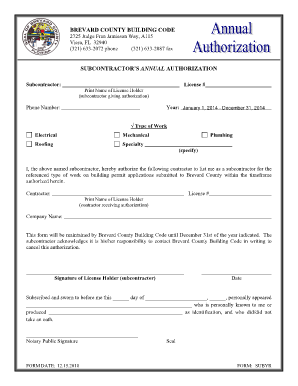
Completing the Subcontractor Annual Authorization for Brevard County is essential for subcontractors wishing to provide their services. This guide offers clear, step-by-step instructions to assist you in filling out this important document online.
Follow the steps to fill out your authorization form accurately.
- Click ‘Get Form’ button to obtain the Subcontractor Annual Authorization form and open it in your preferred editor.
- Fill in the 'Subcontractor' field with your name and ensure that the 'License #' is accurately entered according to your registration details.
- In the 'Print Name of License Holder' section, provide your full name as it appears on your license.
- Enter your phone number where indicated, ensuring it is current so that you can be contacted if necessary.
- In the 'Year' section, specify the applicable year for which you are providing authorization. For example, indicate 'January 1, 2023 - December 31, 2023' or the current year.
- Select the type of work you will be undertaking by checking the appropriate box from the options provided: Electrical, Mechanical, Roofing, Specialty, or Plumbing (be sure to specify if 'Plumbing').
- In the next section, enter the 'Contractor' name and include their 'License #' as required. This identifies whom you are authorizing as your primary contractor.
- Provide the 'Print Name of License Holder' for the contractor receiving authorization, ensuring accuracy in the name provided.
- Fill in the 'Company Name' field with the name of the contractor’s business.
- Sign and date the form in the designated areas. Signature denotes your agreement to the terms outlined within the form.
- Consider completing the notary section if required, including signing in front of a notary public and acquiring their signature, seal, and date.
- After verifying all information for accuracy, save your changes, and download or print the completed form for your records.
- To finalize the process, share the completed form with the appropriate contractor or agency as necessary.
Download, complete, and submit your Subcontractor Annual Authorization form online today!
Just move #header-middle last in your HTML. Then what is float: right will go right, float: left will go left, and the middle content will fill upwards and occupy the unclaimed middle space. What is happening the way you have it, is the unfloated element is pushing the floated element after it.