Loading
Get Form Sft-4 - Mass.gov - Mass
How it works
-

Open form follow the instructions
-

Easily sign the form with your finger
-

Send filled & signed form or save
How to fill out the Form SFT-4 - Mass.Gov - Mass online
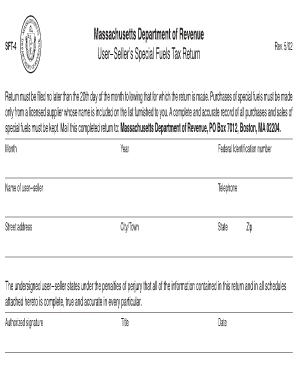
Filling out the Form SFT-4 is essential for users involved in the special fuels tax system in Massachusetts. This guide provides clear, step-by-step instructions to ensure your form is completed accurately and submitted on time.
Follow the steps to complete the Form SFT-4 online.
- Select the ‘Get Form’ button to access the form and open it in your document editor.
- Fill in the month and year for which the return is being filed at the top of the form.
- Provide the name of the user-seller, including their street address, city or town, state, zip code, and federal identification number.
- Enter a contact telephone number for the user-seller.
- In the authorized signature section, the individual responsible must sign, include their title, and date the form to verify that all information provided is complete and accurate.
- Complete Schedule A by listing each purchase made during the month. Record the date, license number, names, and addresses of suppliers for each purchase.
- Document the inventory of special fuels at the beginning of the month, the gallons purchased, and calculate the total gallons by adding the inventory and purchases.
- At the end of the month, take an actual inventory and record it. Calculate the total gallons to be accounted for by subtracting the end inventory from the total gallons calculated earlier.
- Input the taxable gallons used or consumed in registered vehicles and the taxable gallons sold.
- Add the taxable gallons used and sold to find the total taxable gallons.
- Lastly, list any nontaxable gallons sold or consumed for off-highway use, attaching an itemized list if necessary, and ensure the total gallons equal line 5.
- After validating all entries, save any changes made, then download, print, or share the completed form as required.
Complete and submit your Form SFT-4 online to ensure compliance with Massachusetts tax regulations.
Go to MassTaxConnect. Click Make a Payment Click Individual Payment Enter your SSN or ITIN and choose the type of tax payment you want to make. Choose your payment method and enter the required information. Click Submit. Review your payment and click OK .