Loading
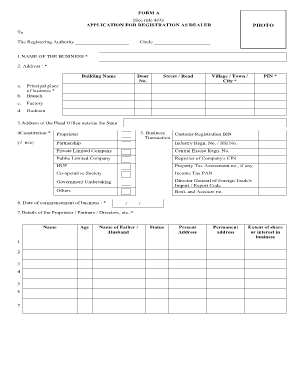
Get Application For Registration As Dealer - Tnvat Gov
How it works
-

Open form follow the instructions
-

Easily sign the form with your finger
-

Send filled & signed form or save
How to fill out the Application For Registration As Dealer - Tnvat Gov online
This guide provides a clear and concise overview of how to successfully fill out the Application For Registration As Dealer - Tnvat Gov online. Each section of the form will be outlined step-by-step to ensure users understand what is required.
Follow the steps to complete your application effectively.
- Press the ‘Get Form’ button to acquire the form and open it in your editing interface.
- Enter the name of your business in the designated field. Make sure this accurately represents the formal name of your enterprise.
- Provide the complete address for your principal place of business, including building name, door number, street/road, and village/town/city. Don't forget to include the PIN code.
- If applicable, fill in the address of your head office outside the state.
- Select the constitutional structure of your business by ticking the appropriate box, such as Proprietor, Partnership, or any other relevant option.
- Input details such as customs registration number, industry registration number, and any other relevant identification numbers required for your business.
- Indicate the date on which the business commenced, using the specified date format.
- Complete the section with details of the proprietor, partners, or directors including their names, ages, addresses, and their extent of share or interest in the business.
- Fill in the contact details such as telephone number, email ID, and any additional identification numbers such as PAN.
- Describe the nature of your business by ticking the appropriate categories or listing others, if necessary.
- Provide the estimated turnover amount as of the date of this application.
- List the main commodities your business deals in, clearly detailing each item.
- Indicate the sources of purchase by ticking the corresponding boxes for local, inter-state, or imports.
- Fill in any details regarding the immovable property associated with the business, including location, survey number, and registration details.
- Include a reference from the Chamber of Commerce or a local business person if required, along with their contact information.
- Provide payment details of the registration fee, including the amount, cheque number, bank name, and branch code.
- Review the declaration section, confirm the truthfulness of the information provided, and sign accordingly.
- Finally, save your changes, and choose to download, print, or share the completed form as needed.
Start filling out your Application For Registration As Dealer online today!
Visit the iTax online portal using https://itax.kra.go.ke/KRA-Portal/ Login to iTax portal with PIN and password. Click on 'e-Returns' or select 'Returns' from the navigation menu and click on 'File Returns' Select the Type, enter your taxpayer's PIN and select the Tax obligation as 'VAT' and Click 'Next'
Industry-leading security and compliance
US Legal Forms protects your data by complying with industry-specific security standards.
-
In businnes since 199725+ years providing professional legal documents.
-
Accredited businessGuarantees that a business meets BBB accreditation standards in the US and Canada.
-
Secured by BraintreeValidated Level 1 PCI DSS compliant payment gateway that accepts most major credit and debit card brands from across the globe.