Loading
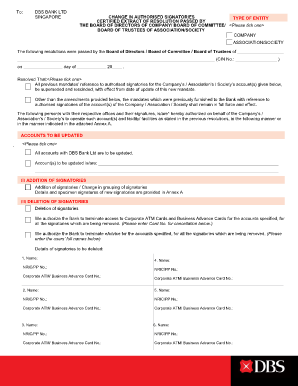
Get Signing Mandate Changes - Dbs Bank
How it works
-

Open form follow the instructions
-

Easily sign the form with your finger
-

Send filled & signed form or save
How to fill out the Signing Mandate Changes - DBS Bank online
Filling out the Signing Mandate Changes form with DBS Bank is an essential step for organizations to manage their authorized signatories efficiently. This guide provides clear and concise instructions to help users complete the form accurately and submit it online.
Follow the steps to complete the Signing Mandate Changes form successfully.
- Press the ‘Get Form’ button to acquire the Signing Mandate Changes form and open it in your preferred online editing tool.
- Select the type of entity from the options provided, such as company, association, or society. Ensure you tick the correct box to reflect your organization accurately.
- Input the name of your organization and the CIN number in the designated fields, along with the date of the resolution passed.
- Choose whether to supersede all previous mandates or to retain previous mandates with the new amendments. Tick the appropriate box to reflect your decision.
- List the accounts that need updating. You can opt for all accounts or specify the account(s) by entering the necessary details in the provided fields.
- For adding signatories, provide their names, NRIC or passport numbers, and include specimen signatures in Annex A. Ensure this is completed for each new signatory.
- If deleting signatories, input their names and NRIC/PP numbers, along with the corporate ATM or business advance card numbers for cancellation as necessary.
- Define the signature requirements and authorization limits by selecting from the options provided. Indicate whether the requirement falls under any specified conditions.
- Review and select options regarding cheque authorization and eAdvice updates as applicable, filling in the required user details for notifications.
- Certify the accuracy of the details provided by signing at the end of the form, including the names of the individuals certifying the changes.
- Finally, save your changes, and utilize the options to download, print, or share the completed form as needed.
Complete your Signing Mandate Changes form online today for seamless updates to your banking arrangements.
We employ multi-factor authentication, when you perform online transactions - with a User PIN, DBS iB Secure Device and SMS OTP, for greater security. User PIN and DBS iB Secure Device are used during your login, but SMS OTP is only used for higher risk transactions - such as funds transfer.