Loading
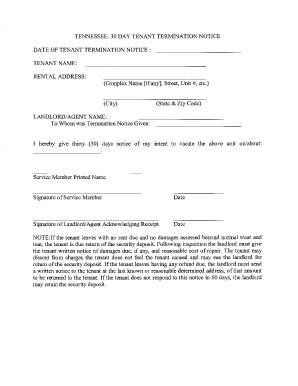
Get 30 Day Notice To Vacate Tennessee
How it works
-

Open form follow the instructions
-

Easily sign the form with your finger
-

Send filled & signed form or save
How to fill out the 30 Day Notice To Vacate Tennessee online
The 30 Day Notice To Vacate Tennessee is a crucial document for tenants planning to end their lease agreement. This guide provides a step-by-step approach to completing the form online, ensuring clarity and support throughout the process.
Follow the steps to complete the notice effectively.
- Click ‘Get Form’ button to access the form and open it for editing.
- Begin by entering your full name as the tenant in the designated field. Ensure that it matches the name on the lease agreement to avoid any discrepancies.
- Next, include the full address of the rental property you are vacating. This information is essential for identifying the location of the tenancy.
- Indicate the date by which you intend to vacate the premises. The date should be precisely 30 days from the date you submit the notice, allowing for proper notice.
- If applicable, provide a forwarding address where future correspondence can be sent. This can be your new residence or a temporary address.
- Review the notice for accuracy, ensuring all information is correctly filled out. Check for any typos or missing details that may delay the process.
- Finally, save your changes. You may have options to download, print, or share the completed form as needed.
Start filling out your 30 Day Notice To Vacate Tennessee online today for a smooth transition.
Month-to-Month Tenancies If the landlord wants to end a month-to-month tenancy, the landlord must give the tenant a 30-day notice that specifies the date on which the tenancy will end. If the tenant does not move out by that date, the landlord can file an eviction lawsuit against the tenant.